



Product Updates
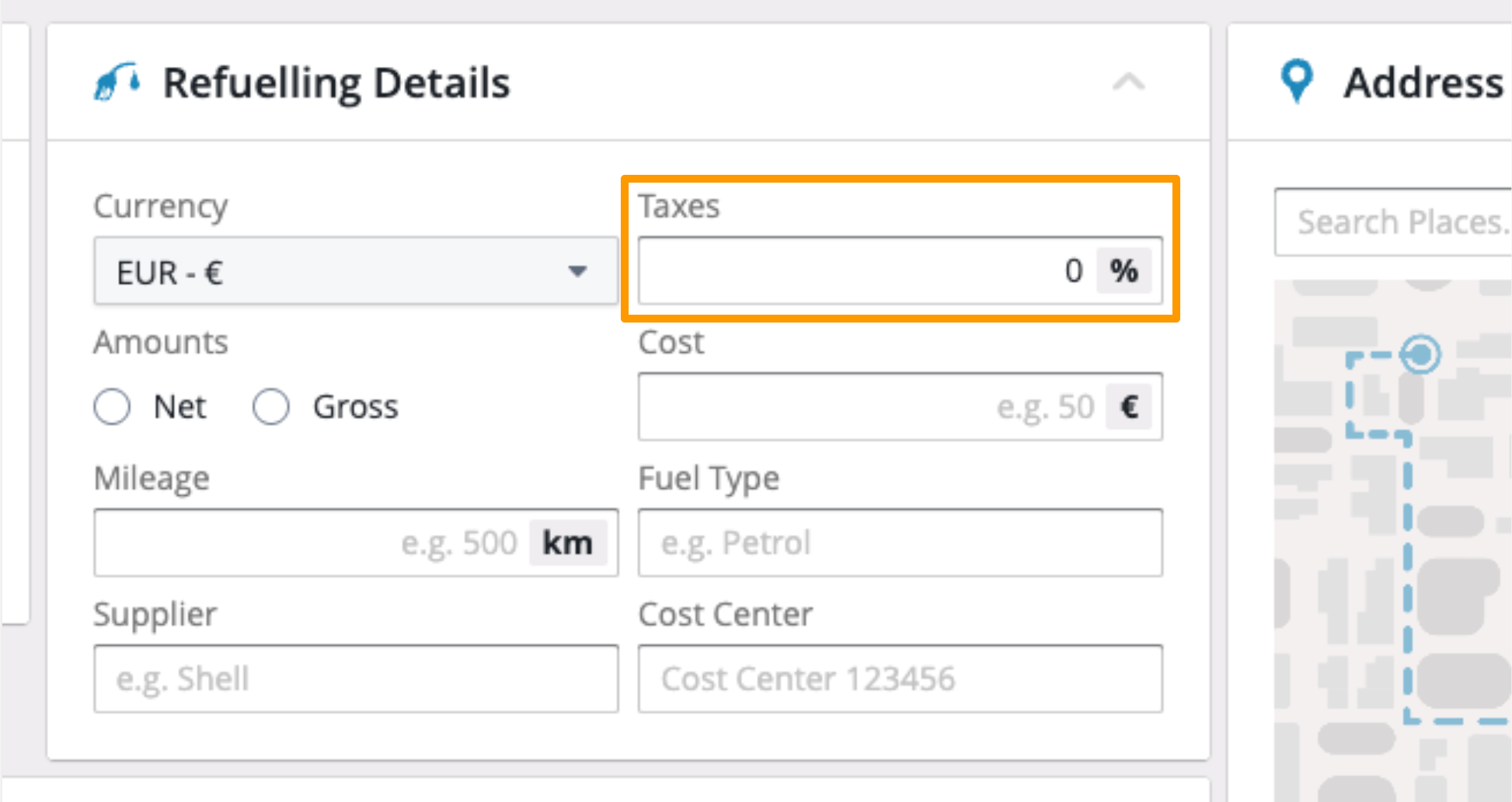
Refuelling & Charging: Allow 0% value in Tax input field
03/26/2026, 3.202
RELEVANT FOR: Fleet Managers & Accountants
What is New:
- Zero-Percent Tax Support: The Tax/Steuern input field in the Refuelling and Charging details now fully supports a 0% value.
- Flexible Data Entry: We’ve removed the previous 1% minimum restriction, allowing you to save entries exactly as they appear on your receipts.
Benefits:
- Global Compliance: Easily log zero-rated or tax-exempt transactions, which are common in specific countries or for certain types of fuel and energy.
- Audit-Ready Records: Ensure your financial exports and fleet cost metrics match your actual invoices down to the cent, without forced rounding or incorrect tax percentages.
Refuelling & Charging: Add view Mileage issues
03/26/2026, 3.202
RELEVANT FOR: Fleet Managers
What is New:
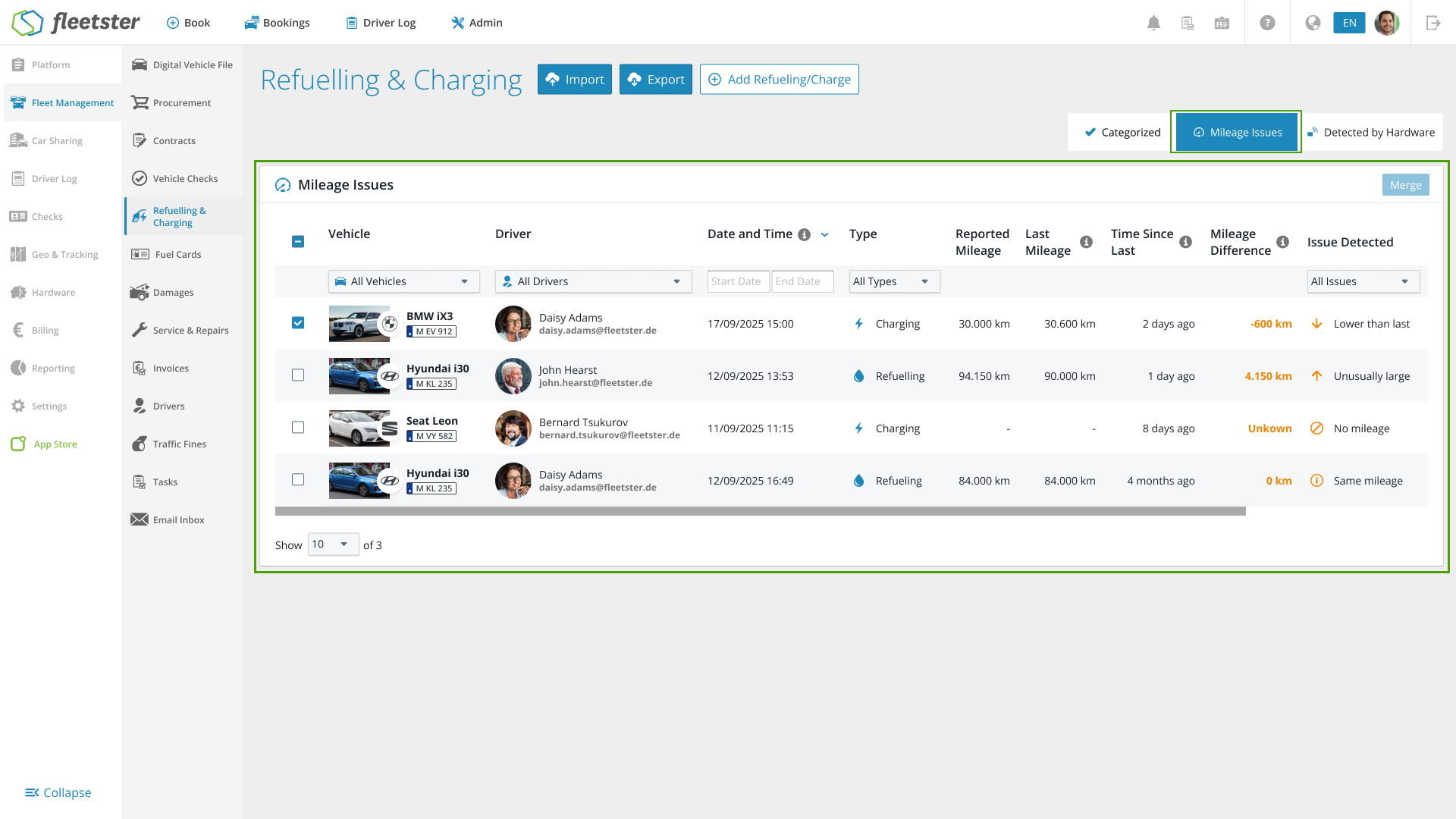
- Dedicated "Mileage Issues" Tab: We’ve introduced a new view (look for the mileage icon) that automatically gathers all refuelling and charging entries where inconsistencies have been detected.
- In-Depth Comparison Data: No more guessing. The new table shows the "Reported Mileage" side-by-side with the "Last Known Mileage," including the exact time elapsed and the difference (delta) between entries.
- Smart Error Classification: The system now labels the specific issue—such as "Smaller than previous"—so you immediately understand why an entry was flagged.
- Streamlined Data Details: When you click into a specific refuelling event, any mileage issues are now highlighted directly in the detail view, mirroring the clear layout found in our invoicing section.
- Advanced Filtering & Sorting: Quickly narrow down issues by Vehicle, Driver, or Date Range. The view is sorted by timestamp by default, putting the most recent discrepancies at the top of your list.
Benefits:
- Eliminate Manual Reviews: Stop hunting through hundreds of entries. The system surfaces the errors for you, saving hours of administrative work.
- Guaranteed Accuracy: By catching and correcting "jumps" or decreases in mileage early, you ensure your fleet metrics, cost calculations, and billing stay 100% accurate.
- Data Integrity Across Sources: Whether data comes from hardware or manual entry, the new "Mileage Issues" view acts as a universal safety net for your fleet data.
UX/UI Improvements: Input errors now include an error icon
03/26/2026, 3.202
RELEVANT FOR: All Users
What is New:
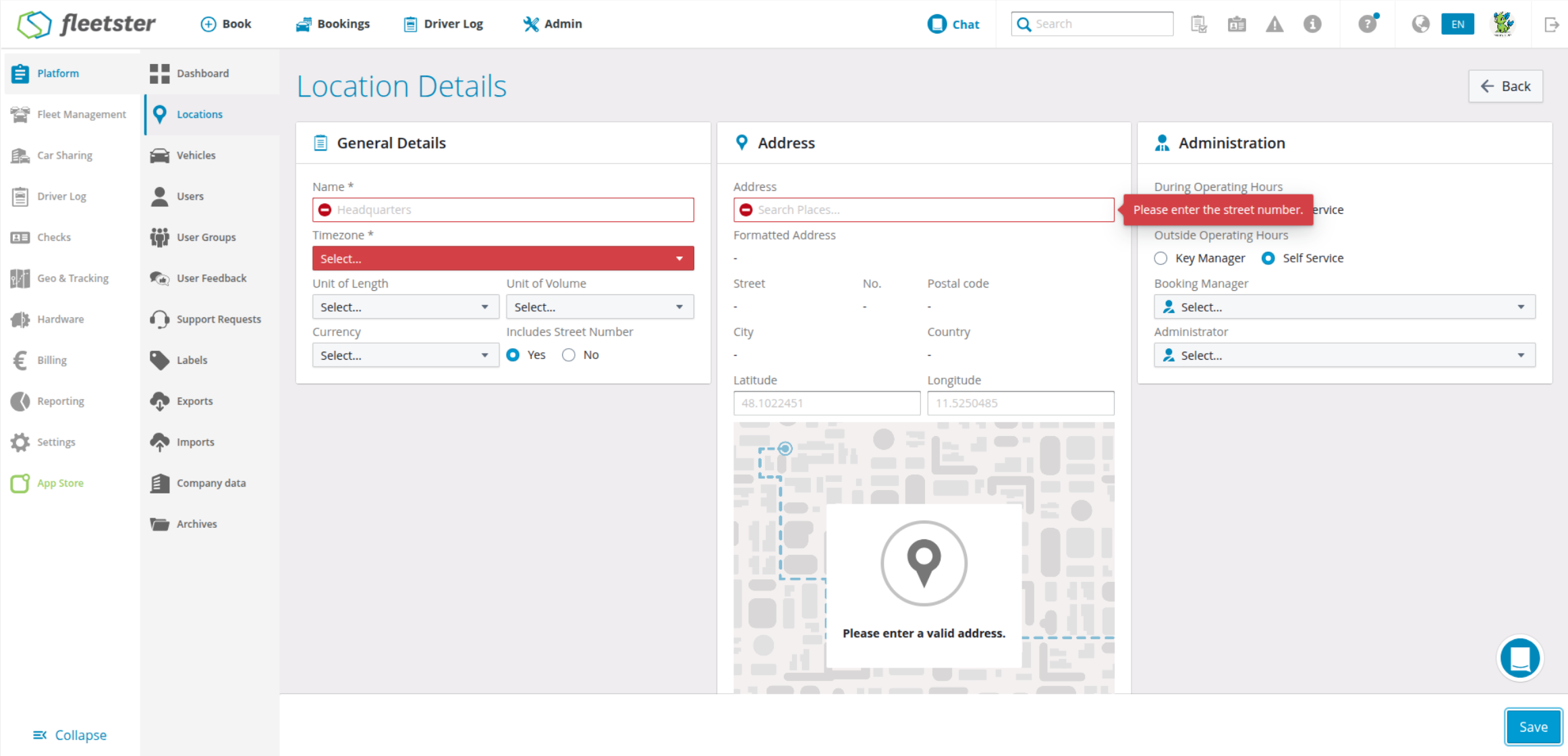
- Persistent Error Icons: When a field contains an error (such as an invalid date or missing information), a red warning icon now appears directly within the input field.
- Instant Guidance Tooltips: Simply hover your mouse over the error icon to see a helpful tooltip explaining exactly what needs to be corrected.
- Clearer Form Validation: We’ve upgraded the way our forms communicate, moving beyond simple color changes to provide high-visibility feedback as you type.
Benefits:
- Faster Form Completion: No more guessing why a "Save" button is disabled. The new icons point you directly to the problem area so you can fix it in seconds.
- Improved Accessibility: By adding a distinct icon alongside color changes, we’ve made the interface easier to navigate for all users, including those with color vision deficiencies.
- Reduced Data Entry Errors: Contextual tooltips provide immediate clarity on formatting requirements, ensuring your fleet data remains clean and accurate from the start.
Contracts: Notifications when contracts end
03/12/2026, 3.201
RELEVANT FOR: Fleet Managers & Administrators
What is New:
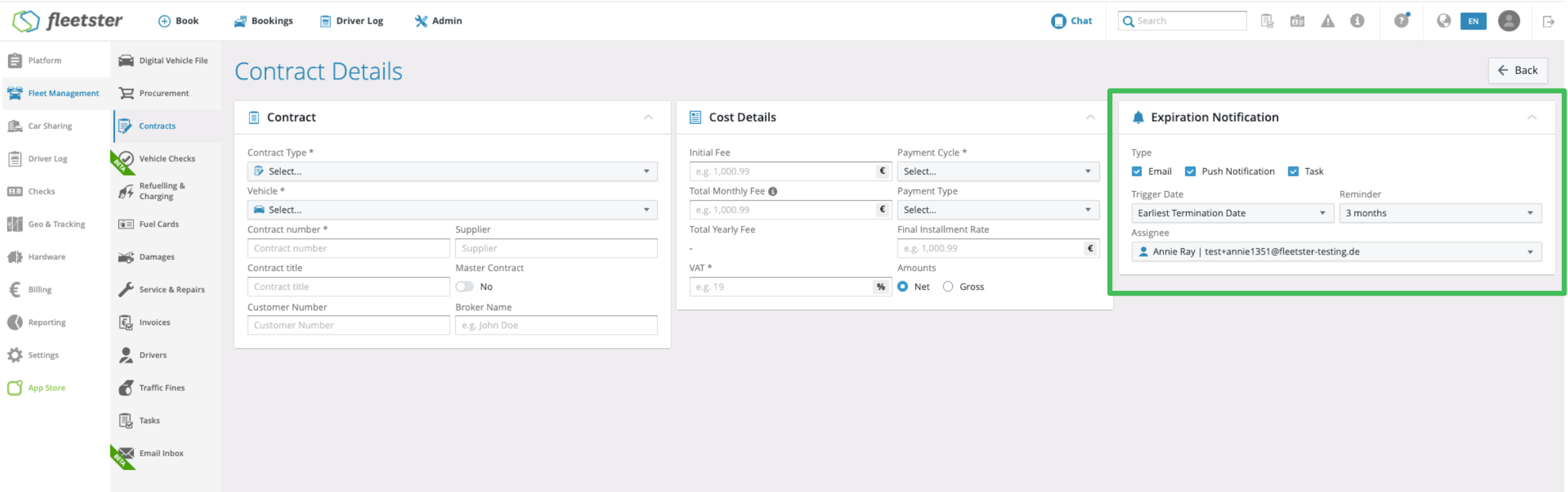
- Customizable Alert Methods: Choose exactly how your team gets reminded about expiring contracts—via Email, Push Notification, or by automatically generating an actionable Task in the system. You can even select multiple methods at once.
- Flexible Triggers & Timing: Base your alerts on the "Contract End" date or the "Earliest Termination Date." You can also customize your lead time, choosing to be notified 1, 2, 3, 6, or 12 months in advance.
- Targeted Assignments: Instead of the system guessing who to notify, you can now explicitly select an "Assignee" to receive the alert, ensuring the right person gets the memo immediately.
- Revamped Interface: The contract overview features a newly designed "Expiration notification" card, making it incredibly easy to set up and review your alert preferences at a glance.
Benefits:
- Never Miss a Deadline: Proactive, multi-channel alerts give your team ample time to cancel, renew, or renegotiate vehicle leases without the last-minute scramble.
- Clear Accountability: Directly assigning a specific person to a notification eliminates confusion over who is responsible for handling the contract's end-of-life steps.
- Fail-Safe Routing: If an assigned user leaves the company or their account is deactivated, the system automatically redirects the alert to the next responsible manager (like the location or vehicle manager), ensuring no contract is ever forgotten.
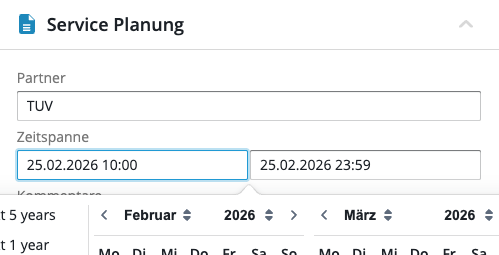
Service & Repairs: Allow edit Time
02/26/2026, 3.200
RELEVANT FOR: Fleet Managers & Financial Controllers
What is New:
- Expanded Contract Library: Track a wider variety of contract types, including Vehicle Tax, Radio & Broadcasting, and Maintenance.
- Visual Contract Cards: Clean, intuitive cards with specific icons help you distinguish between liabilities at a glance.
- One-Click Creation: A new "Add a contract" shortcut pre-selects the vehicle, saving you time.
- Tailored Data Views: See the metrics that matter, like "Buyback Price" for leases or "Depreciation Rate" for purchases.
- Smart Permissions: The interface stays clean; the tab only appears to users with the right clearance.
Benefits:
- Total Transparency: View "Total Fees" and "Amount Paid" for a real-time understanding of costs.
- Centralized Info: All details—contract numbers, suppliers, and end dates—are in one place.
Security: System Hardening & Data Protection
02/26/2026, 3.200

RELEVANT FOR: IT Administrators & Security Officers
What is New:
- Enhanced Input Sanitization: We have implemented stricter validation for organizational names and user group fields. This prevents unauthorized scripts from being stored or executed within the platform, effectively neutralizing potential Cross-Site Scripting (XSS) risks.
- Secure UI Rendering: We’ve upgraded our front-end components to ensure all user-supplied text is rendered safely. By moving away from "triple-mustache" (unfiltered) rendering in our selection tools, we’ve added a critical layer of defense against malicious data.
- Global API Validation: Our integration layers now enforce specific data types for property fields, ensuring that information sent to our servers is verified and clean before it ever reaches the database.
Benefits:
- Account Integrity: These measures protect your fleet data and user accounts from compromise or unauthorized access.
- Future-Proof Security: By standardizing how we handle user input, we’ve created a more resilient platform architecture that proactively blocks common web vulnerabilities.
- Peace of Mind: Your organization can continue managing large-scale user groups with the confidence that the platform meets modern security standards.
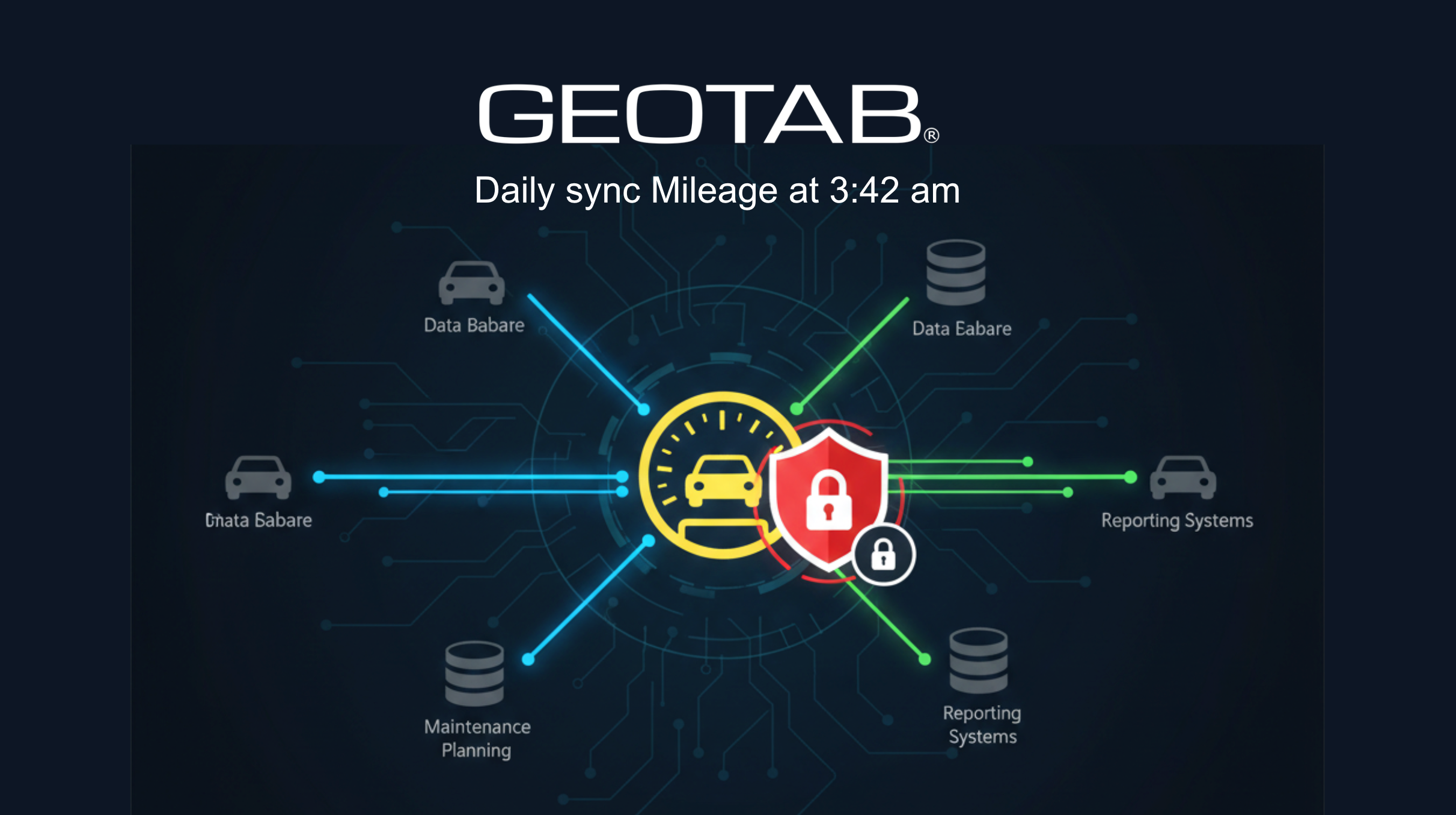
Hardware: New Geotab daily mileage sync
02/26/2026, 3.200
RELEVANT FOR: Fleet Managers & Operations Teams
What is New:
- Privacy-First Sync: You can now automatically sync mileage data from Geotab devices without enabling "Geo & Tracking" or GPS features. This is ideal for companies with strict data protection policies.
- Automated Daily Updates: A new background process runs every night to ensure your vehicle odometers are current, removing the need for manual mileage entries or imports.
- Smart Filtering: The system automatically excludes vehicles already managed via Car Sharing or Driverlog to prevent data conflicts and ensure integrity.
- Unit Conversion: Hardware data is automatically converted to match your location's preferred units (km/miles), ensuring consistency across your entire fleet.
Benefits:
- Maintenance Accuracy: Accurate mileage ensures service intervals and maintenance tasks are triggered at exactly the right time.
- Policy Compliance: Benefit from hardware-integrated data while fully respecting internal bans on vehicle tracking.
- Operational Efficiency: Saves hours of manual administrative work by automating the mileage reporting pipeline.
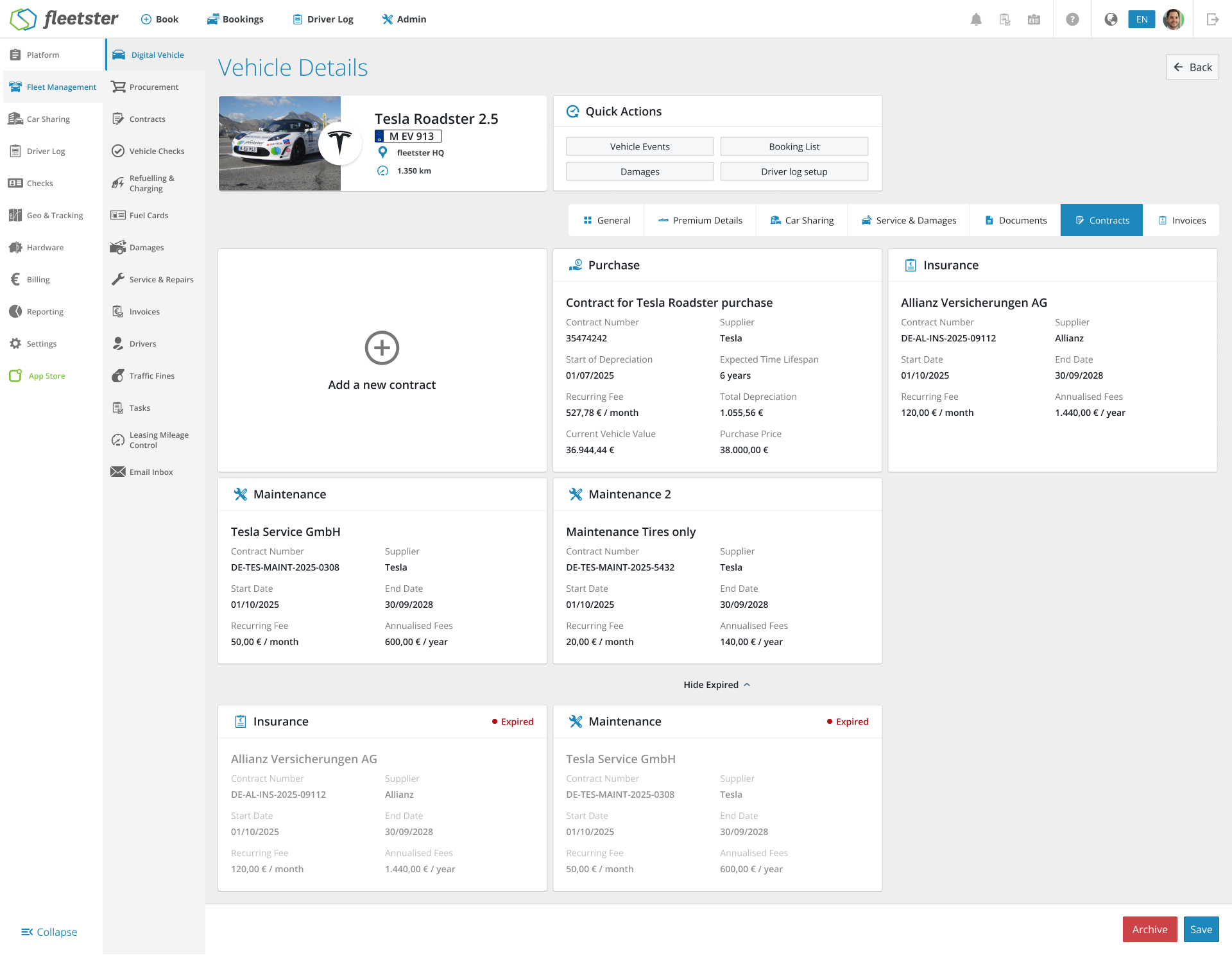
Digital Vehicle: New Contracts Tabs
02/26/2026, 3.200
RELEVANT FOR: Fleet Managers & Financial Controllers
What is New:
- Expanded Contract Library: Track a wider variety of contract types, including Vehicle Tax, Radio & Broadcasting, and Maintenance.
- Visual Contract Cards: Clean, intuitive cards with specific icons help you distinguish between liabilities at a glance.
- One-Click Creation: A new "Add a contract" shortcut pre-selects the vehicle, saving you time.
- Tailored Data Views: See the metrics that matter, like "Buyback Price" for leases or "Depreciation Rate" for purchases.
- Smart Permissions: The interface stays clean; the tab only appears to users with the right clearance.
Benefits:
- Total Transparency: View "Total Fees" and "Amount Paid" for a real-time understanding of costs.
- Centralized Info: All details—contract numbers, suppliers, and end dates—are in one place.
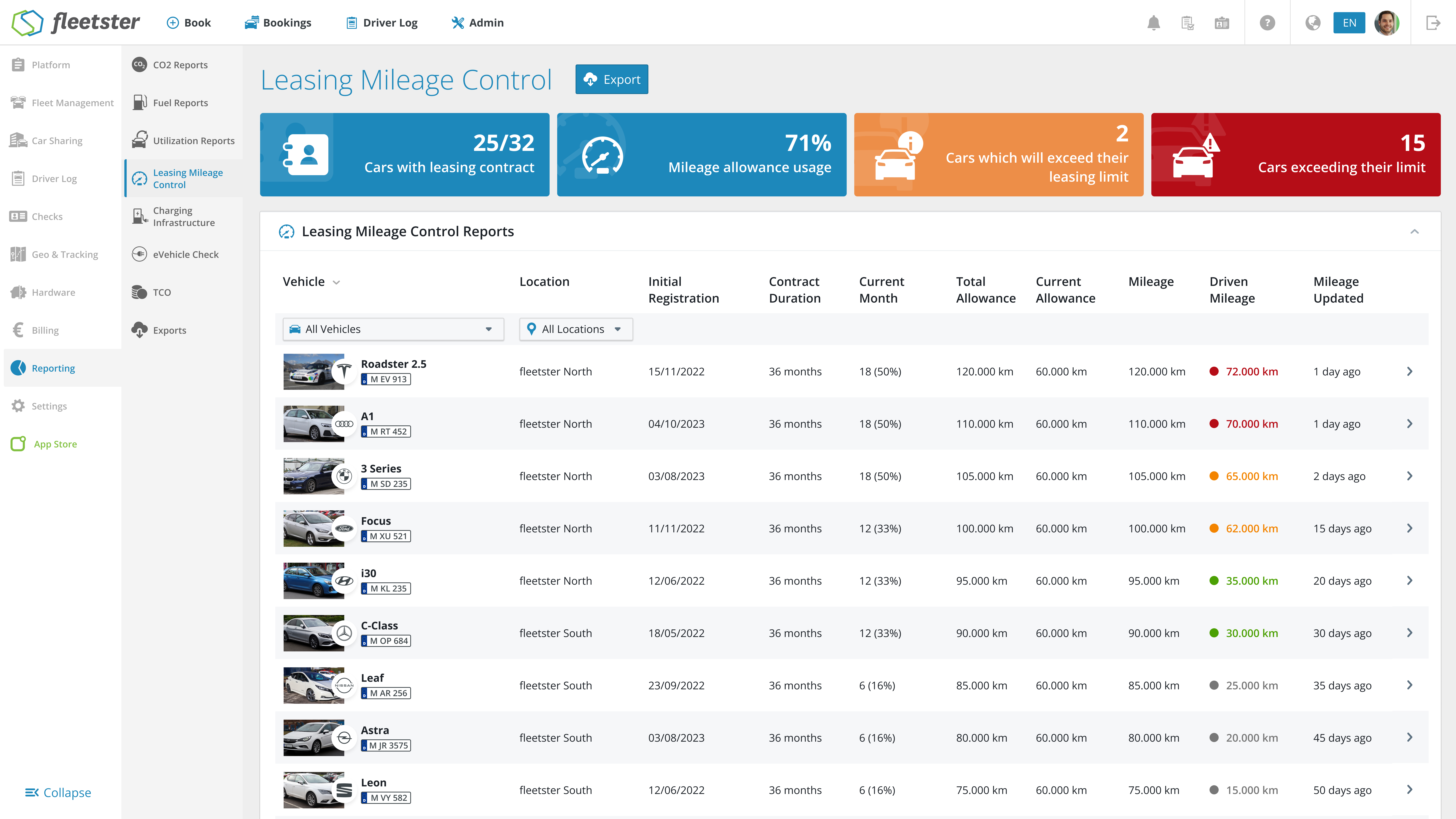
Analytics: Improve Leasing Mileage Control
02/12/2026, 3.199
RELEVANT FOR: Fleet Managers & System Administrators
We have updated the Leasing Report to improve data stability and expand your reporting capabilities. This update optimizes how data is fetched in the background and introduces a highly requested data point to your Excel exports.
What is New:
- New Excel Column: We have added an "Estimated Final Mileage" column to the Excel export, giving you better visibility into projected vehicle usage.
- Improved Data Architecture: The Leasing table now utilizes JSON values directly from our reporting services (
lambda-reports), ensuring higher stability and accuracy when loading your data. - Temporary UI Adjustment: Please note that the dynamic color coding in the table (where colors change according to the value) has been temporarily disabled. This will be reworked and reintroduced in an upcoming update.
The benefits at a glance:
- Better Forecasting: The new Estimated Final Mileage column helps you track lease limits more effectively and avoid unexpected penalties.
- Increased Reliability: Backend improvements mean faster, more stable, and accurate data rendering in your leasing tables.
Platform: Data loading speed improvement
02/12/2026, 3.199

RELEVANT FOR: All Platform Users
We have completed a major infrastructure upgrade to the way our platform retrieves information like vehicle lists, user directories, and location data. This "under-the-hood" enhancement replaces older data-loading methods with modern, high-performance logic to ensure a faster and more reliable experience as your fleet grows.
What is New:
- Optimized Data Loading: We have updated 26 core areas of the platform—including Driver Management and Vehicle Details—to change how information is requested from our servers. Instead of loading entire datasets at once, the system now uses smarter retrieval methods.
- Faster Page Responses: By streamlining the way the platform handles "Vehicles," "Countries," and "Locations," you will notice snappier transitions when opening cards or managing large lists of assets.
- Improved Search & Navigation: We have implemented better "paging" and search logic. This means that even for fleets with thousands of vehicles or users, the platform remains lightweight and responsive, only loading exactly what you need to see on your screen.
- System-Wide Consistency: This update touched over 18 different screens across the platform, ensuring that whether you are checking a damage report or assigning a driver to a vehicle, the technology powering those actions is consistent and up to date.
The benefits at a glance:
- Future-Proof Performance: The platform is now better equipped to handle rapid fleet expansion without slowing down.
- Reduced Data Usage: By retrieving information more intelligently, the platform is more efficient, which is especially beneficial for managers working on mobile connections or in areas with lower bandwidth.
- Enhanced Stability: Replacing older code paths reduces the likelihood of "timeout" errors when generating reports or viewing extensive driver lists.
Export: Add bulk capabilities and improve statuses
02/12/2026, 3.199
RELEVANT FOR: Fleet Managers & System Administrators
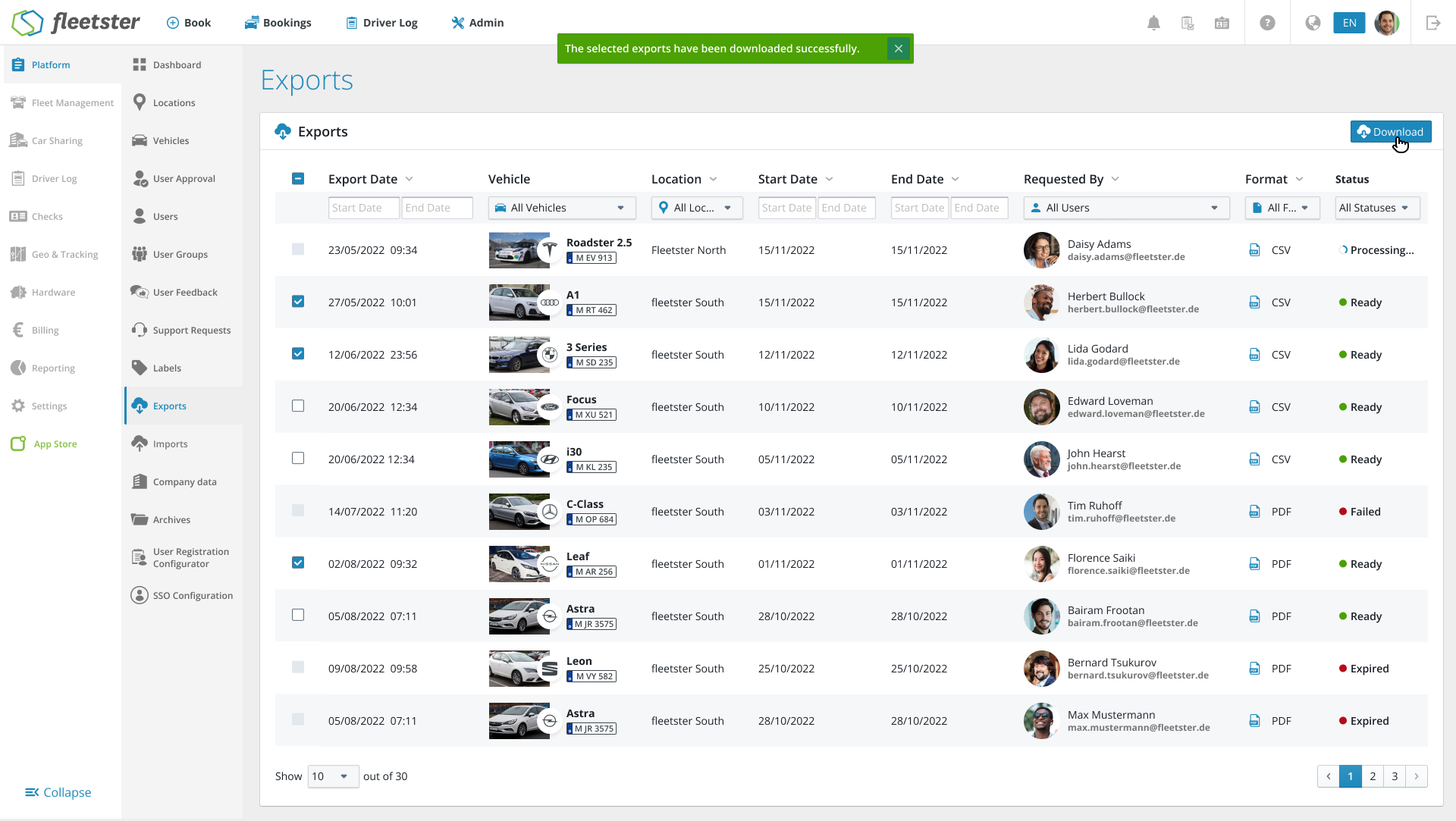
We have overhauled the Exports section within the Platform to make managing your data reports faster and more intuitive. This update introduces bulk actions and clearer status tracking, specifically designed to reduce the number of clicks required to get your data.
What is New:
- Bulk Download Capabilities: you can now select multiple reports at once using the new checkbox system. A single click on the global "Download" button will bundle your selected files, saving you from downloading files one by one.
- Clearer Status Indicators: we’ve replaced basic text with high-visibility color-coded icons so you can see the health of your reports at a glance:
- Processing (Blue): the system is currently generating your report.
- Ready (Green): your file is available for download.
- Failed/Expired (Red): indicates the report needs to be re-run or has passed its storage limit.
- Smart Selection Logic: to prevent errors, checkboxes are only enabled for reports with a "Ready" status. We’ve also added a "Select All" feature in the header that automatically filters out any reports that aren't ready to download yet.
- Streamlined Table Layout: we’ve removed the individual download buttons in every row to clean up the interface, moving the download action to a single, smart button at the top of the page.
- Intelligent Notifications: the system now provides clear feedback when downloads start, with specific messages confirming if you have downloaded a single file or a bulk package.
The benefits at a glance:
- Significant Time Savings: download your entire monthly reporting suite in seconds rather than minutes.
- Improved Scannability: quickly identify which reports are ready and which need attention without reading through every row.
- Reduced UI Clutter: a cleaner, more modern table makes navigating large lists of historical exports much easier.
Contracts: Improve dates calculation and rounding
02/12/2026, 3.199
RELEVANT FOR: Fleet Managers & Contract Administrators
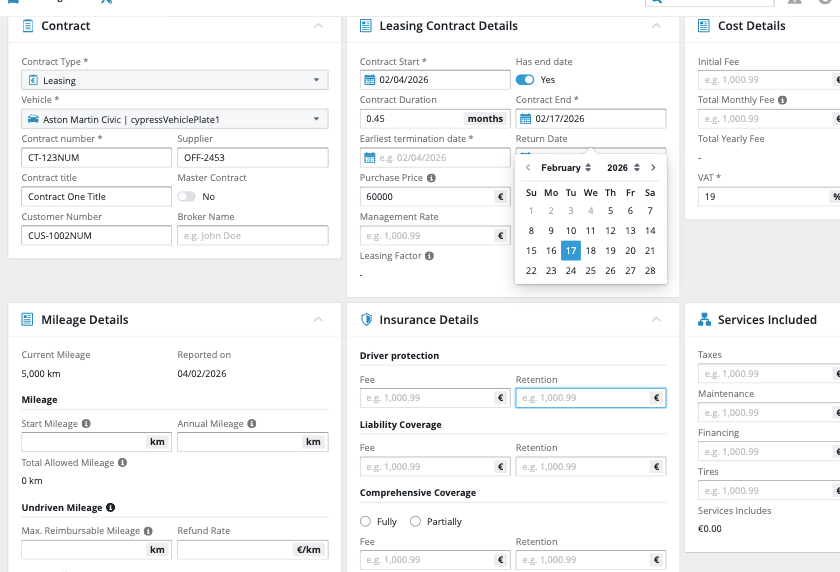
We have refined the logic governing leasing contract durations to ensure mathematical precision and intuitive date handling. This update eliminates the "off-by-one-day" errors and decimal inconsistencies that previously occurred during contract creation.
What is New:
- Aligned Duration Logic: We have synchronized the relationship between start dates, end dates, and total duration. Changing one field now updates the others with 100% accuracy, reflecting real-world leasing standards.
- Intelligent Month Calculation: No more messy decimals. When you select a standard month range (e.g., Jan 1st to Jan 30th), the system now correctly identifies this as exactly 1 month instead of 0.97, ensuring your reports remain clean.
- Precise End-Date Anchoring: When setting a duration manually, the system now correctly calculates the inclusive end date. For example, a 1-month contract starting on the 1st of the month will now correctly end on the 30th (or the last day of that month), preventing overlapping contract days.
- Boundary Awareness: The calculation engine has been upgraded to better handle month boundaries and varying month lengths (28, 30, or 31 days), providing a reliable experience regardless of the time of year.
The benefits at a glance:
- Data Integrity: Your contract database will now reflect clean, whole numbers for durations, making audit and financial exports more professional.
- User Confidence: Admins can trust that the dates calculated by the system match the physical leasing paper-work without manual overrides.
- Seamless Management: Reduced friction during the contract setup process means faster onboarding of new vehicles into your fleet.
Billing: Display Transaction ID
02/12/2026, 3.199
RELEVANT FOR: Car Sharers & Accounting Departments
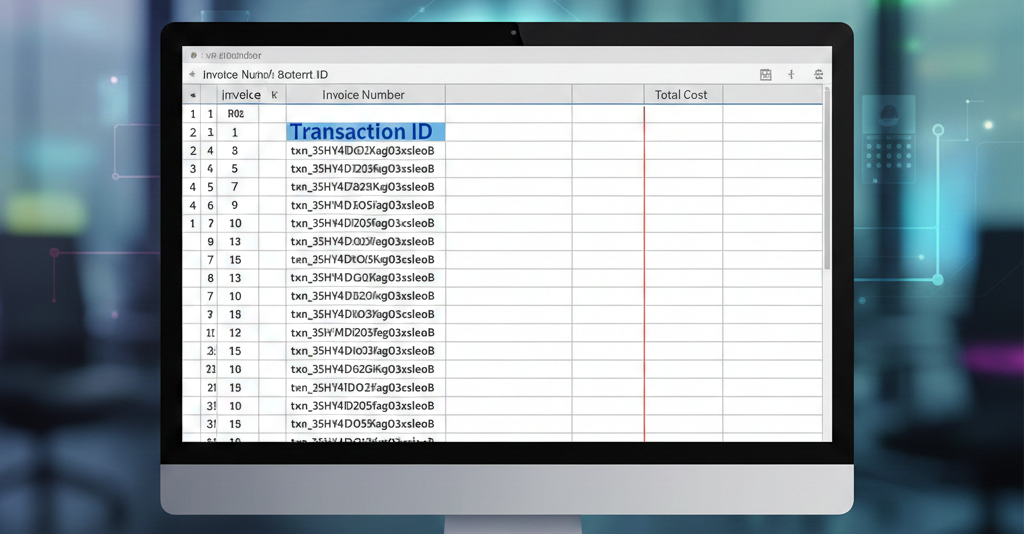
We have streamlined the financial reconciliation process by integrating payment transaction data directly into your invoice exports. This update is designed to eliminate manual lookups and save your accounting team hours of administrative work.
What is New:
- Integrated Transaction IDs: When exporting invoices, a new column for Transaction ID is now included automatically. This provides a direct link between your internal invoice numbers and the external records in your payment gateway.
- Multi-Processor Support: The export logic is built to handle multiple payment providers. Whether the payment was processed via Stripe or Telecash, the corresponding transaction reference will appear in the export.
- UI-Consistent Logic: To ensure data integrity, the export uses the same selection logic as the platform's user interface. If an invoice has multiple related transactions, the system intelligently selects the primary ID displayed in the UI.
- Clean Data Formatting: We have maintained the existing export structure to ensure compatibility with your current spreadsheets. If an invoice has no associated transaction (e.g., manual bank transfers or pending payments), the field remains neatly empty.
The benefits at a glance:
- Efficiency Gains: No more switching between the platform and Stripe/Telecash to manually match missing IDs.
- Reduced Error Margin: Automated data mapping removes the risk of "copy-paste" errors during the monthly closing process.
- Faster Reconciliation: Accountants can now perform bulk reconciliations in Excel or their ERP system using the Transaction ID as a unique join key.
Platform: Add Danish language
01/29/2026, 3.198
RELEVANT FOR: Fleet Managers
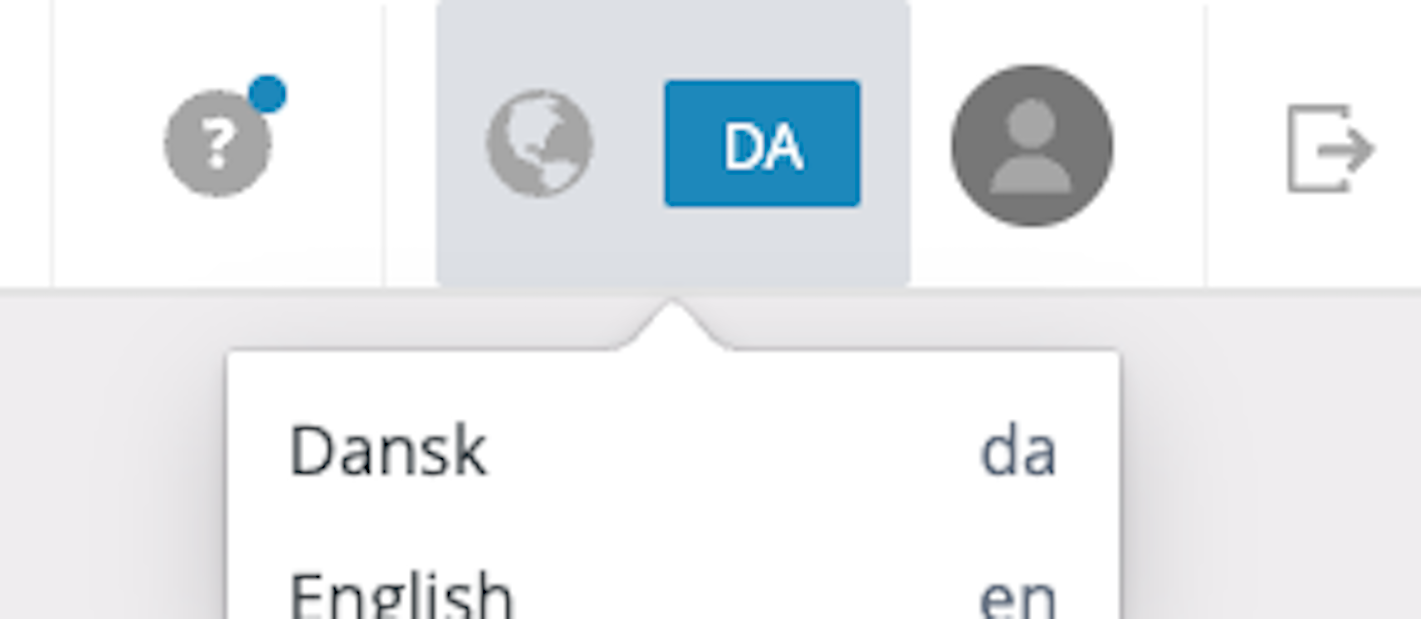
We have expanded our platform’s localization capabilities to include full support for the Danish language. This update is designed to strengthen your operations in Scandinavian markets and provide a seamless experience for your Danish-speaking teams.
What is New:
- Danish Interface Support: Users can now select Danish from the language settings, localizing the entire platform environment.
- Smart Fallback Logic: To ensure the system remains 100% functional at all times, we have implemented a safety mechanism. If a specific translation is missing, the system automatically defaults to English for that label, preventing blank screens or errors.
- Quality-Focused Updates: The translation framework is optimized for accuracy. While the initial release covers the core system, the architecture allows for precise updates by native speakers to ensure terminology fits local context perfectly.
The benefits at a glance:
- Market Expansion: Lowers the barrier to entry and simplifies adoption for fleets operating in Denmark.
- User Comfort: Allows local teams to work efficiently in their native language.
- Uninterrupted Usability: The fallback to English ensures that the software is always usable, even as new translation terms are being added or refined.
Import: Upload Vehicle Images for Vehicles
01/29/2026, 3.198
RELEVANT FOR: Fleet Managers
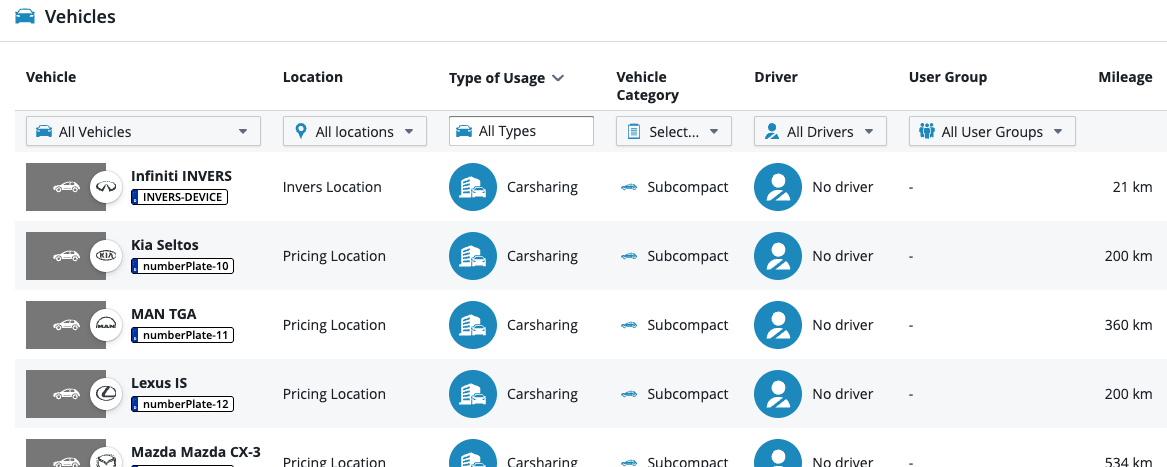
We have introduced a powerful new script designed to streamline how vehicle images are uploaded to the system. This update eliminates the tedious process of manual, single-image uploads, allowing you to import multiple images per vehicle in one efficient batch directly from your local machine.
What is New:
- Bulk Import Capability: You are no longer restricted to uploading one image at a time. The new script enables the simultaneous import of multiple images per vehicle, drastically reducing data entry time.
- Smart Auto-Assignment: The system now intelligently handles image mapping. It assigns images automatically based on your specific customer input. If no input is provided, it seamlessly defaults to two preset standard images.
- User-Friendly Local Execution: Designed specifically for non-technical users, this script runs locally on your machine. It bypasses complex user interfaces, allowing you to handle large data sets with minimal technical skills required.
The benefits at a glance:
- Massive Time Savings: By removing manual steps and enabling bulk processing, import workflows are significantly faster.
- Reduced Complexity: You can handle high-volume imports without needing deep technical knowledge or navigating through multiple UI screens.
- Consistent Data Entry: Automated assignment rules ensure every vehicle has the correct imagery (or a standardized default) from the moment it is imported.
Advance Vehicle List: Add Category column
01/29/2026, 3.198
RELEVANT FOR: Fleet Managers
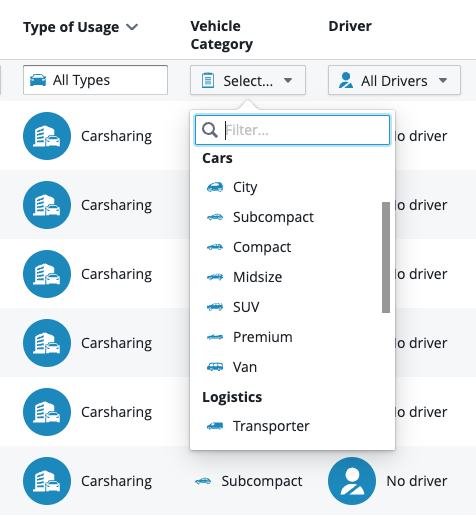
We have expanded the capabilities of the Advanced Vehicle List by adding a dedicated "Vehicle Category" column. This update pulls data directly from the General Tab of the Digital Vehicle File, providing a higher level of data granularity for managing complex fleets.
What is New:
- New "Vehicle Category" Column: You can now view, sort, and filter your fleet list specifically by vehicle category (e.g., Passenger Car, Van, Truck) directly within the advanced list view.
- Enhanced Data Synchronization: This column reflects the categorization already defined in the Digital Vehicle File, ensuring your list views match your individual vehicle records.
- Foundation for Analytics: This addition lays the groundwork for more powerful filtering and reporting tools coming in future updates.
The benefits at a glance:
- Precise Reporting: Generate more targeted reports by segmenting your fleet data based on specific vehicle types.
- Improved Organization: Quickly distinguish between different asset classes in large lists without needing to open individual vehicle files.
- Streamlined Management: Apply bulk actions or specific workflows to entire categories of vehicles with ease.
Email Inbox: Add Email Details
01/29/2026, 3.198
RELEVANT FOR: Fleet Managers
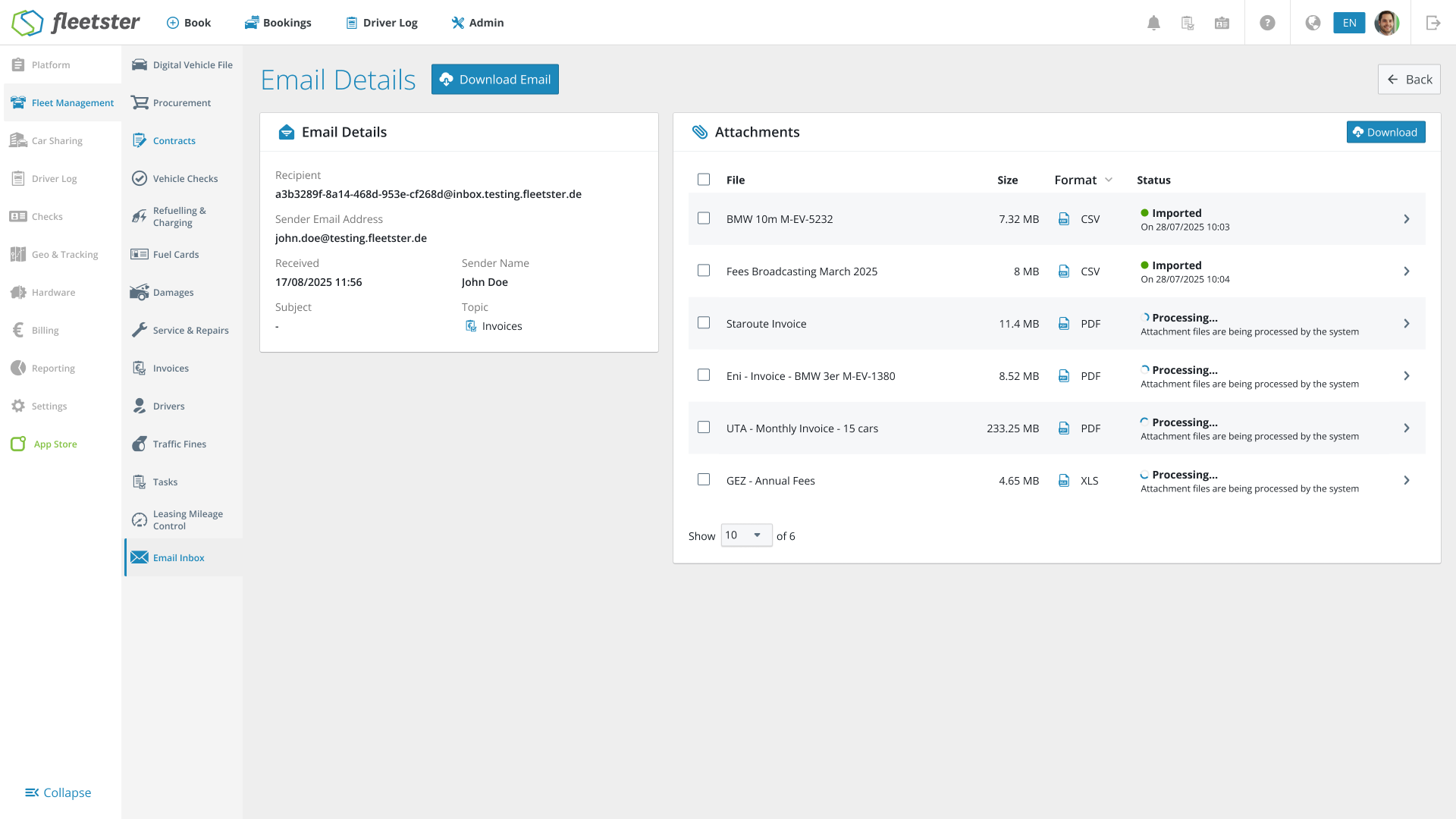
We have enhanced the transparency of our automated email import feature. This update provides a detailed view of the metadata associated with imported refueling and invoice emails, giving you full visibility into the data entering your system.
What is New:
- Expanded Email Details: You can now view critical information for every imported email log, specifically the Sender, Recipient, and Subject line.
- Clarified Import Sources: Immediately identify the exact origin of a refueling record or invoice document without needing to cross-reference your email client.
The benefits at a glance:
- Faster Troubleshooting: Quickly verify if the correct emails are being processed or investigate why a specific import might have failed.
- Total Transparency: Gain complete visibility into your automated workflows, ensuring that all data sources are verified and trustworthy.
- Simplified Auditing: Easily trace imported data back to the specific email communication that generated it, streamlining compliance checks.
Digital Vehicle: Bookings status improvements
01/15/2026, 3.197
RELEVANT FOR: Fleet Managers
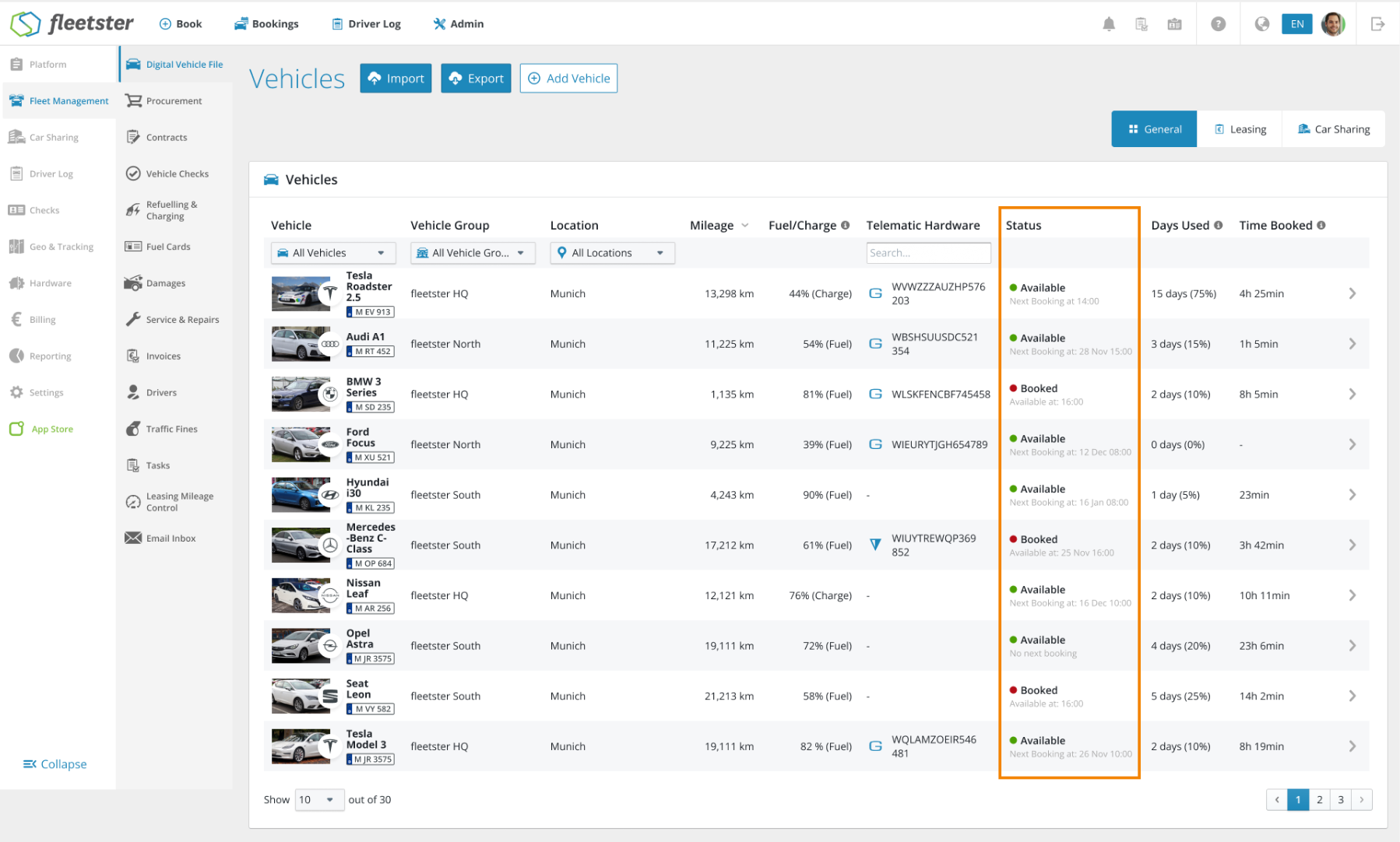
We have redesigned how vehicle availability is displayed in the Carsharing tab of the Digital Vehicle File. This update replaces complex status messages with a clean, high-contrast layout that tells you exactly whether a vehicle is ready for use and when its status will change.
What is New:
- Simplified Status Labels: At a glance, you will see a clear color-coded status. Green (Available) indicates the vehicle is ready, while Red (Booked) shows it is currently in use.
- Precise Timing Subtitles: Underneath the status, we’ve added a helpful hint.
- If Available, it shows: "Next Booking at: [Time/Date]".
- If Booked, it shows: "Available at: [Time/Date]".
- Standardized Date Formats: To eliminate guesswork, we no longer use vague terms like "tomorrow" or "in 3 hours".
- Today’s events: Show the time only (e.g., 14:30).
- Future events: Show the date and time (e.g., 12 Feb 09:00).
- Clear Edge Case Handling: If a vehicle is available and has no future bookings scheduled, the system will clearly state "No upcoming booking," giving you total peace of mind.
The benefits at a glance:
- Instant Clarity: Visual color coding allows you to scan the fleet status in seconds.
- Elimination of Ambiguity: By using absolute timestamps instead of relative text, there is no confusion about exactly when a vehicle is free.
- Better Planning: Seeing the "Next Booking" immediately helps managers make quick decisions about vehicle assignments.
Documents: More Communication Types
01/15/2026, 3.197
RELEVANT FOR: Fleet Managers
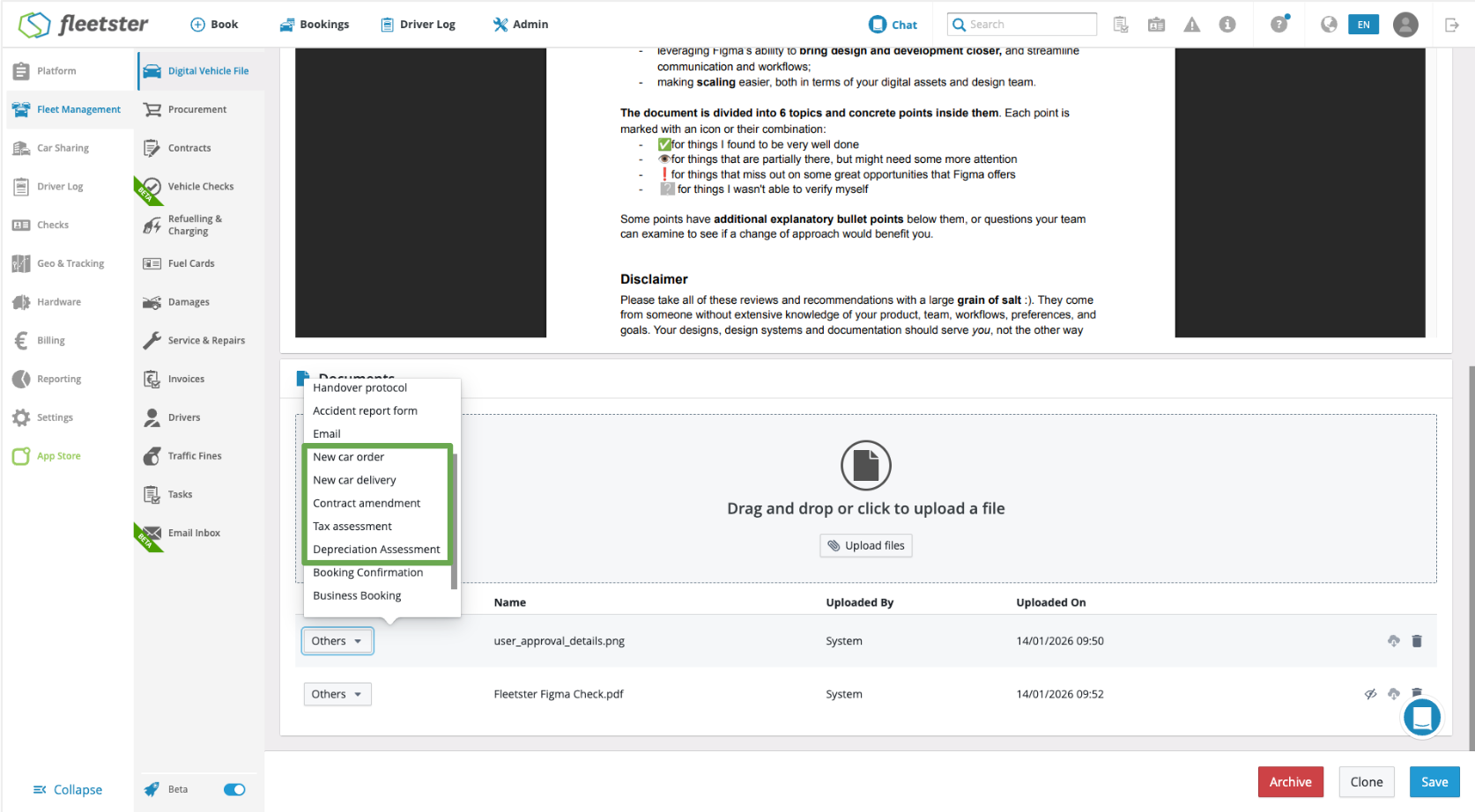
We have expanded the document management capabilities within the digital vehicle file to provide more precise categorization. This update introduces six new communication types to the document upload process, allowing you to organize vehicle-related paperwork with greater detail and accuracy.
What is New:
- Expanded Document Labels: You can now select from a wider range of specific categories when uploading documents. The following labels have been added to the dropdown menu:
- New car order
- New car delivery
- Contract amendment
- Tax assessment
- Registration documents
- Value loss appraisal
- Verified Display Accuracy: After submission, the selected label is strictly tied to the document, ensuring that the file reflects the correct communication type throughout the digital vehicle record.
- System Consistency: All previously existing document types remain fully available and functional, ensuring no disruption to your established filing workflows.
The benefits at a glance:
- Granular Organization: Moving beyond general labels allows for a more structured digital vehicle file, making it easier to distinguish between orders, deliveries, and legal assessments.
- Improved Searchability: By using specific communication types, you can find critical documents—such as registration papers or tax assessments—much faster.
- Reliability & Stability: Every new label has been rigorously tested to ensure the upload process remains seamless and that no existing data is affected.