



Product Updates
Hardware: Vehicle Events now available in the main interface
09/18/2026, 3.214

RELEVANT FOR: Fleet managers & admins
The Vehicle Events page has been rebuilt in the platform's main interface, where you will now find it under Hardware > Vehicle Events. The page still does what it always did, showing a chronological timeline of everything that happened with a single vehicle, but it is now easier to read, quicker to work with, and shows far more context for each event.
What's changed:
- Clearer timeline: Pick a vehicle and a start and end date to see all its events listed newest first, each with a clear name, a timestamp, and where it came from (hardware, platform, mobile, web, or Fleet Master Access).
- Vehicle at a glance: A new header shows the vehicle photo, model, license plate, home location, and odometer, alongside the connected hardware and its serial number.
- More detail per event: Selecting an event now opens a panel tailored to it, including live vehicle status and position on a map, keyfob and fuel card activity, refueling and recharging amounts and costs, geofence entries and exits with duration and distance travelled, and booking details.
- Quick navigation: Buttons take you straight to Device Details, Vehicle Details, Vehicle Map, or Vehicle Tracking, and booking events link directly to the booking record.
- Privacy respected: When privacy mode was active for the vehicle, location data stays hidden.
Advantages:
- Faster workflows: The page is part of the modern, responsive interface, so there is no need to switch between older views to follow a vehicle's history.
- More context, less guesswork: Event-specific details such as refueling volumes, geofence durations, booking origins, and keyfob connectivity are now surfaced consistently instead of being left out.
- Reliable audit trail: Hardware, booking, geofence, energy, and platform activity all appear in one timeline with time and origin, making it easy to reconstruct what happened and when.
Analytics: TCO Cost Details modal on categories
09/18/2026, 3.214

RELEVANT FOR: Fleet managers
Clicking a cost figure in the TCO report now opens a detail modal showing exactly what makes up that number — whether it comes from contract data or linked invoices — so you can verify any figure without leaving the report.
What's new:
- Contract-based costs: Clicking a cost cell sourced from contract data opens a modal displaying the relevant contract cost details.
- Invoice-based costs: Clicking a cost cell sourced from linked invoices opens a modal listing those invoices, filtered to the report's selected date range.
- Zero-cost cells: Clicking a cell with no underlying cost clearly indicates that no data is available, so you always get a meaningful response.
Advantages:
- Faster verification: Trace any cost figure back to its source in one click, without switching to a separate contracts or invoices view.
- Full context at a glance: The modal always reflects the same date range as your report, so the detail matches exactly what you see in the cell.
- Fewer interruptions: Stay in your reporting flow while investigating figures, reducing the back-and-forth that slows down cost reviews.
Hardware: Invers Vehicle List now available in the main interface
09/18/2026, 3.214

RELEVANT FOR: Fleet managers & Control Tower admins
The Invers vehicle list has been rebuilt in the platform's main interface, giving hardware managers a faster, more reliable experience when viewing and managing connected devices.
What's new:
- Vehicle overview: A clear list displays all vehicles alongside their status, device ID, device status, and GPS tracking information at a glance.
- Device assignment: Vehicles without a connected Invers device can be set up directly from the list, with guided input and real-time validation feedback.
- Device detail view: Selecting a connected device opens a dedicated detail page showing device information, vehicle status, access and vehicle controls, Bluetooth and peripheral state, and location data including a live map.
- Data management: Vehicle and device data can be refreshed or downloaded directly from the page header.
Advantages:
- Faster workflows: All key Invers device information and controls are consolidated in one modern, responsive interface — no need to switch between older views.
- Clearer visibility: GPS tracking status, device connectivity, and telematics data are presented in a structured layout that is easy to scan and act on.
- Guided setup: Adding a new device to a vehicle is straightforward, with clear prompts and immediate feedback if something needs correcting.
Languages: Add Japanese
09/18/2026, 3.214

RELEVANT FOR: Fleet managers & drivers
The fleetster platform now supports Japanese across the web app, mobile app, email templates, and push notifications, making the platform fully accessible to Japanese-speaking users.
What's new:
- Web app language selection: Japanese (日本語) is now available in the language dropdown, and selecting it renders the entire web app in Japanese.
- Mobile app: Users with a device set to Japanese will automatically see the app in Japanese.
- Email templates: Administrators can now select Japanese when managing email templates, with all template content displayed in Japanese.
- Push notifications: Users with Japanese set as their language will receive push notification text in Japanese.
Advantages:
- Inclusive experience: Japanese-speaking users can navigate and operate the platform entirely in their own language, without needing to rely on another language.
- Consistent coverage: Japanese is supported across every touchpoint — web, mobile, email, and notifications — so nothing is left untranslated.
- Reliable fallback: If any label is not yet available in Japanese, the platform automatically falls back to English, ensuring users always see meaningful text rather than a blank or broken string.
Login Tasks: New Password now available in the main interface
09/18/2026, 3.214

RELEVANT FOR: All users
The "Set New Password" step that appears during first login or after an admin password reset has been rebuilt as part of the main interface, ensuring a smoother and more consistent onboarding experience from the very first moment.
What's changed:
- Unified experience: The new password prompt now runs entirely within the main interface, eliminating any visual inconsistency during the login flow.
- Same familiar flow: All existing validations, field behavior, and completion logic are preserved — nothing about the process itself has changed for users.
- Reliable task tracking: Completion of the password step is tracked and persisted consistently, so users are never asked to repeat a step they have already finished.
Advantages:
- Consistent look and feel: The onboarding flow now matches the rest of the platform, making first impressions polished and professional.
- Fewer friction points: A unified flow reduces the chance of unexpected behavior or visual jumps during a critical moment — logging in for the first time.
- Easier to maintain: The consolidated approach means future improvements to the login flow can be made in one place, benefiting all users faster.
Contracts: Documents AI reader with OCR
08/20/2026, 3.212
RELEVANT FOR: Fleet managers, Fleet Admins
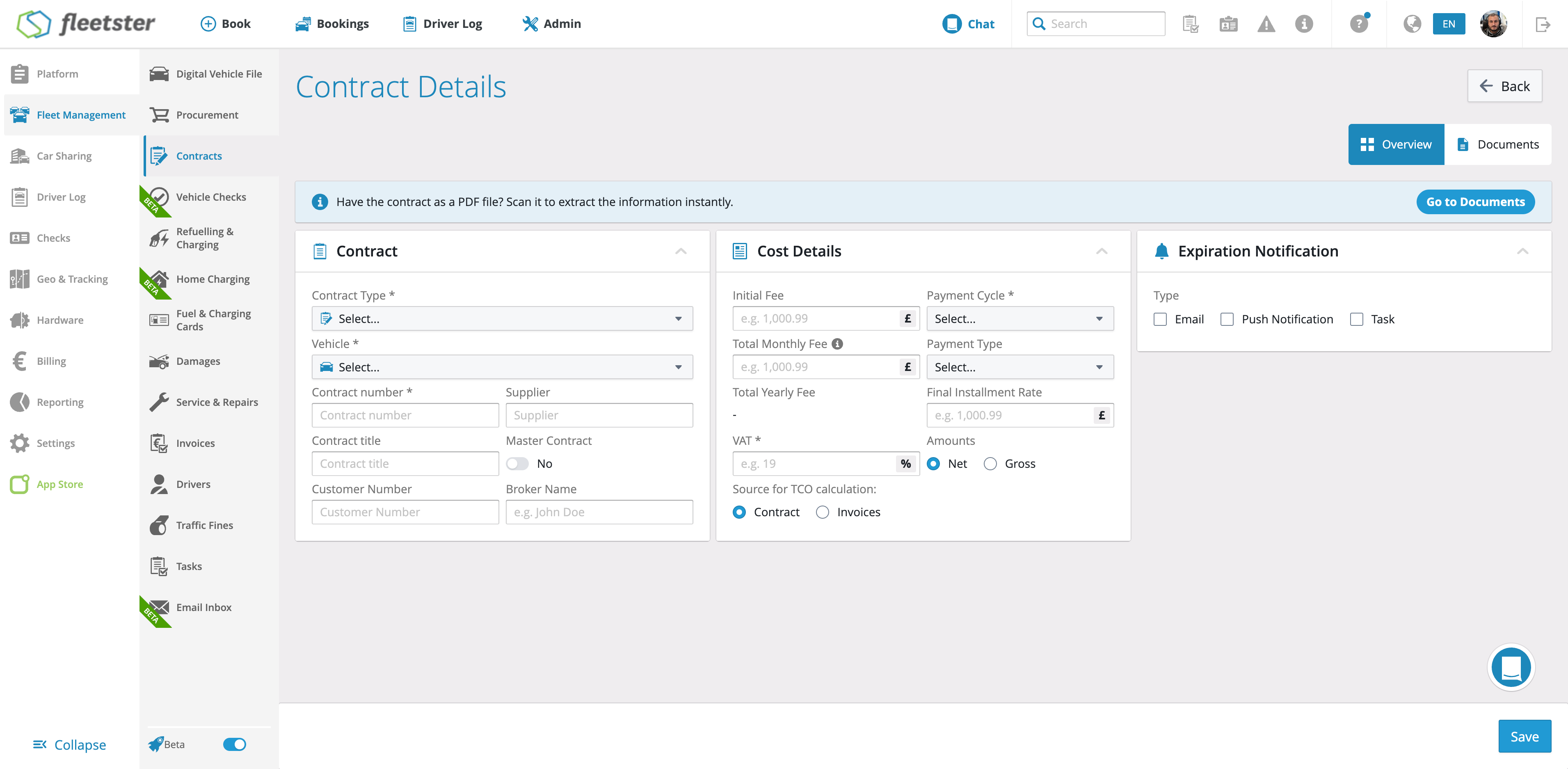
Upload a contract PDF in the Contract Section, let the AI auto-detect the contract type, overridable at any time, and have it extract the type-specific cost fields to prefill the contract for review. Supports 10 contract types and runs in parallel without blocking other workflows.
What's new:
- PDF upload in Contract Section: Upload contract documents directly within the Contract Section; the document is stored and linked to the contract.
- Automatic contract type detection: The AI identifies the contract type on upload. Users can override the detected type before extraction begins.
- AI-powered field extraction: Once the type is confirmed, the AI reads the document and extracts type-specific cost fields, prefilling the contract form for human review.
- Broad contract type coverage: Supports leasing, purchase, insurance, maintenance, vehicle tax, radio & broadcasting, rental, credit, bank loan, and other contract types.
- Non-blocking parallel processing: The reader runs independently and does not block the vehicle report or any other workflow.
Benefits:
- Faster data entry: Cost fields are prefilled automatically, eliminating manual transcription and reducing input time significantly.
- Lower error rate: AI extraction reduces the risk of manual entry mistakes on structured cost data.
- Flexible and overridable: Users can correct the detected contract type before extraction, keeping full control over the process.
- Works alongside other tasks: Processing runs in the background, so teams can continue working without waiting.
Analytics: TCO logic and UI rebuild
08/20/2026, 3.212
RELEVANT FOR: Fleet managers
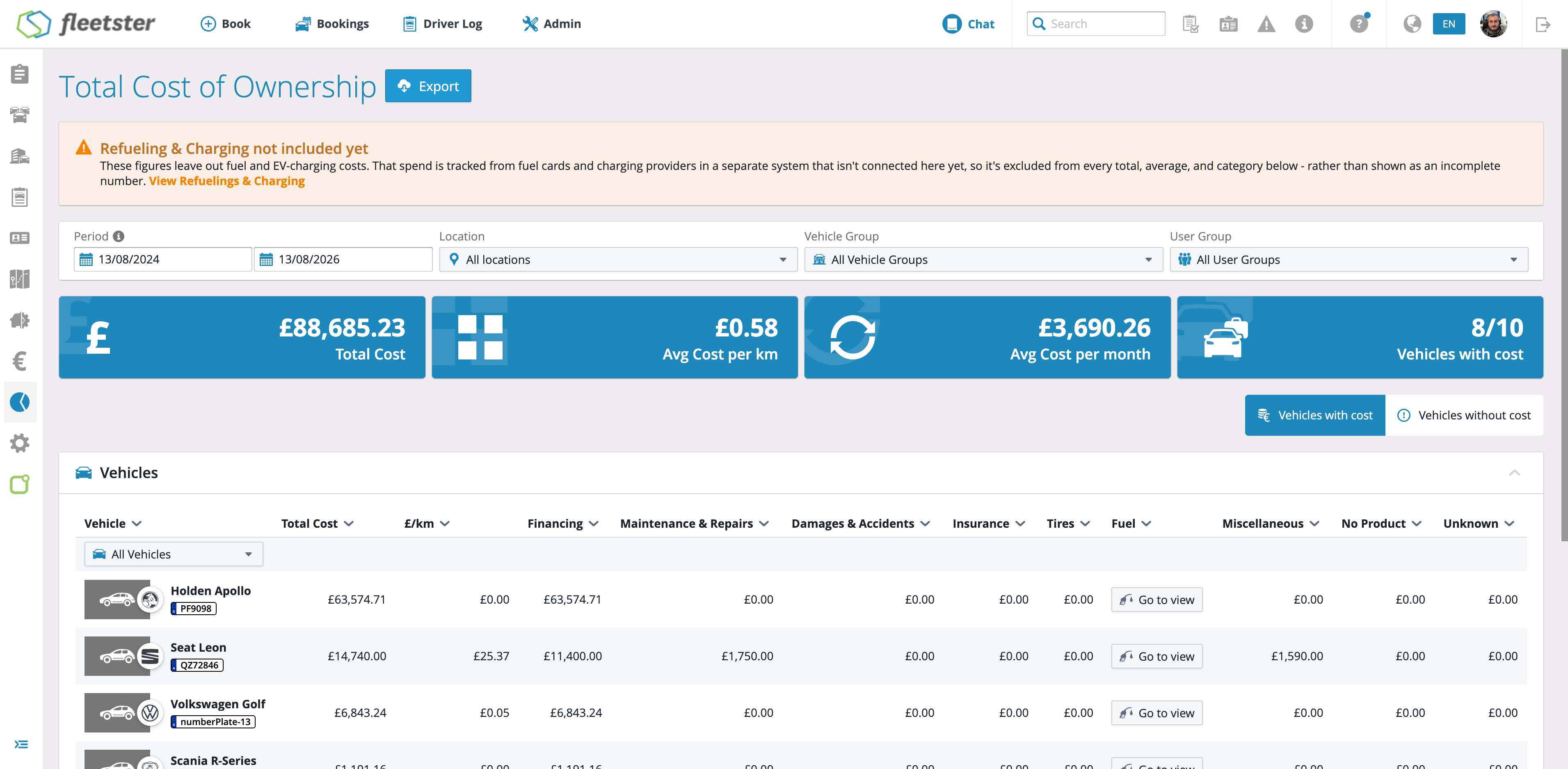
The Total Cost of Ownership (TCO) report has been rebuilt from the ground up, giving fleet managers a clearer, more complete picture of what every vehicle actually costs, and making it easier to act on that data.
What's new:
- Every vehicle in the fleet appears in the report, including those with no recorded costs, so nothing is accidentally overlooked.
- Each vehicle row shows costs split across categories such as Financing, Maintenance & Repairs, Damage/Accidents, Insurances, Tires, and more, all in a single, scannable table.
- Cost per month and cost per km/mile columns provide at-a-glance efficiency metrics for each vehicle, calculated using the fleet's configured distance unit.
- Refuelling costs appear in a dedicated column and link directly to the relevant refuelling events for the selected period, while remaining visually separate from the TCO total so the distinction is always clear.
- A flexible start/end date filter lets users focus on any period, with last month preselected as the default.
- Summary analytics cards surface key figures at the top of the report: total fleet cost, cost per distance, vehicle count, and average cost per vehicle.
- The table defaults to highest cost per month at the top, so the vehicles that need attention are always front and center.
Benefits:
- Every vehicle is included regardless of cost activity, so the report reflects the entire fleet, not just vehicles with recorded spending.
- Separating fuel from the TCO total allows operational costs to be compared fairly across vehicles with different fuelling patterns.
Bookings: Authorization Requests now available in the main interface
08/20/2026, 3.212
RELEVANT FOR: Fleet managers
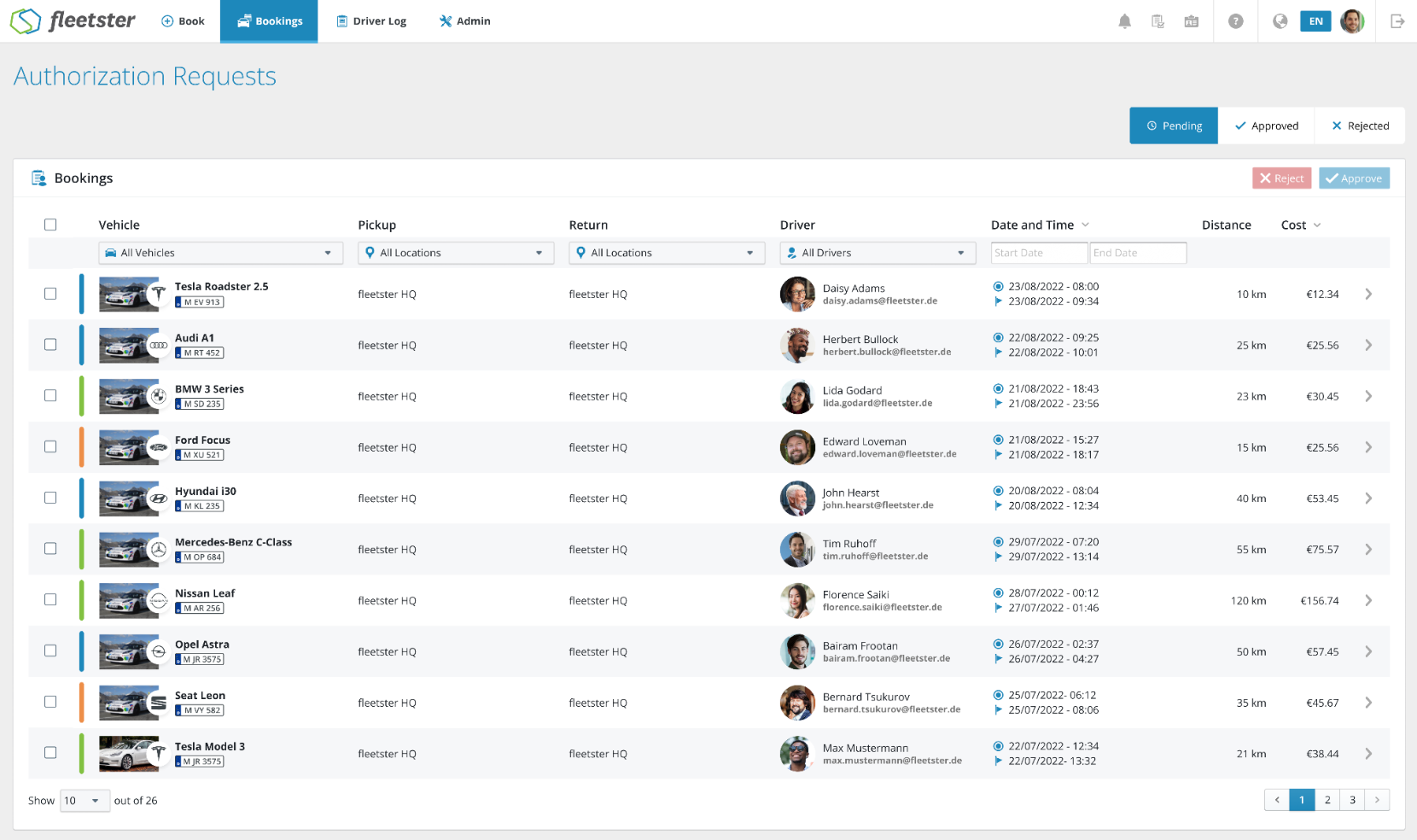
Fleet managers can now access a dedicated Authorization Requests dashboard that brings all booking approval activity into one clear, organized view. Pending decisions and finalized requests are immediately visible and easy to act on, with no complex filtering needed.
What's new:
- Requests are split into three tabs (Pending, Approved, and Rejected) so the most urgent items are always front and center.
- Opening a pending request leads directly to a detail page where the request can be approved or rejected, with the option to add notes.
- Approved and rejected requests remain accessible for monitoring and review, including any recorded reason for rejection.
- Each view can be filtered by vehicle, pickup location, return location, driver, and date range to quickly narrow down the relevant requests.
- Estimated distance and cost are shown for each request, giving fleet managers the information they need to make informed decisions at a glance.
Benefits:
- Pending requests are immediately visible on arrival, reducing the risk of delays in the authorization process.
- Approved and rejected requests are always available for follow-up, audit, or reference without requiring a separate search.
Geo & Tracking: Geo Fences now available in the main interface
08/06/2026, 3.211
RELEVANT FOR: Fleet managers & fleet administrators
Geo Fence management has been redesigned and is now available directly within the main interface, giving fleet managers a clearer, more interactive way to create, view, and maintain geographic boundaries for their vehicles.
- List view: Browse all Geo Fences in a structured table showing each fence's name, associated location, address, radius, and exact coordinates, with a click-through to full details.
- Map view: See all Geo Fences plotted on an interactive map, with clickable markers that display the fence name, postal address, and a direct link to its detail page.
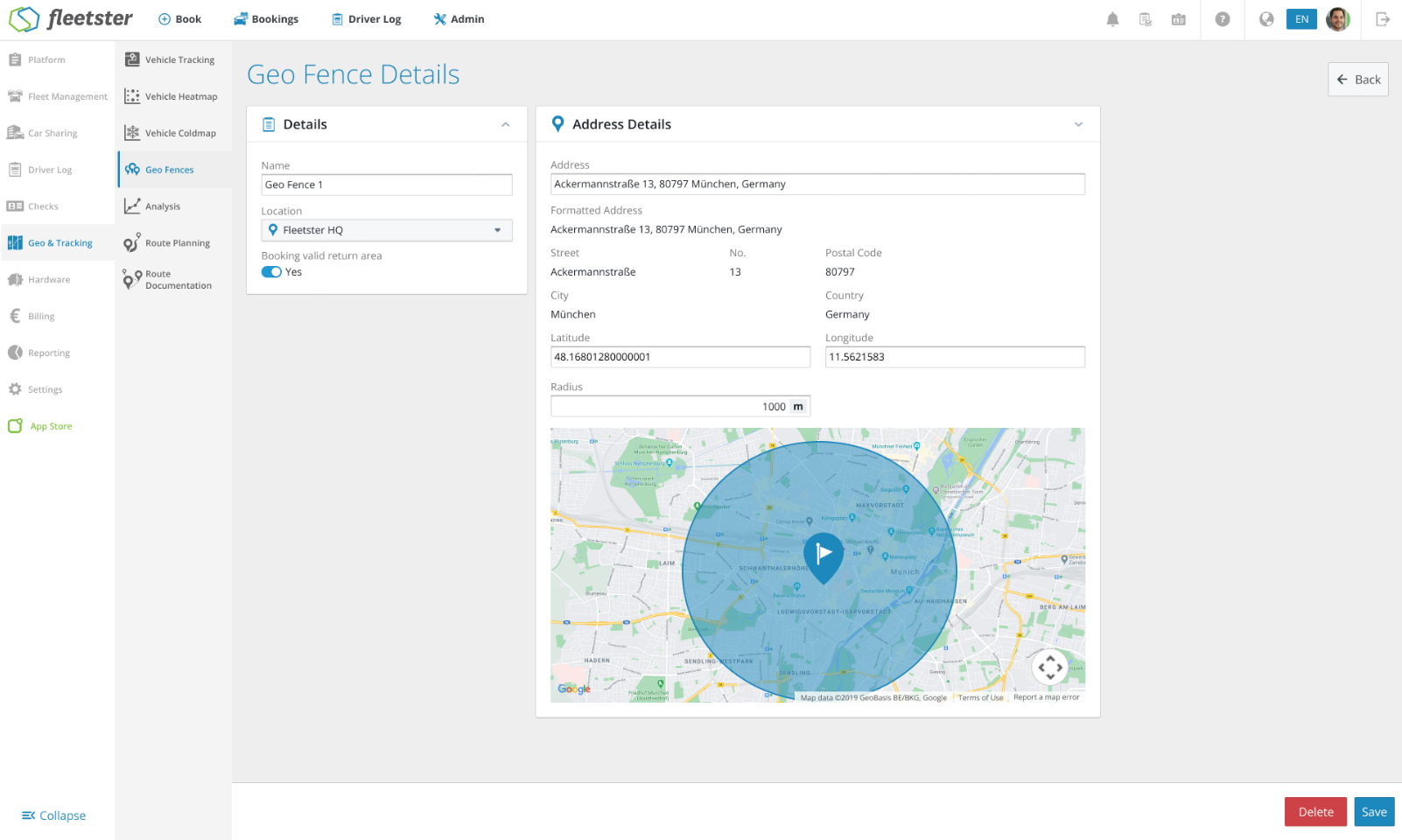
- Geo Fence details: Configure each fence with a name, linked location, address, and radius, and drag the map pin to reposition the fence, automatically updating the address and coordinates.
- Quick creation: Add a new Geo Fence directly from the page heading, opening a blank detail form ready to fill in.
- Faster oversight: Switching between a searchable list and a live map means you can find and review any Geo Fence in seconds, whether you prefer data or a visual layout.
- More precise boundaries: Draggable map pins combined with automatic address and coordinate updates make it straightforward to position fences accurately without manual data entry.
- Simplified setup: Creating and configuring a Geo Fence, including setting it as a valid booking return area, now takes place in one consistent, clearly structured page.
Hardware: Invers Vehicle List now available in the main interface
08/06/2026, 3.211
RELEVANT FOR: Fleet managers & Car Sharing Kit admins
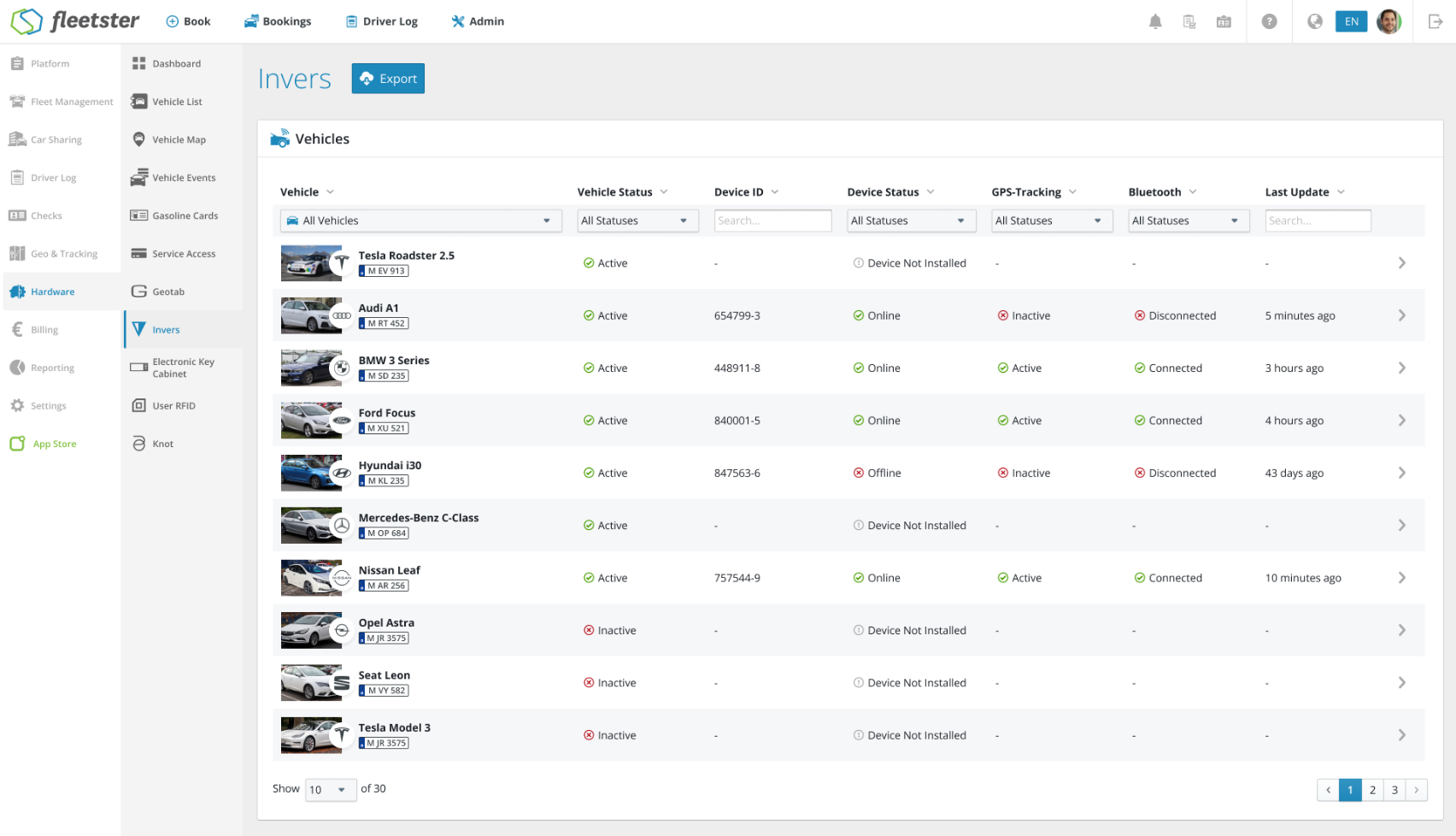
The Invers vehicle list has been fully redesigned and is now available as a modern, integrated page within the main platform interface, making it easier to manage connected devices and vehicle hardware at a glance.
- A clear list of all vehicles shows each vehicle's status, device ID, device status, and GPS tracking information in one place.
- Vehicles without a connected Invers device can be set up directly from the list: select the vehicle and enter the device number to link it.
- Each connected device has a dedicated detail page showing device information, vehicle status, access and vehicle controls, Bluetooth and peripheral state, and location and geo data including a live map.
- Device data can be refreshed or downloaded directly from the page header, keeping information up to date without leaving the screen.
- All key device and vehicle information is consolidated in one modern view, reducing the time spent navigating between sections.
- Connecting a new Invers device to a vehicle is now a straightforward, guided process with clear validation and feedback.
- Access controls, telematics data, and location information are available in real time, giving administrators greater visibility and control over their fleet hardware.
Login: Header and footer now visible
08/06/2026, 3.211
RELEVANT FOR: All users
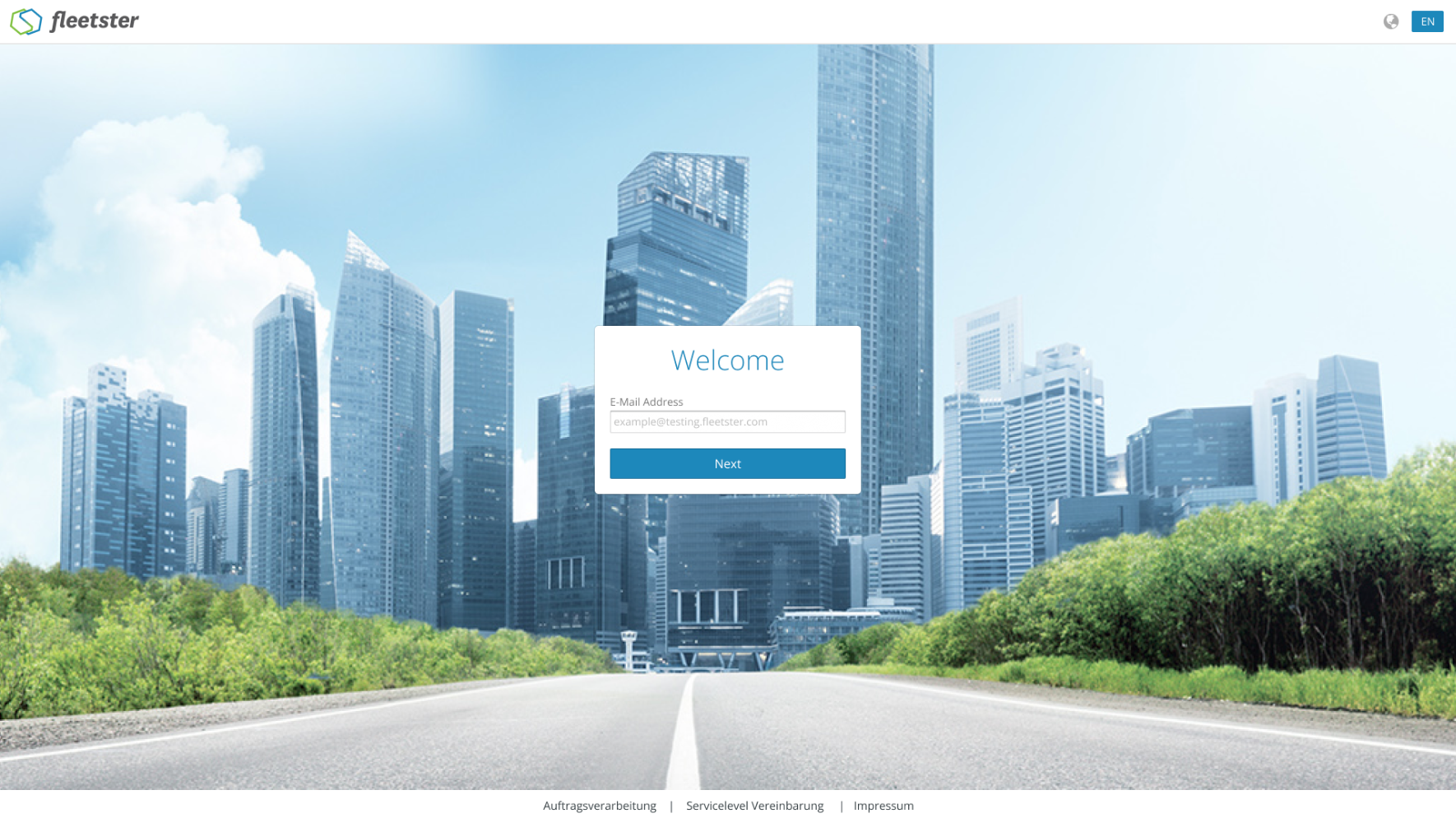
The login, forgot password, and reset password screens now display a consistent header and footer, giving you clear product branding, easy language switching, and quick access to important links, all before you sign in.
- The Fleetster logo is now visible at the top of every authentication screen, so you always know you're in the right place.
- A language picker in the header lets you switch your preferred language directly from the login screen, and your choice is remembered for future visits.
- Relevant links, such as legal and informational pages, appear in the footer in the correct order, opening exactly as expected.
- Both the language picker and all footer links are reachable and usable without a mouse, supporting a wider range of users and workflows.
- The header and footer match the look and behavior across the rest of the platform, with consistent branding and navigation throughout.
- You can switch your language before signing in so the entire sign-in flow is immediately in your preferred language.
- Important pages are available directly from the login screen, without requiring a sign-in.
Car Sharing: Import Booking button now available in the main interface
07/23/2026, 3.210
RELEVANT FOR: Fleet managers & Car Sharing admins
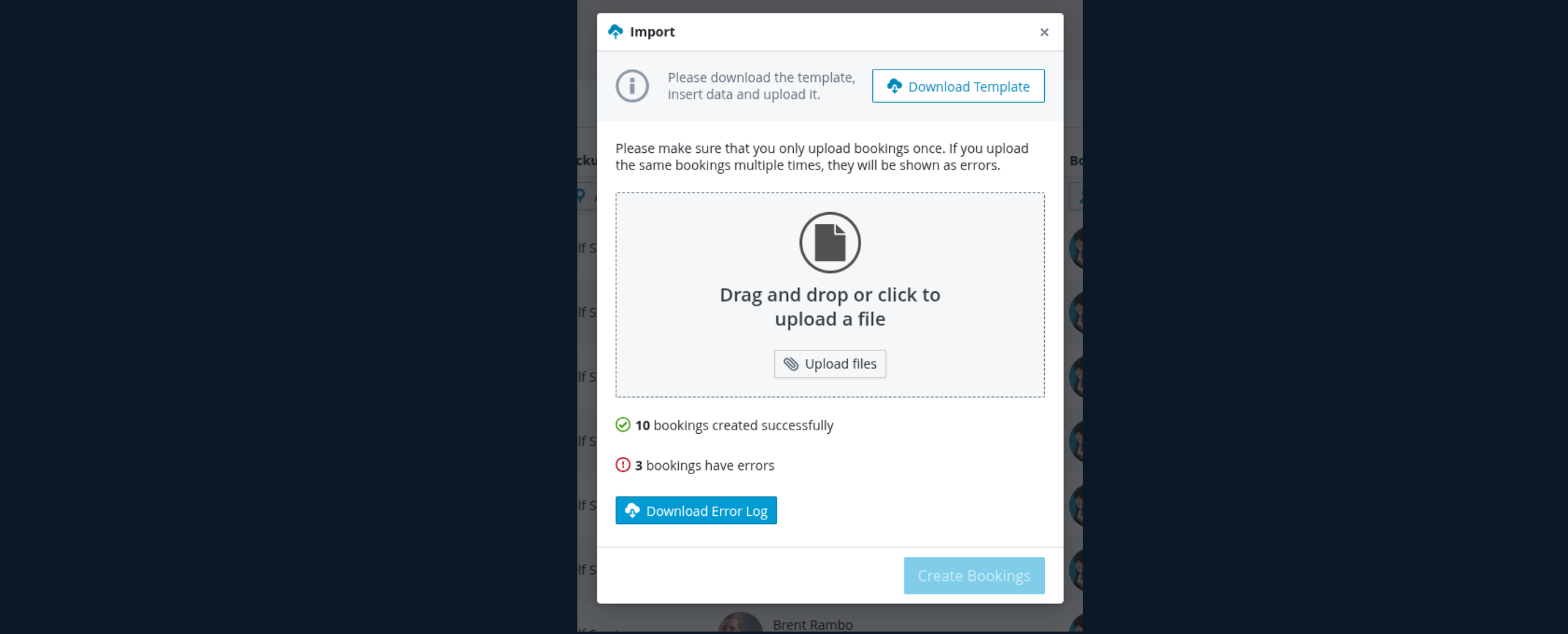
The Import Booking button has been moved into the main interface, replacing a legacy custom implementation with the platform's standard import system for a more consistent and reliable experience.
- Unified import flow: Booking imports now use the same standard import system as the rest of the platform, reducing inconsistencies.
- Modernised interface: The button is now fully integrated into the current interface, matching the look and feel of other platform controls.
- Improved reliability: Retiring the older custom implementation means the import process benefits from the same maintenance and improvements applied across the platform.
- Consistency: A single, familiar import experience across all areas of the platform.
- Easier to use: Booking imports now use the same flow as the rest of the platform, without switching to a separate or differently styled interface.
- Future-proof: Improvements to the standard import system automatically benefit booking imports as well.
Driver log: Improvement on merge trips
07/23/2026, 3.210
RELEVANT FOR: Fleet managers & drivers
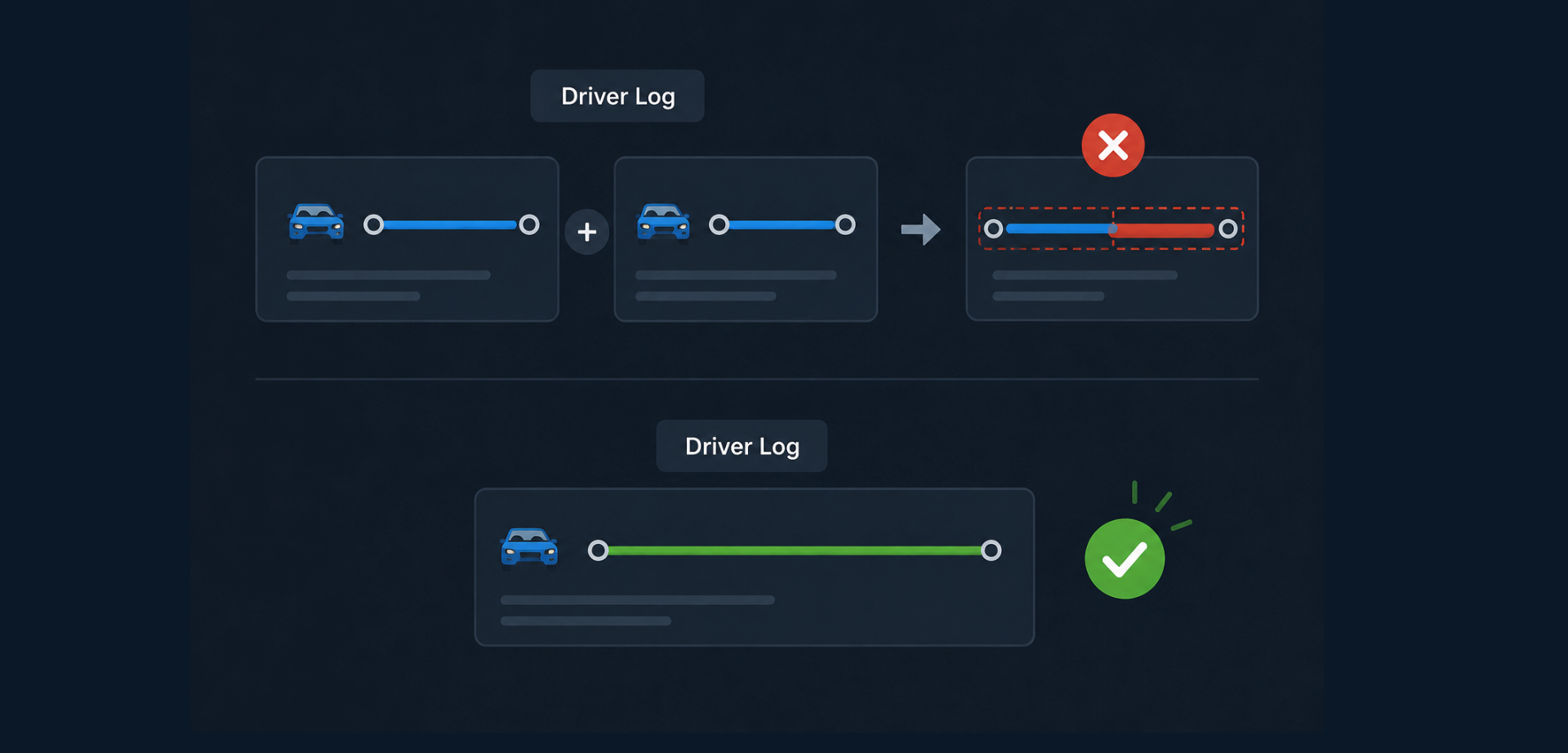
Merging driver log trips is now more reliable and consistent. Several issues that could leave trip data in an inconsistent state or produce unexpected errors have been resolved.
- Validation before saving: All checks are now completed before any changes are written, so a failed merge no longer leaves partial or incorrect data behind.
- Accurate overlap detection: Merging trips now correctly checks whether the combined time window would overlap with any other existing trip on the same vehicle, preventing invalid data from being saved.
- Reliable cost calculation: The cost update that follows a merge no longer incorrectly triggers a date-conflict error, so merges complete successfully when the combined window is valid.
- Data integrity: If a merge cannot be completed for any reason, trip records remain exactly as they were, with no changes or deletions applied.
- Fewer false errors: Fleet managers and drivers no longer encounter misleading overlap errors when merging valid, contiguous trips.
- Consistent results: Merged trips are saved with accurate cost information in a single, reliable step.
Hardware: Add banner that gasoline cards route will be deprecated
07/23/2026, 3.210
RELEVANT FOR: Fleet managers
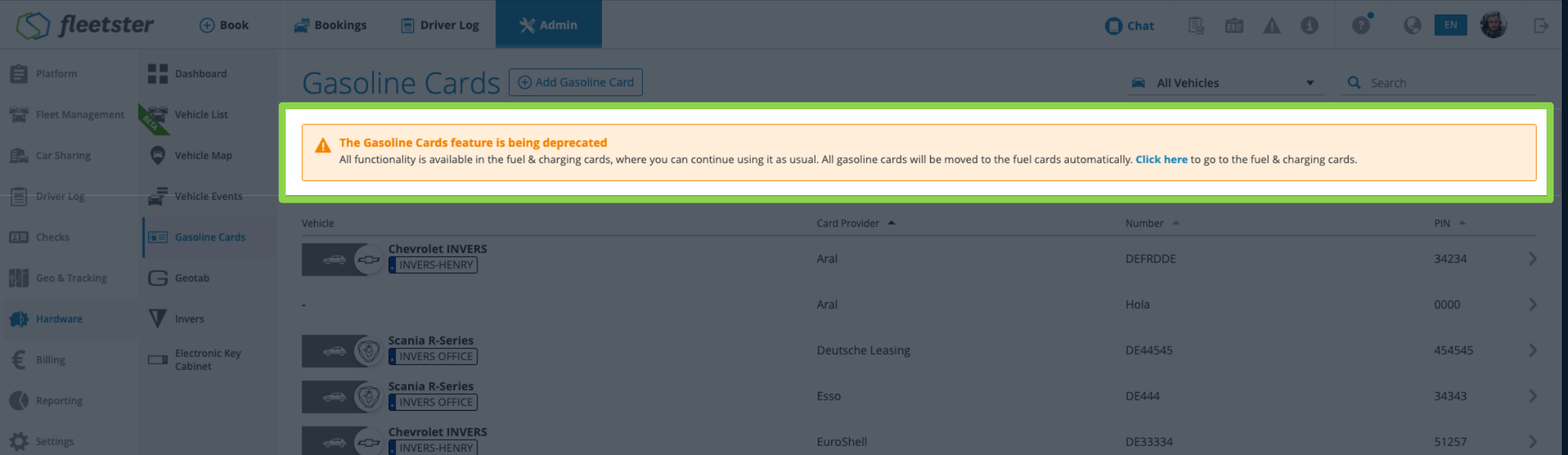
A notification banner now appears in the web app to let administrators know that the gasoline card feature is being deprecated and that all functionality is moving to the Fuel & Charging Cards section.
- Deprecation notice: A prominent banner is displayed at the top of the web app, informing users that the gasoline card feature will be retired soon.
- Automatic migration: All existing gasoline cards will be moved to the Fuel & Charging Cards section automatically, with no manual action required.
- Direct navigation: The banner includes a link that takes users straight to the Fuel & Charging Cards section, where all the same functionality remains available.
- Advance notice: Administrators are informed well in advance, giving them time to familiarise themselves with the Fuel & Charging Cards section before the transition is complete.
- Continuity: All gasoline card data and functionality carries over automatically, so day-to-day workflows are uninterrupted.
- Quick access: The direct link in the banner makes it easy to explore the new section right away.
Home Charging: Export entries log option
07/23/2026, 3.210
RELEVANT FOR: Fleet managers
Fleet managers can now track and export home charging sessions for electric vehicles, making driver reimbursement accurate, auditable, and far less time-consuming.
- Home Charging locations: Admins can define home charging locations for individual drivers by specifying a name, driver, and address. Sessions at those locations are then captured automatically.
- Automatic session detection: The vehicle's onboard system detects charging sessions and matches them to the correct home charging location and driver, without manual input.
- Session overview: Each home charging location shows a breakdown of recorded sessions, including total energy consumed (kWh), the applicable electricity rate, and the calculated reimbursement amount.
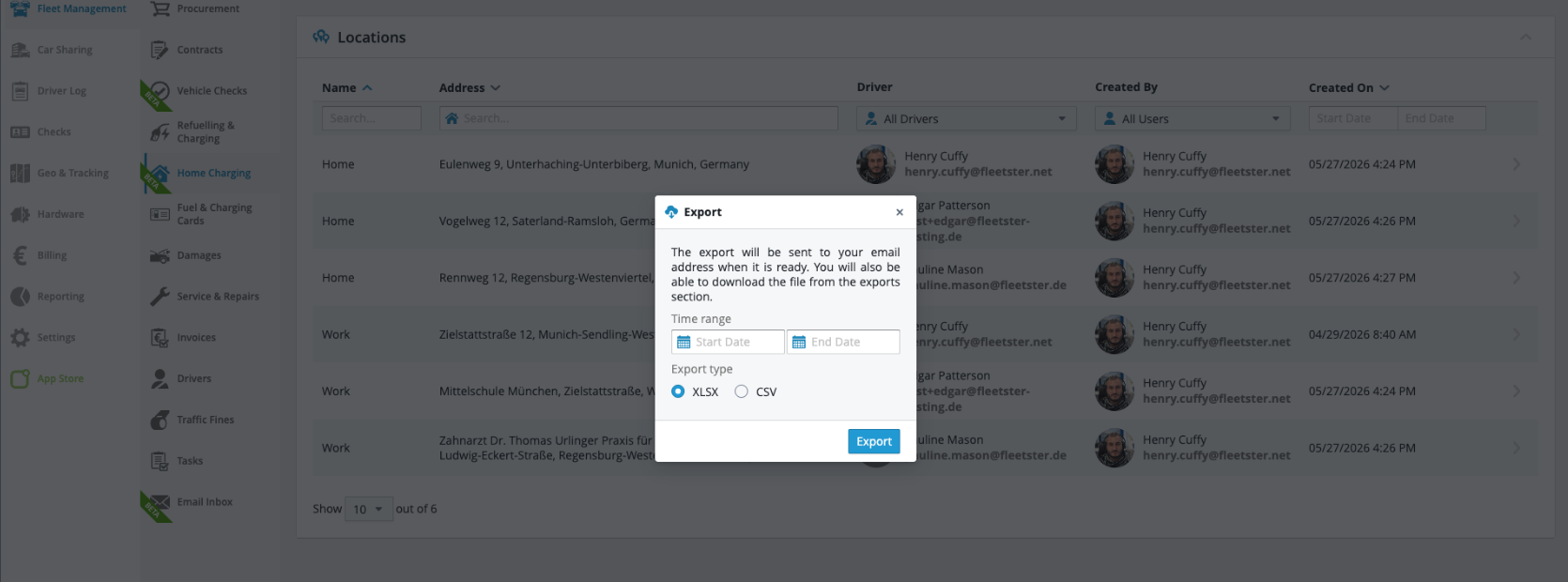
- Exportable report: Admins can export all home charging sessions across all locations for a chosen time period, with each row showing the location name, driver, vehicle, date, kWh, and reimbursement amount in euros.
- Accurate reimbursements: Every qualifying charging session is recorded automatically, so drivers are reimbursed for exactly what they used, without estimates or manual tracking.
- Audit-ready records: Only system-detected sessions are included in the overview and export, ensuring the data is reliable and compliant with reimbursement regulations.
- Efficient batch processing: The cross-location export lets fleet managers handle reimbursements for all drivers at once, reducing administrative effort significantly.
Mobile: Improvement on merge driver logs
07/23/2026, 3.210
RELEVANT FOR: Drivers
The mobile app now prevents edits made after merging trips from accidentally undoing the merge, keeping the driver log accurate and complete.
- Editing a trip shortly after merging no longer reverts the merged result back to its previous state.
- Mileage records are preserved correctly after a merge, with no unexpected gaps appearing in the driver log.
- Stops and trip details added during a merge are no longer lost when a subsequent edit is saved.
- Trip history reflects every action in the order it was taken, and merges and edits coexist without conflict.
- Drivers and fleet managers no longer need to spot and fix inconsistencies caused by this timing issue.
- Trips can be merged and edited in quick succession, and the app saves all changes correctly.
My Bookings: now available in the main interface
07/23/2026, 3.210
RELEVANT FOR: Drivers & fleet users
The My Bookings section has been fully redesigned and integrated into the main interface, delivering a consistent and modern experience when viewing and managing your personal bookings.
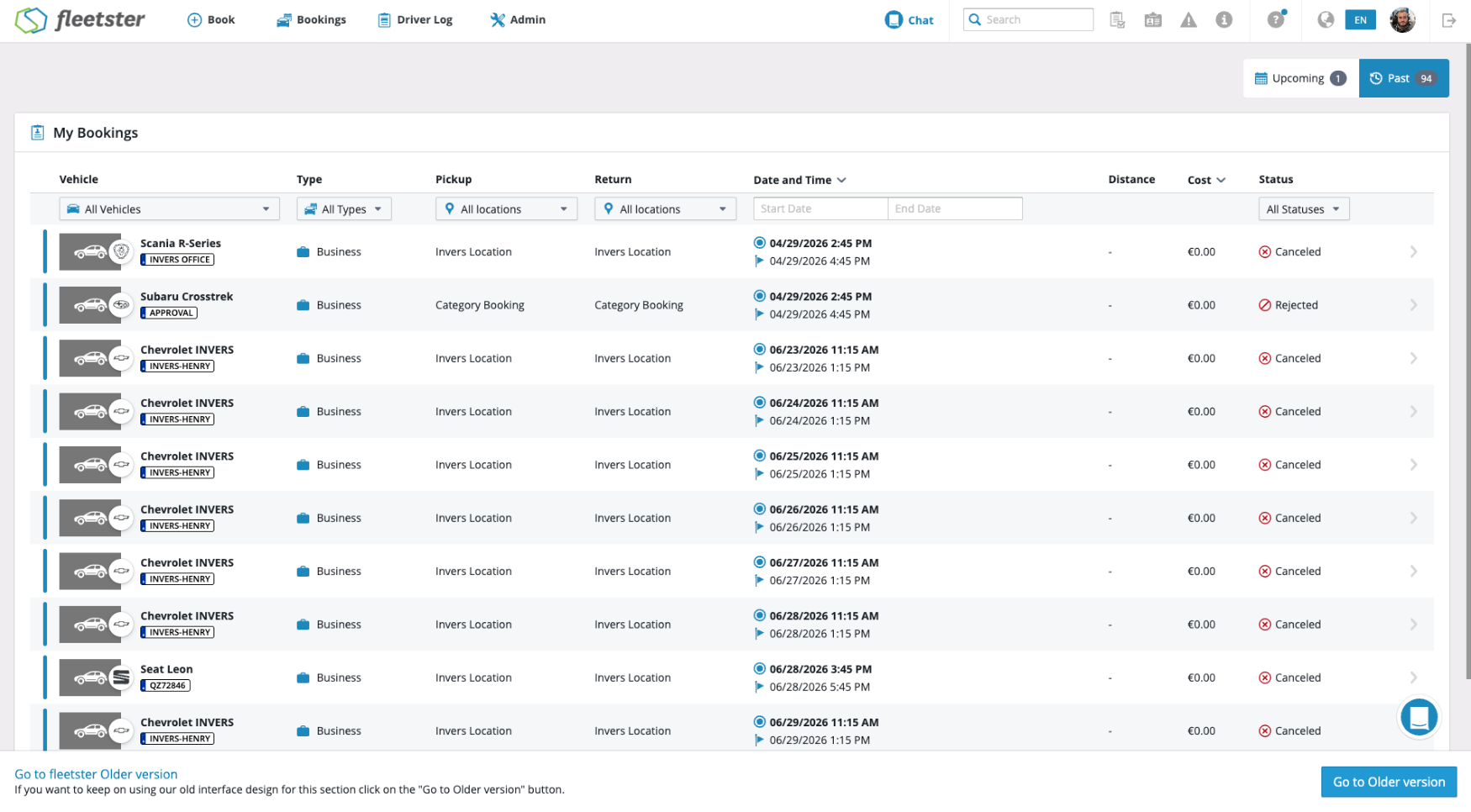
- Upcoming and Past tabs: Bookings are now organized into two clear tabs, Upcoming (covering active, created, and pending bookings) and Past (covering finished, expired, and canceled bookings), so you can find what you need at a glance.
- Each booking row displays key details including vehicle, booking type, pickup and return locations, dates and times, estimated distance, and cost, all in a clean, scannable table.
- Tapping into a booking shows a full details page covering vehicle information, departure and arrival details, status, cost center, and more, all in one place.
- After creating a booking, users are taken directly to My Bookings, and a back button in the detail view returns them there.
- The redesigned section matches the look and feel of the rest of the platform, reducing friction when moving between areas.
- Tabbed filtering and clear status information reduce time spent searching and make it easier to act on bookings.
- All the information needed to manage a booking, from vehicle specs to departure details, is visible in one unified view.
New Feature: Driver License Type Detection
07/23/2026, 3.210
RELEVANT FOR: Fleet managers
The system can now detect whether a driver's license belongs to a format or generation that is no longer legally valid, independent of the expiration date printed on the card, so fleet managers can act before a compliance issue arises.
- When a driver's license is scanned, the system identifies its generation or format and checks it against known validity rules.
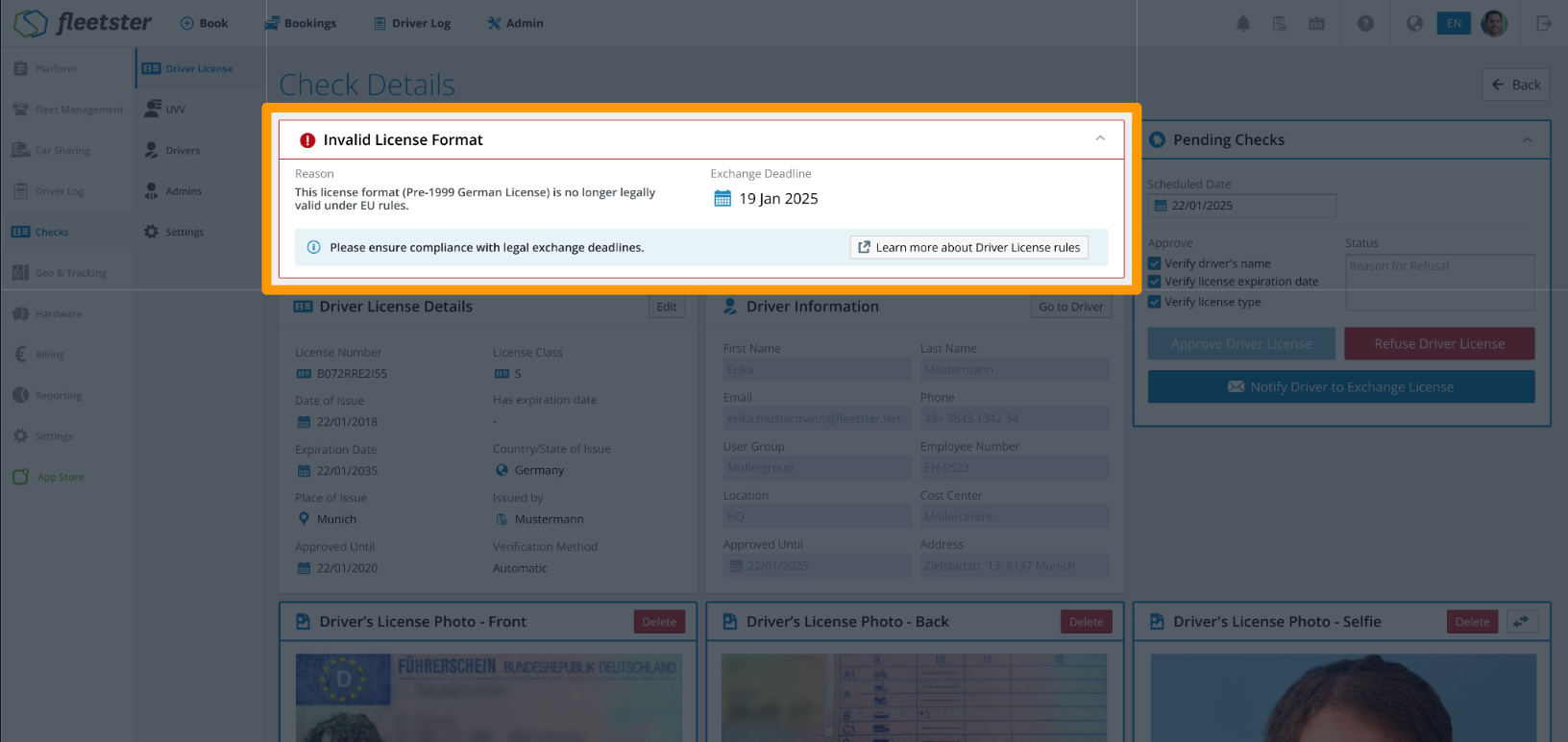
- If the license belongs to an outdated or soon-to-be-invalid format, the system displays a dedicated admin warning, distinct from a standard expiry notice, explaining that the driver needs to exchange their license.
- Licenses flagged as belonging to an invalid format require manual review and approval, adding an extra layer of compliance oversight.
- The system accounts for country-specific exchange schedules, so warnings reflect the correct legal deadlines for each license generation.
- Fleet managers can identify legally invalid license formats before they cause a compliance problem, even when the printed expiry date has not yet passed.
- Warnings are specific and tell managers exactly what action to take, rather than flagging a generic issue.
- Fleet operators can confirm that only drivers holding legally recognized licenses are permitted to make bookings.
Refuelling & Charging: Add Mini Analytics
07/23/2026, 3.210
RELEVANT FOR: Fleet managers
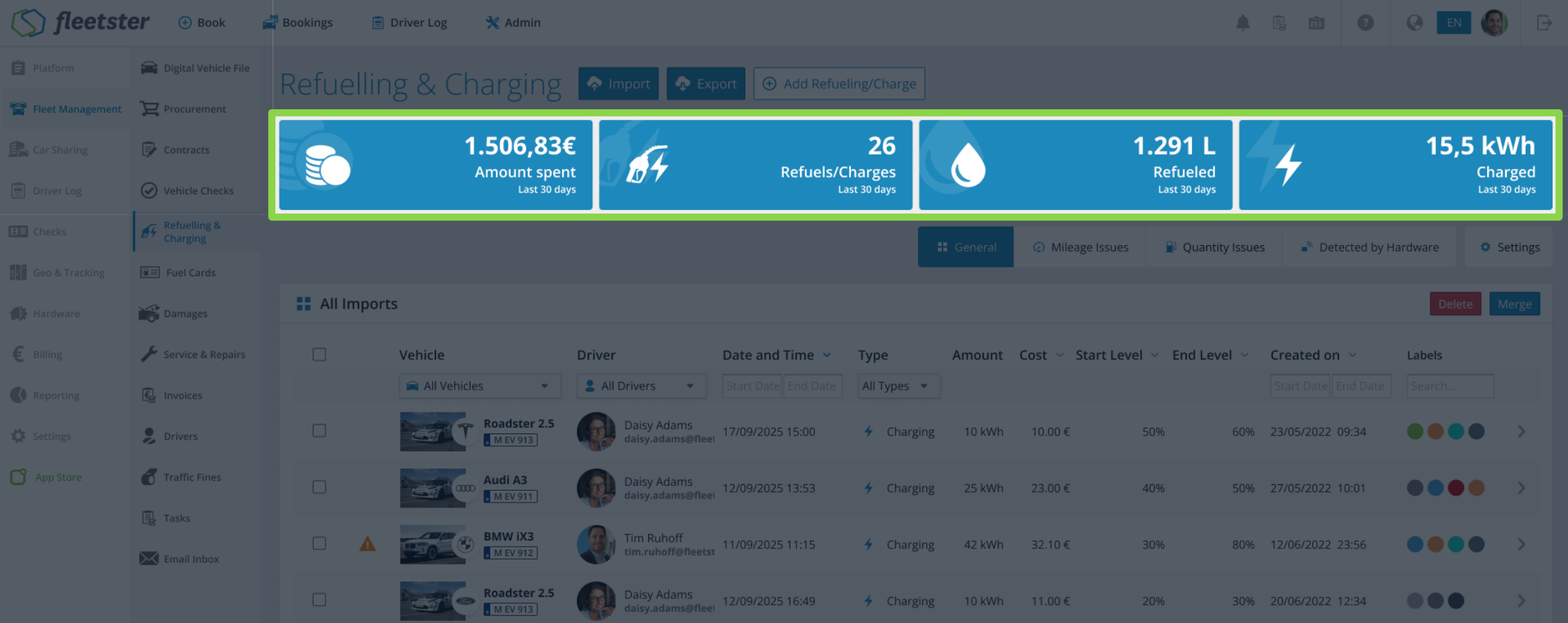
The Refuelling & Charging overview now displays key summary statistics at a glance, so you can analyse fuel and energy consumption without exporting data to a spreadsheet.
- Money spent: total refuelling and charging costs for the last 30 days, updated automatically based on your active filters.
- Number of refuellings: a count of all fill-up and charging events in the last 30 days.
- Litres consumed: total fuel volume filled in the last 30 days, shown only when your fleet includes non-electric vehicles.
- kWh consumed: total energy charged in the last 30 days, shown only when your fleet includes electric vehicles.
- Totals and trends are visible at a glance, with no need to export or process data externally.
- Summary cards adapt automatically to your vehicle mix, showing fuel or energy figures only where relevant.
- Unusual spending or consumption patterns per driver or time period are easier to spot, so you can act on them sooner.
Refuelling & Charging: Notification on Refuelling issues
07/23/2026, 3.210
RELEVANT FOR: Fleet managers & refuelling managers
Refuelling managers can now receive regular notifications about unresolved refuelling and charging issues, so problems are flagged promptly and can be acted on before they pile up.
- Scheduled notifications: Alerts are sent on a regular weekly schedule, keeping managers informed without overwhelming them with individual messages for every issue.
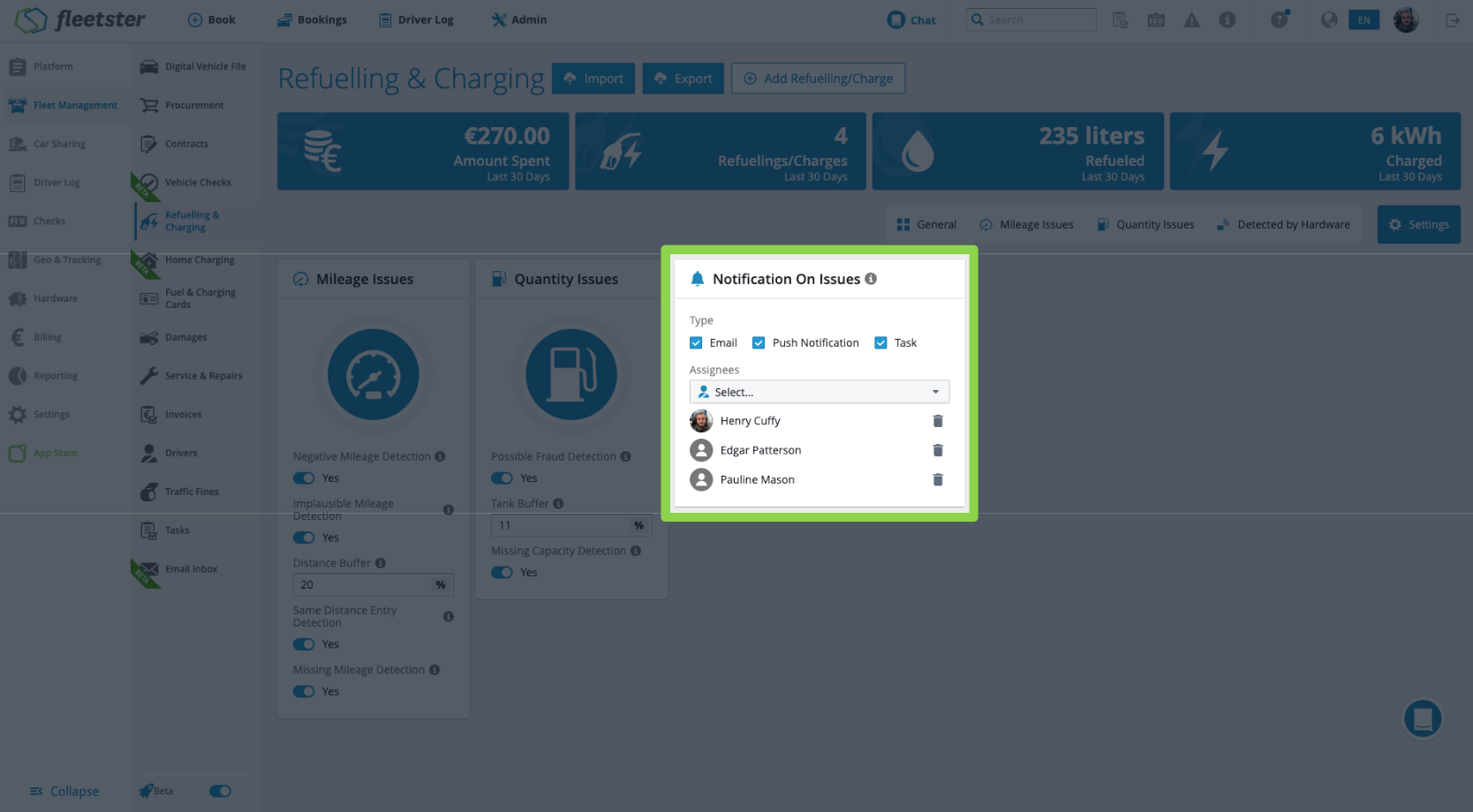
- Multiple notification channels: Notifications can be delivered via email, push notification, or task, giving managers flexibility to receive alerts in the way that suits them best.
- Issue summary at a glance: Each notification includes a count of unresolved issues, so managers immediately know the scale of what needs attention.
- Configurable recipients and channels: Notifications can be tailored to specific recipients and channels directly within the Refuelling & Charging settings, and are off by default until configured.
- Managers are proactively informed about open refuelling and charging issues without having to check manually.
- The scheduled, summary-based approach means relevant alerts arrive at a predictable time rather than as a constant stream of interruptions.
- Teams can choose exactly who gets notified and how, ensuring the right people receive the information through their preferred channel.
UI Improvements: Add "Load More" button on select to get more results
07/23/2026, 3.210
RELEVANT FOR: Fleet managers & drivers
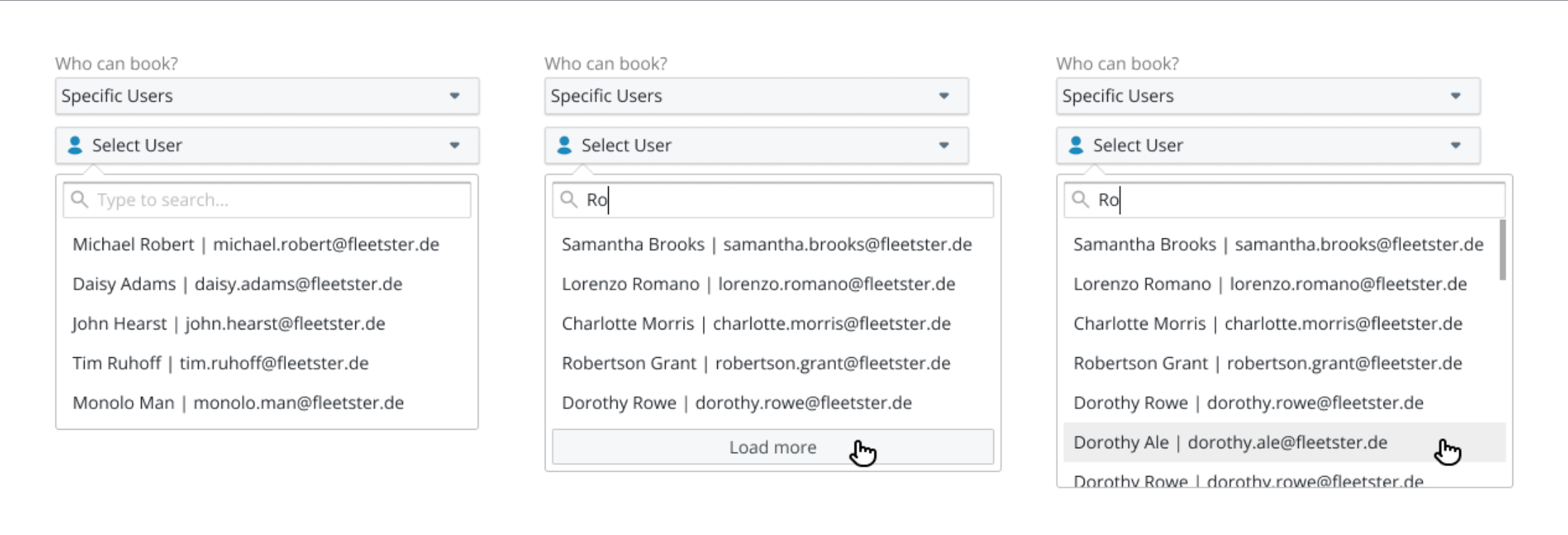
Selection lists across the platform now load reliably regardless of how many items they contain, and a new "Load More" button makes it easy to browse through longer lists at your own pace.
- When a selection list contains more than 50 items, a "Load More results" button appears at the bottom. Click it to load the next 50 entries; it disappears automatically once all results are shown.
- The first 50 options are displayed immediately when you open a list, keeping the initial load fast and focused.
- Options that cannot be selected are now shown in a greyed-out style rather than hidden entirely, so you always have a clear picture of what is and isn't available.
- Lists that previously failed to load due to their size now always display correctly, so you never get stuck with an empty or incomplete selector.
- Progressively loading results keeps lists manageable without hiding anything from you.
- Seeing unavailable options in context helps you understand your choices at a glance, without confusion about why certain items are absent.
UI Improvements: New Chart component
07/23/2026, 3.210
RELEVANT FOR: Fleet managers
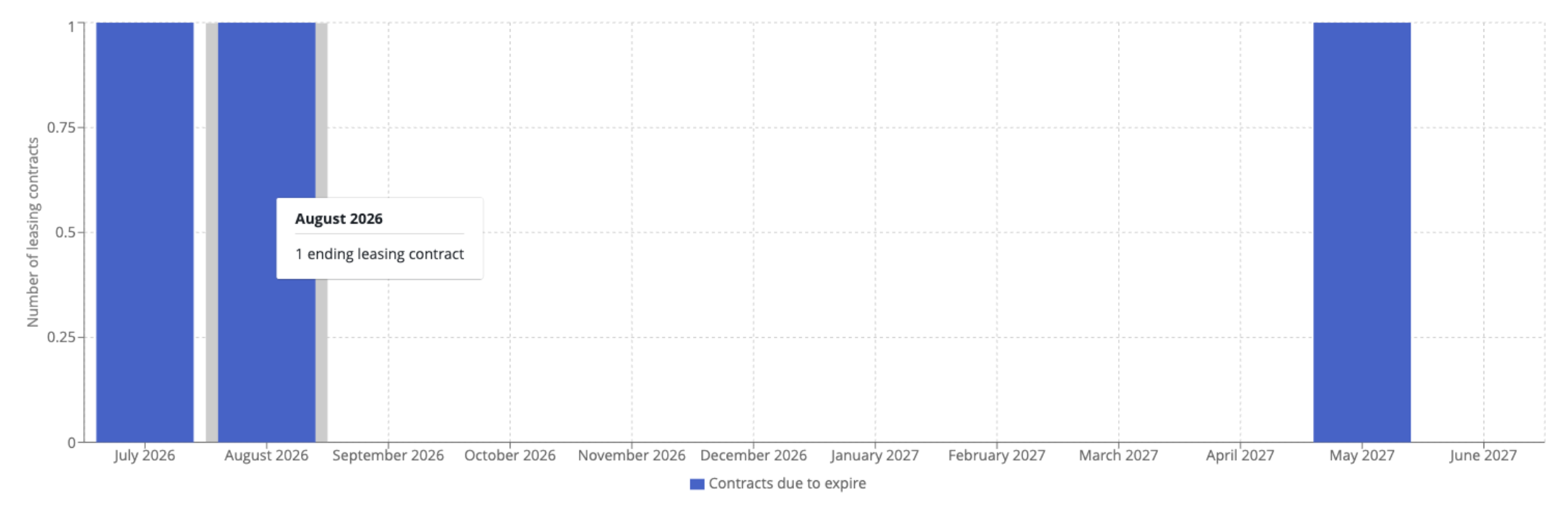
The Fuel Consumption Overview chart has been updated to improve readability and visual consistency across the dashboard.
- The "Total Consumption" label is now vertically centered along the full height of the chart, making it clearly associated with the axis it describes.
- The fuel type legend (Petrol, Diesel, Hybrid, Gas, LPG) now has adequate spacing below the chart area, reducing visual clutter and making it easier to distinguish from the chart data.
- Spacing and alignment scale correctly when the chart is resized or viewed on narrower screens.
- A cleaner layout reduces the time needed to interpret the chart, making it faster to act on the data.
- The updated chart aligns visually with the rest of the dashboard, producing a more consistent interface.
- Clear separation between chart elements helps fleet managers quickly identify fuel consumption trends by fuel type.
Locations: Improve address parsing
07/03/2026, 3.209
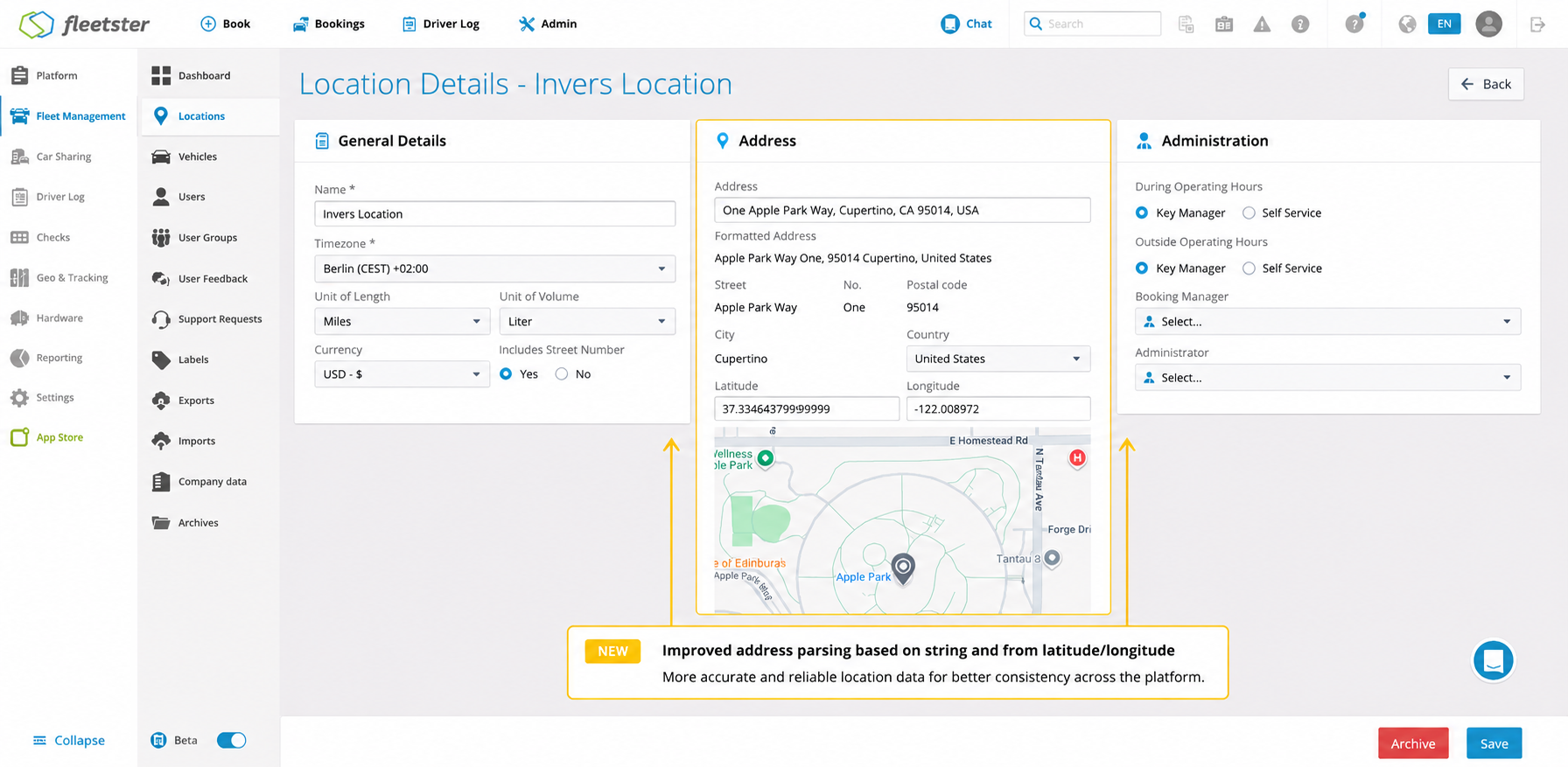
RELEVANT FOR: Fleet managers
Filter states across the platform can now be captured in the page URL, making it easy to save and share exactly the view you need.
- Any filter you apply is reflected in the page URL, so you can copy and share a link that opens the same filtered view for anyone who receives it.
- This capability now works across a wide range of pages throughout the platform, from Fleet Management and Car Sharing to Reporting, Driver Log, Checks, and more.
- Returning to a bookmarked or shared URL restores your filters automatically, saving time when revisiting frequently used views.
- Share a precisely filtered view with a colleague in one click, without them having to recreate the same filter settings manually.
- Bookmark specific filtered views for quick access to the data you work with most often.
- The same behavior is available wherever you use filters across the platform.
Bug: Duplicate Driver License check reminder emails
07/03/2026, 3.209
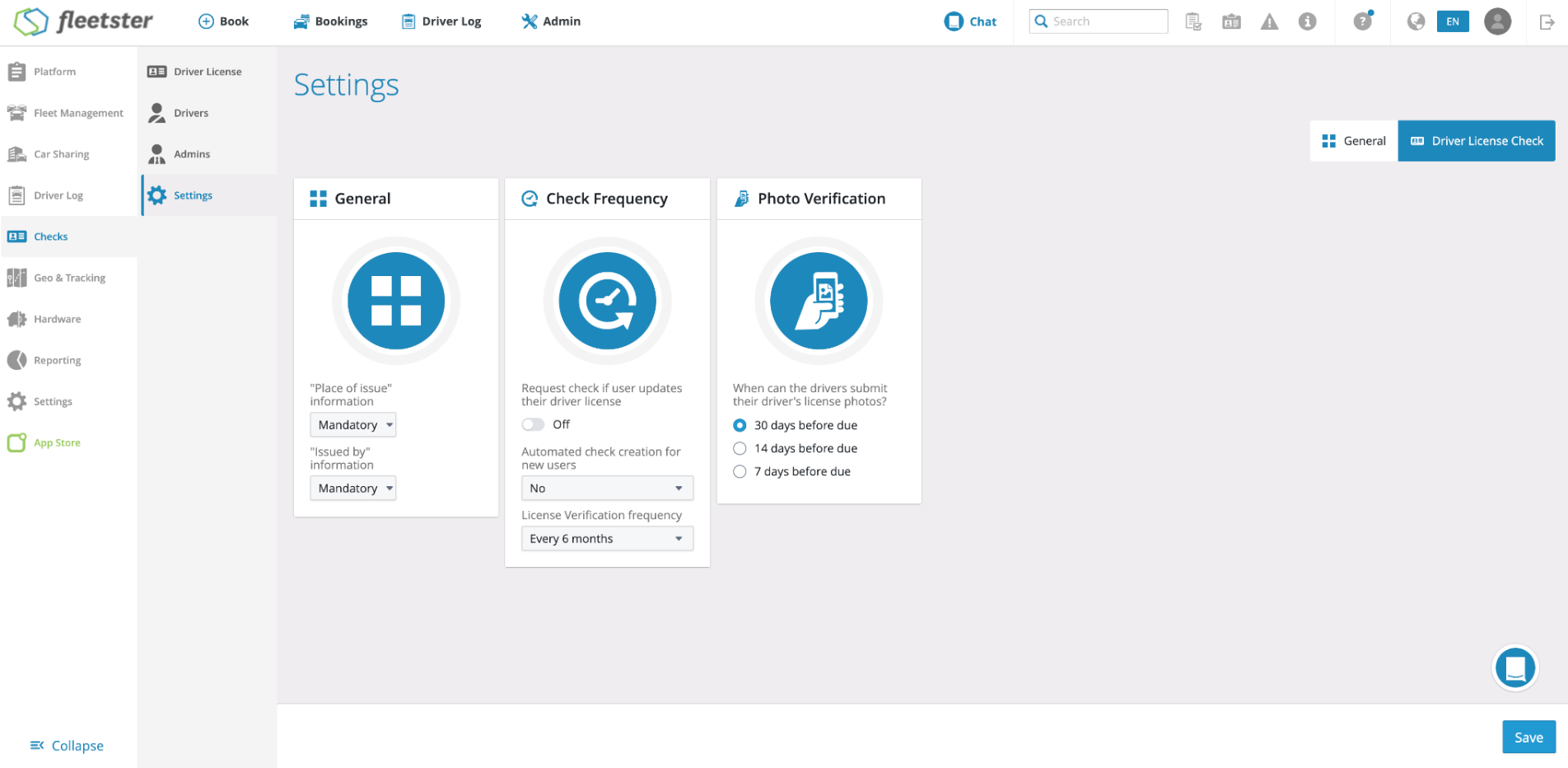
RELEVANT FOR: Fleet managers & drivers
Driver License check reminder emails could previously be sent multiple times to the same user on the same day. This issue has been identified and resolved so that each reminder is delivered exactly once, as intended.
- Each Driver License check reminder is now sent at most once per scheduled trigger, regardless of any background processing retries.
- Users receive a single, timely notification when their Driver License check is due, with no repeated messages.
- The reminder system now handles large numbers of users reliably without producing unintended duplicate notifications.
- Drivers receive exactly one reminder per due date, keeping communications clear and trustworthy.
- Fleet managers can rely on automated reminders reflecting the correct schedule without manual intervention.
- Single-send reminders help ensure Driver License checks are completed on time without confusion caused by repeated messages.
Import: Display Fields Data Types
07/03/2026, 3.209
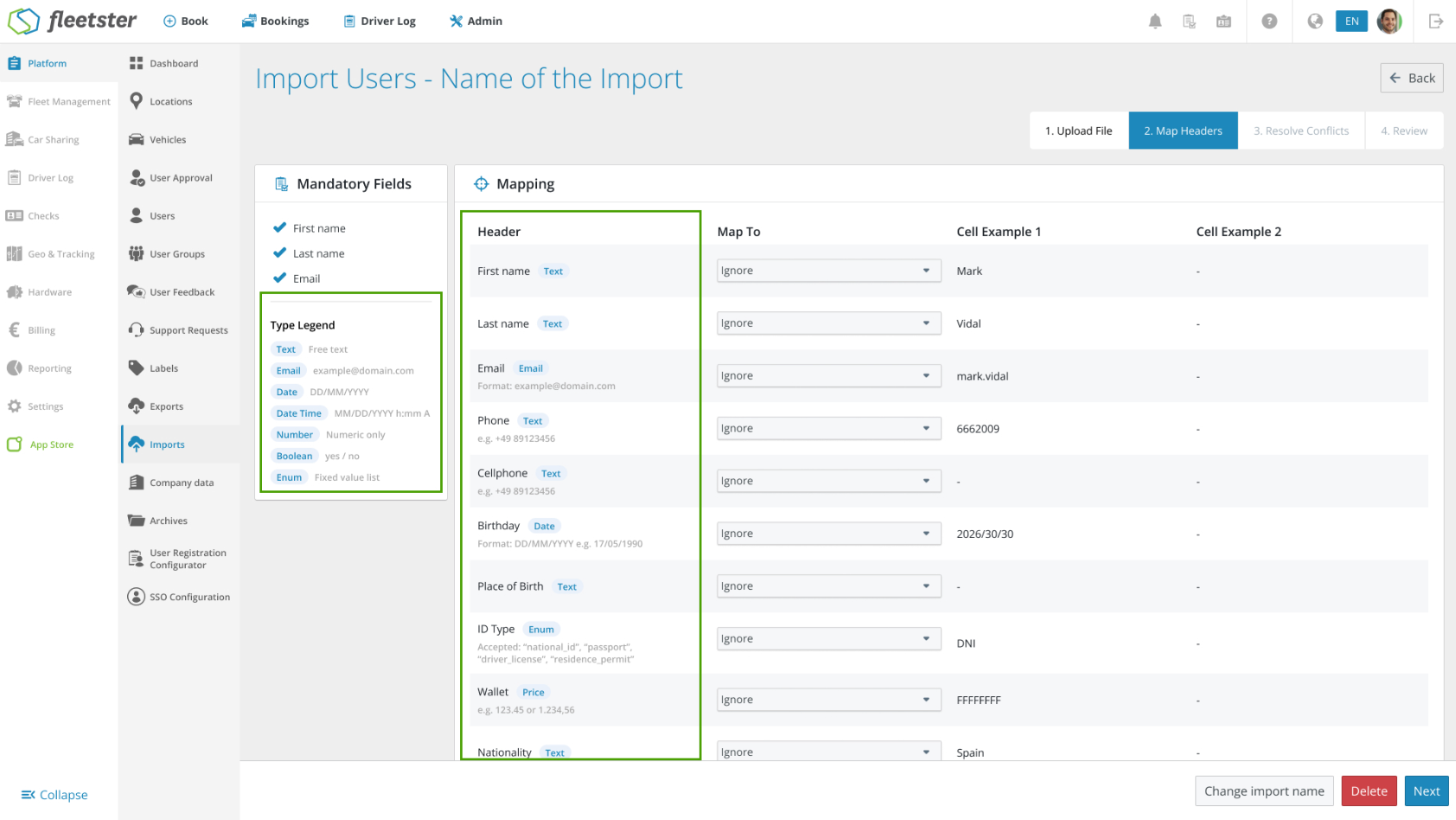
RELEVANT FOR: Fleet managers & Control Tower admins
The import process now surfaces field types, accepted formats, and inline guidance at every step, so users can prepare their files correctly and resolve issues without guesswork or external support.
- A sticky reference card lists every data type used in the current import, including formats for dates, emails, numbers, and more, so the rules are always visible while you work.
- Each mapped column now shows the expected data type alongside the field name, with format examples for dates, emails, prices, and accepted values for fixed-value fields.
- When a conflict is detected, every affected cell displays a clear label explaining the error, the correct format, and suggested fixes, with an editable input to correct the value on the spot.
- A ready-made CSV template is available at the upload step, giving users a correctly structured starting point before they begin.
- Seeing format requirements upfront means errors are caught before the file is submitted, not after, which reduces failed imports.
- Inline explanations and suggested fixes let users correct mistakes in place, without leaving the import flow or contacting support.
- First-time or infrequent users have everything they need to complete an import successfully, entirely within the app.
Refuelling & Charging: Merging with Fuel Cards
07/03/2026, 3.209
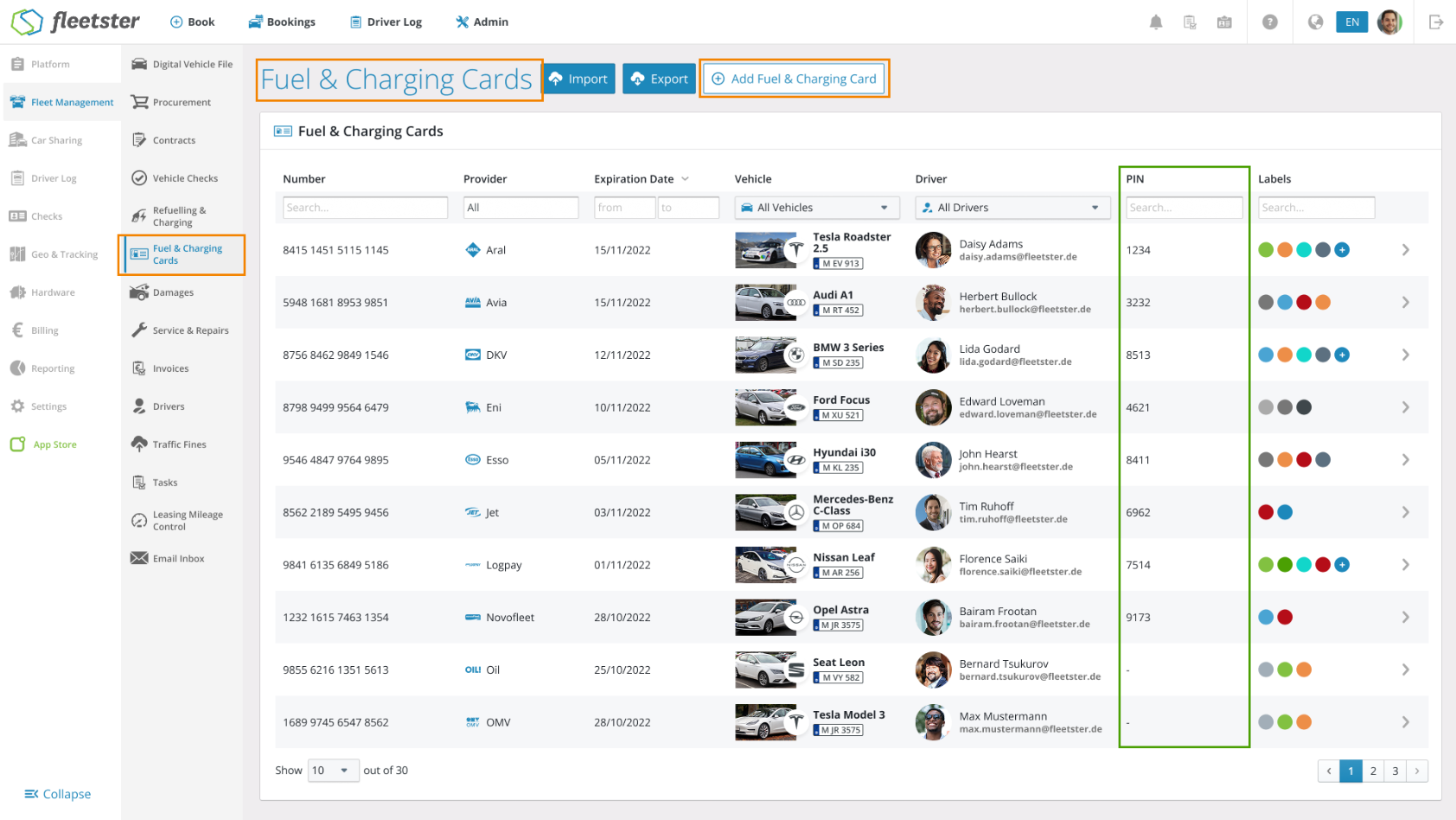
RELEVANT FOR: Fleet managers & fleet administrators
Fuel and charging card management is now unified in a single section, Fleet Management > Fuel & Charging Cards, replacing the previous split between two separate areas. Everything needed to manage, assign, and track cards is available in one place.
- Unified card list: All fuel and charging cards are now displayed in a single, consolidated view with key details: card number, provider, expiration date, assigned vehicle, driver, PIN, and labels, all visible at a glance.
- Invers RFID assignment: When a card is assigned to a vehicle with compatible hardware, an RFID token can now be linked directly from the card details page.
- Expanded provider support: Additional fuel card providers are now available, so all existing cards can be managed without interruption.
- Consistent import & export: Adding, importing, and exporting cards works consistently across the unified section, with no data lost from the previous setup.
- Managing all fuel and charging cards from one location saves time and reduces the risk of overlooking cards spread across separate sections.
- A single list combining all card types gives fleet managers a complete, accurate picture of card assignments and status at any time.
- Existing workflows, including warnings during vehicle key returns, continue to work exactly as before, so there is no disruption to daily operations.
UX: Apply filters from URL parameters
07/03/2026, 3.209
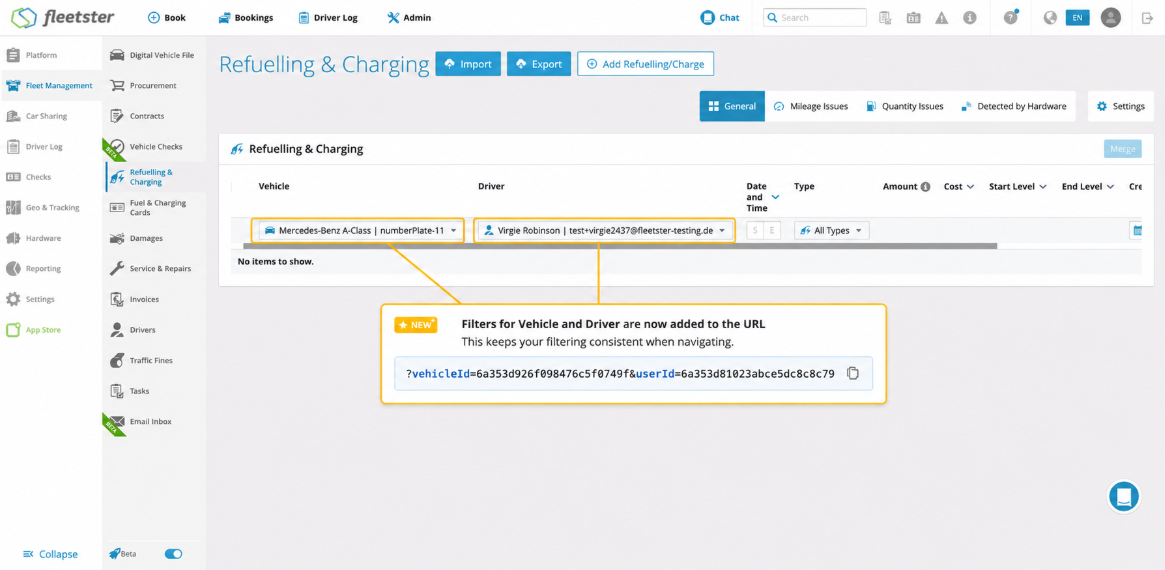
RELEVANT FOR: Fleet managers & Control Tower admins
Filter states across the platform can now be captured in the page URL, making it easy to save and share exactly the view you need.
- Shareable filtered views: Any filter you apply is reflected in the page URL, so you can copy and share a link that opens the same filtered view for anyone who receives it.
- This capability now works across a wide range of pages throughout the platform, from Fleet Management and Car Sharing to Reporting, Driver Log, Checks, and more.
- Returning to a bookmarked or shared URL restores filters automatically, saving time when revisiting frequently used views.
- A precisely filtered view can be shared with a colleague in one click, without them having to recreate the same filter settings manually.
- Specific filtered views can be bookmarked for quick access to the data you work with most often.
- The same filter behavior is available wherever filters are used across the platform.