



Product Updates
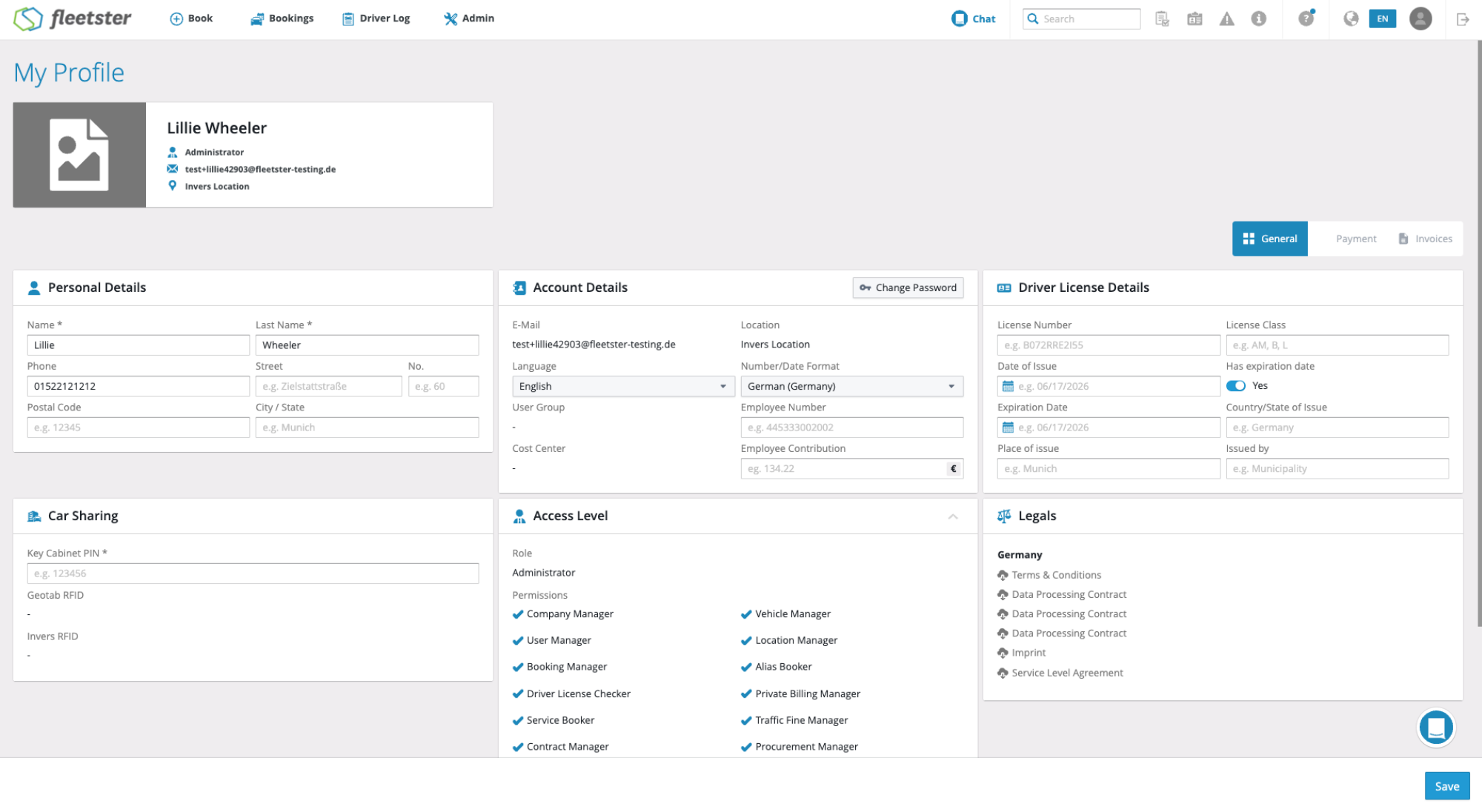
User Profile: now available in the main interface
06/19/2026, 3.208
RELEVANT FOR: Fleet managers & drivers
User profile settings have been updated as part of ongoing platform improvements, making it easier to manage and maintain accurate user information.
What's changed:
- Profile overview: Users can now view and manage their general profile information in a cleaner, more organised layout.
- Data accuracy: Key personal details are easier to review and update, helping ensure records stay current.
- Consistency: The profile experience has been aligned with the latest platform design standards for a more cohesive feel.
Advantages:
- Easier self-service: Users can quickly find and update their own profile details without needing administrator assistance.
- Improved clarity: A cleaner layout reduces confusion and makes it faster to locate the right information.
- Better data quality: Encouraging regular profile reviews helps keep fleet records accurate and up to date.
Import: Error Handling with Descriptions
06/19/2026, 3.208
RELEVANT FOR: Fleet managers
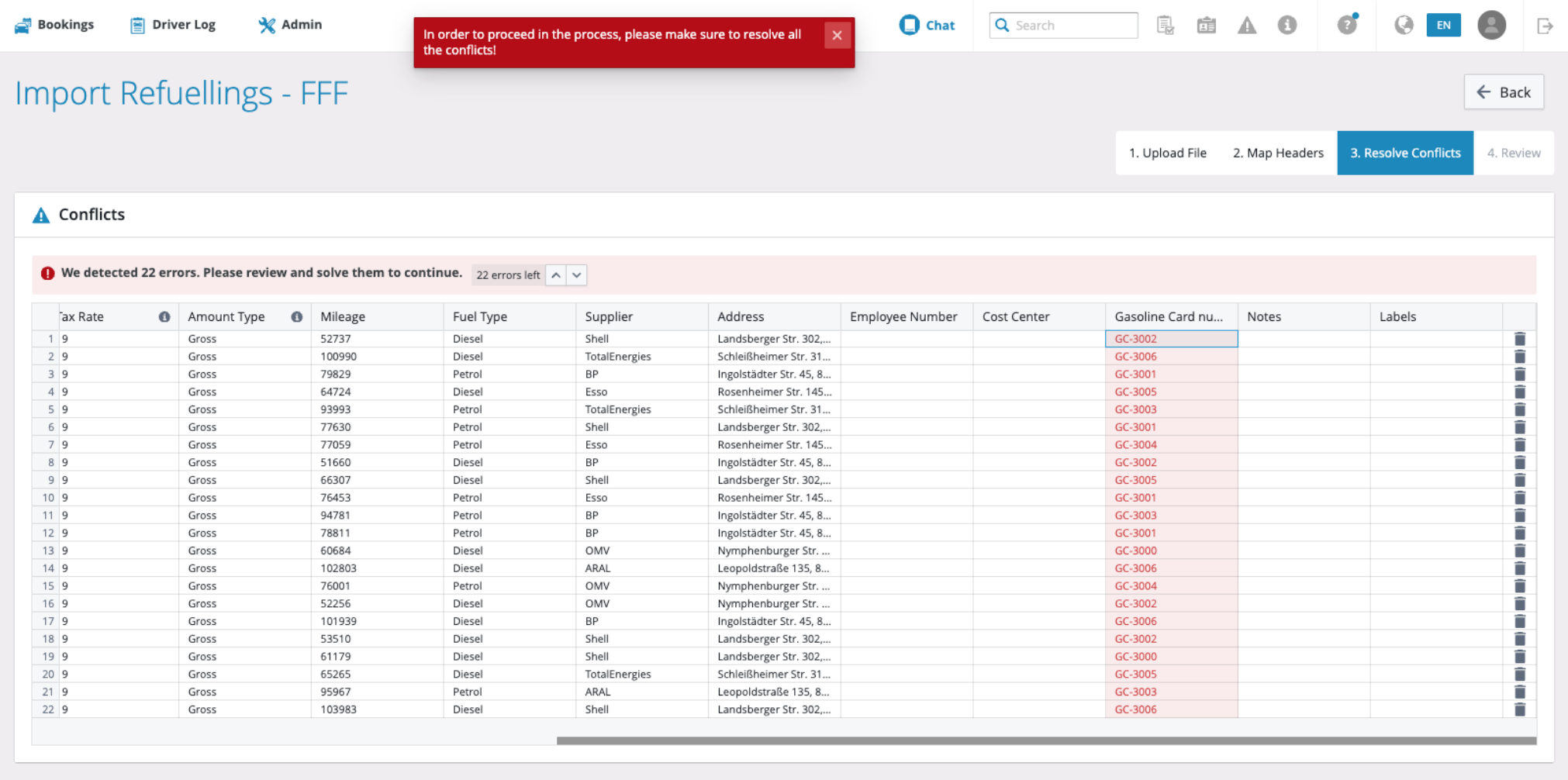
Resolving conflicts during data imports is now faster and clearer, with a live error summary, direct navigation between problem fields, and immediate feedback as each issue is fixed.
What's new:
- Error summary bar: A banner above the import table shows the total number of remaining errors at a glance, updating in real time as you work through them.
- Navigate between errors: Arrow controls in the summary bar let you jump directly from one error field to the next, so nothing gets missed without manual scrolling.
- Descriptive tooltips: Hovering over a highlighted field shows a plain-language explanation of what is wrong and an example of a valid value for that field type.
- Inline editing with instant feedback: Clicking a highlighted field lets you correct the value directly in the table; the error clears immediately once the new value is valid.
Advantages:
- Full visibility: You always know exactly how many errors remain and what each one requires — no more guessing from cell colour alone.
- Faster resolution: Sequential navigation and inline editing mean you can work through every conflict in one focused pass, without losing your place.
- Clear completion signal: A green confirmation replaces the error banner once all conflicts are resolved, so you can proceed to the next step with confidence.
Import: Header Mapping Improvements
06/19/2026, 3.208
RELEVANT FOR: Fleet managers
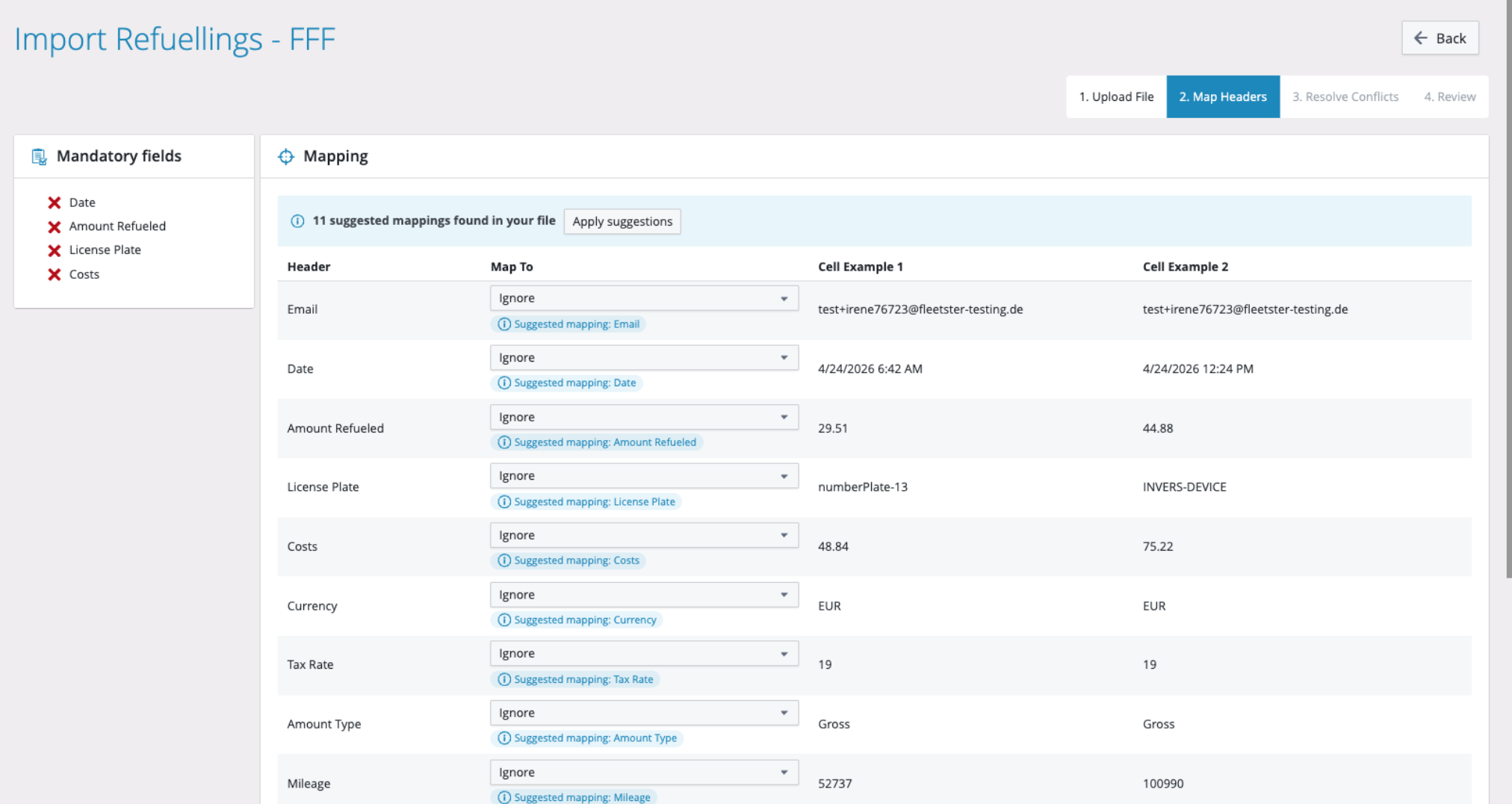
Importing users from a spreadsheet just got significantly faster. The importer now automatically suggests how your file's column headers should map to fleetster fields — even when those headers are in another language or use non-standard names — so you can complete the process with far less manual effort.
What's new:
- Automatic suggestions: As soon as you reach the header mapping step, the system analyses your column headers and sample data and suggests the most appropriate fleetster field for each one.
- One-click apply: A banner at the top of the mapping screen shows how many suggestions were found and lets you accept all of them at once with a single button.
- Individual acceptance: You can also accept suggestions one at a time, and override any suggestion manually by simply choosing a different value from the dropdown.
- Conflict detection: If two columns are suggested to map to the same field, the second one is flagged with a clear warning so you can resolve it before proceeding.
Advantages:
- Saves time: No more mapping every column by hand — most or all fields can be confirmed in seconds, especially for files with non-English headers.
- Reduces errors: AI-assisted suggestions lower the chance of accidentally mapping the wrong column to the wrong field.
- Always in control: Suggestions are never applied without your input, mandatory fields are still validated, and the importer works exactly as before if suggestions are unavailable.
Refuelling & Charging: Add card Quantity Differences in Settings
06/19/2026, 3.208
RELEVANT FOR: Fleet managers
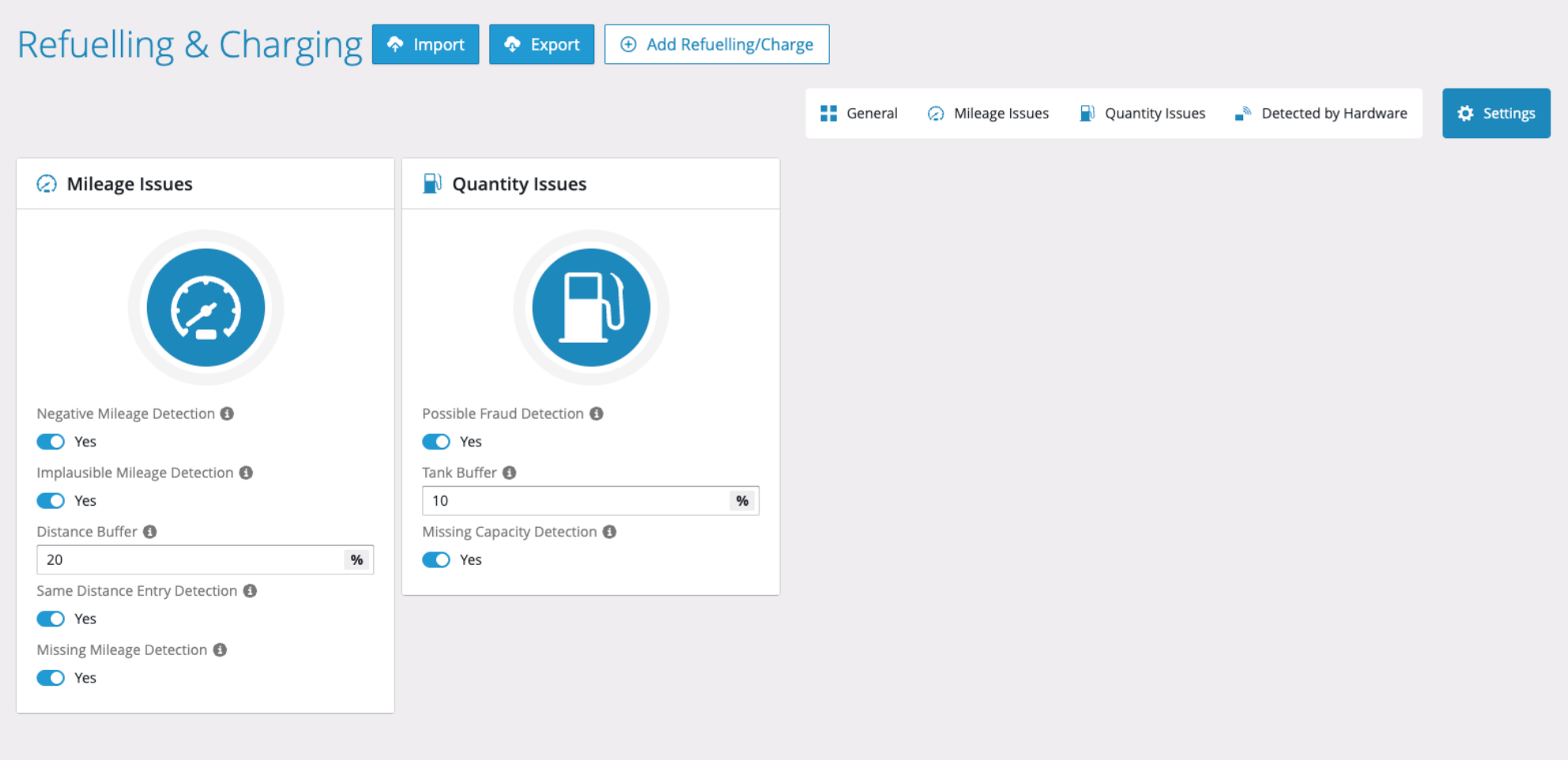
Fleet managers can now configure how unusually high fuel or energy quantities are detected, giving teams precise control over what counts as a real issue and reducing unnecessary noise in their workflows.
What's new:
- Quantity Issues settings card: A dedicated configuration card is now available in the Refuelling & Charging settings, sitting alongside the existing Mileage Issues card for a consistent experience.
- Fraud detection toggle: Fleet managers can enable or disable unusually high quantity detection at any time — when switched off, the Quantity Issues tab is hidden and no alerts are surfaced.
- Configurable tank buffer: A percentage-based buffer field lets fleet managers define exactly how much a recorded fuel or energy quantity must exceed a vehicle's known capacity before it is flagged as an issue.
- Dynamic recalculation: Whenever the buffer value is adjusted, past and current entries are automatically re-evaluated so the issues list always reflects the latest settings.
Advantages:
- Fewer false positives: Tailoring the detection threshold to your fleet's real-world behaviour — such as buffer fills or partial charges — means only genuine anomalies are flagged.
- Cleaner interface: Toggling detection off removes the Quantity Issues tab entirely, keeping the workspace focused on what is relevant to your team at any given time.
- Consistent oversight: Re-enabling detection immediately surfaces historical issues as well as new ones, so nothing is missed when settings are revisited.
Refuelling & Charging: General Import View
06/19/2026, 3.208
RELEVANT FOR: Fleet managers
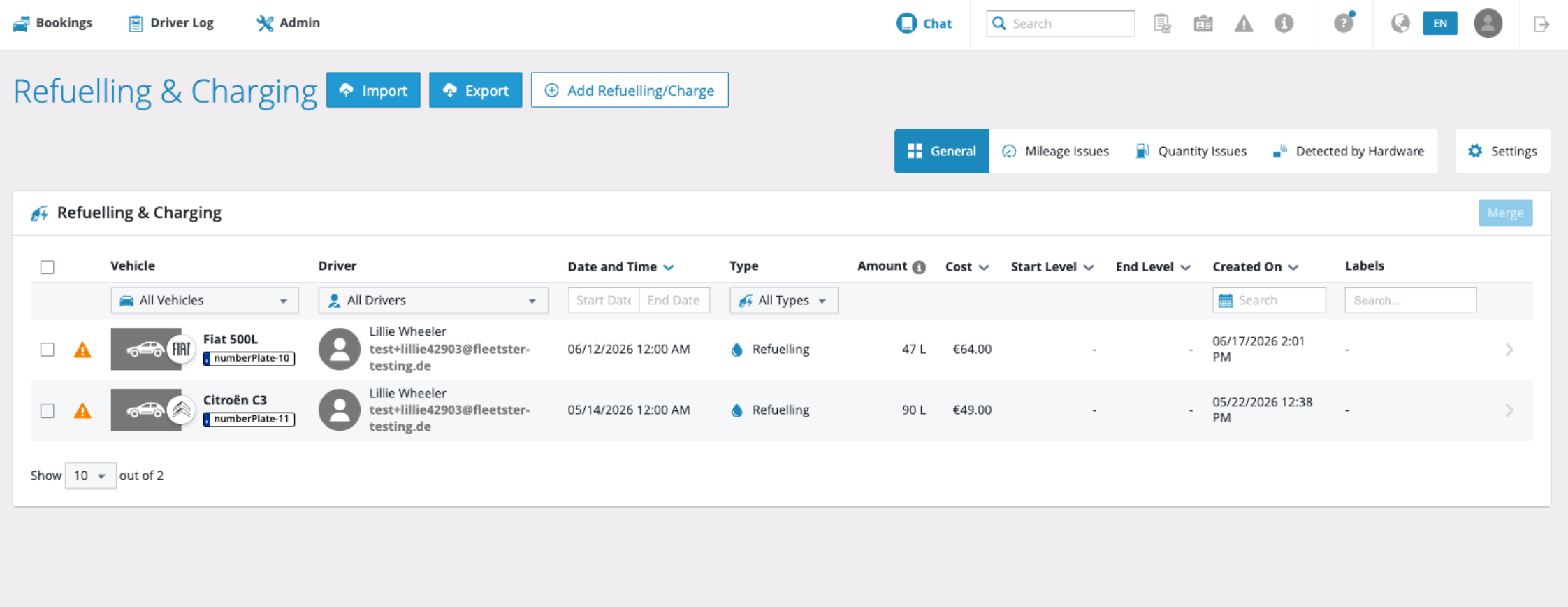
The Refuelling & Charging section now includes a unified General view that brings all imported entries together in one place, making it easier to review, search, and act on data without switching between tabs.
What's new:
- Centralized overview: All refuelling and charging entries are visible in a single, consolidated list, serving as the foundation for all other filtered views.
- Validation status at a glance: Each entry displays a clear status indicator so fleet managers can instantly spot entries that have detected issues, with details available on hover.
- Rich, sortable columns: The table includes vehicle, driver, date and time, entry type, amount, cost, and fuel level data — most of which can be sorted and filtered to find exactly what you need.
- Bulk actions: Multiple entries can be selected at once to perform actions such as deleting or merging, regardless of each entry's validation state.
Advantages:
- Faster data verification: No more jumping between tabs to get a complete picture — everything is visible and actionable from one view.
- Consistent search and filtering: A single base layer means filters and searches behave predictably across all entry types.
- Efficient bulk management: Acting on multiple entries in one step saves time and reduces the risk of missing records during review.
Replace Map Library
06/19/2026, 3.208
RELEVANT FOR: Fleet managers, Drivers
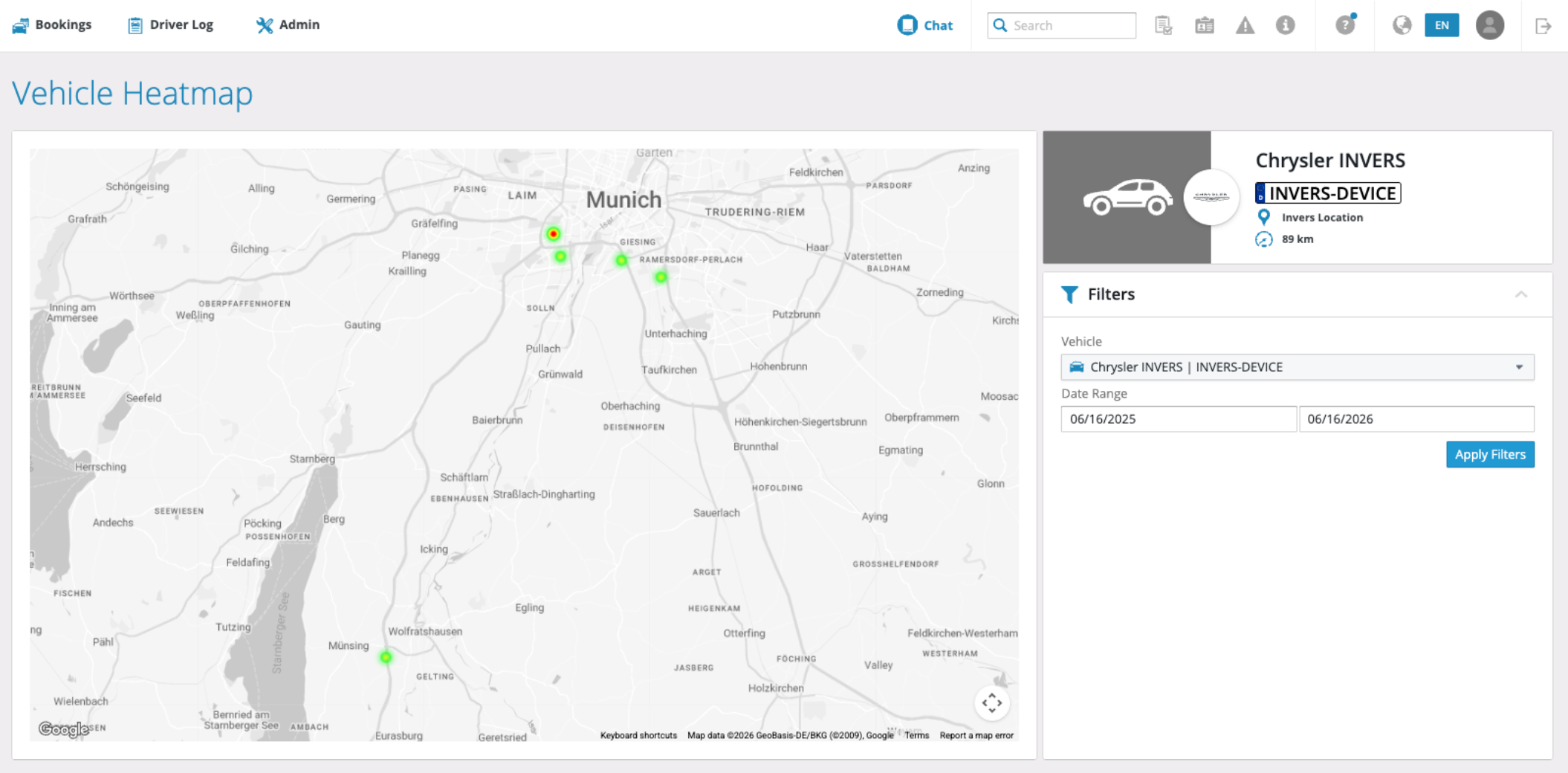
The map components used throughout the platform — including location management, geofencing, and driver log trip views — have been migrated to an officially supported mapping library. This change ensures long-term reliability and continued improvements to all map-based features.
What's changed:
- Location maps: Viewing and editing location coordinates continues to work as before, now powered by a more stable foundation.
- Geofencing: Defining and visualising geofence areas remains fully functional with no change to the user experience.
- Driver log maps: Route and trip visualisation is preserved, with improved compatibility going forward.
- Address selection: Autocomplete and place search work exactly as before.
Advantages:
- Greater reliability: Map features are now backed by an officially maintained library, reducing the risk of unexpected issues or disruptions.
- Long-term stability: Regular updates and security patches mean map functionality will remain consistent and well-supported over time.
- Improved performance: The updated library brings better compatibility with modern browsers and devices, keeping the experience smooth.
Login Tasks: Billing popup now available in the main interface
06/05/2026, 3.207
RELEVANT FOR: Fleet managers
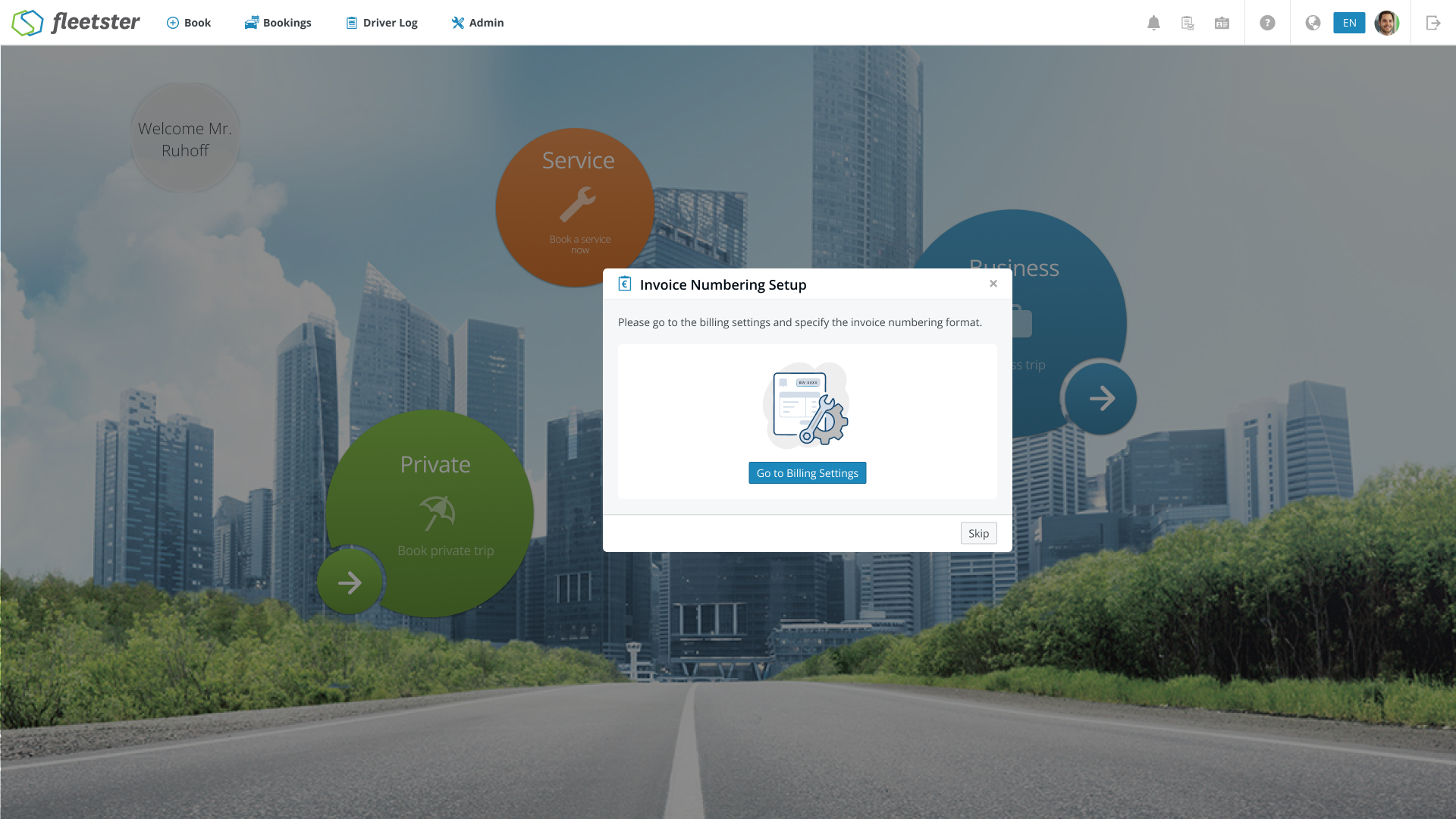
The billing setup step shown during first login has been brought into the main interface, ensuring a smoother and more consistent onboarding experience from the very first session.
What's new:
- Unified onboarding flow: The cost center setup popup now appears as part of the standard first-login task sequence, matching the look and feel of the rest of the application.
- Same guided experience: All fields, validations, and completion behavior work exactly as before — nothing about the setup process itself has changed.
- Required completion: The billing setup step must be completed before proceeding, ensuring your account is fully configured from the start.
Advantages:
- Consistent experience: Onboarding now feels seamless and cohesive, with no jarring transitions between different parts of the interface.
- Reliable setup: Required billing information is always captured at first login, reducing the risk of incomplete account configuration.
- Easier maintenance: A unified flow means future improvements to onboarding tasks will be faster to deliver and more consistent across all steps.
Reporting: Leasing Mileage Control — Improvements on Forecast & Risk
06/05/2026, 3.207
RELEVANT FOR: Fleet managers
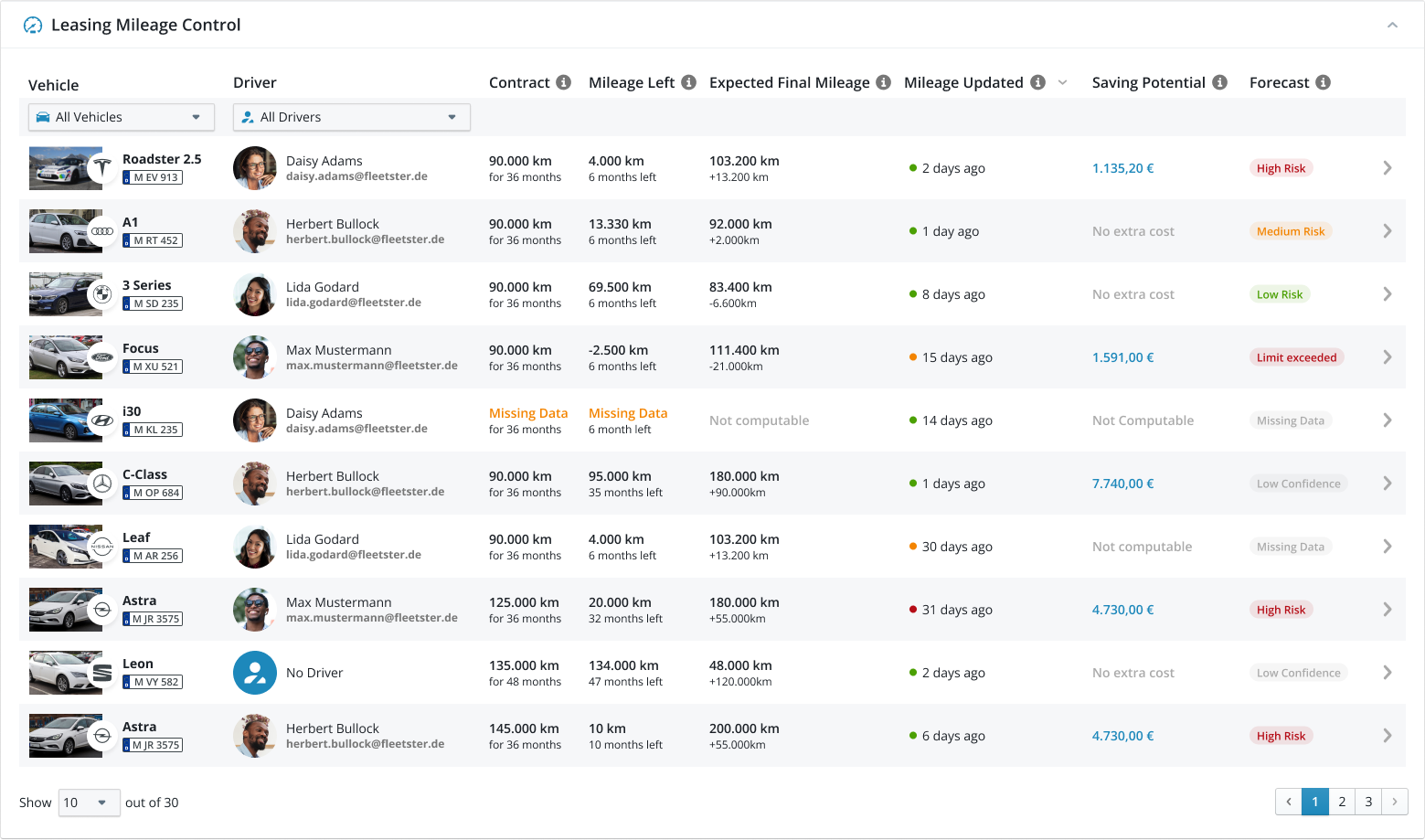
Leasing mileage forecasts now reflect the true status of each vehicle more accurately, so you can immediately distinguish between vehicles that have already exceeded their limit and those where a future risk is being predicted.
What's changed:
- Correct grouping for exceeded vehicles: Vehicles whose actual mileage has already passed the contractual limit are now shown under "Vehicles with Excess Mileage" rather than "Vehicles with Expected Excess Mileage".
- Accurate status label: Vehicles that have already exceeded their leasing limit now display a "Limit exceeded" tag instead of a forecast-based label, since no prediction is needed.
- Clearer forecast priority: Status labels now follow a consistent order — from missing data, through confirmed excess, low-confidence forecasts, and on to low, medium, or high risk — so each vehicle always shows the most relevant and accurate status.
Advantages:
- No more misleading labels: A vehicle that has already gone over its mileage limit is clearly identified as such, removing any ambiguity between a confirmed outcome and a forecast.
- Faster decision-making: Fleet managers can instantly separate vehicles requiring immediate action from those still being monitored for future risk.
- Greater confidence in reporting: Consistent, prioritized status logic means the data you see always reflects reality, making leasing cost management more reliable.
Security: Enhanced Invers access control
06/05/2026, 3.207

RELEVANT FOR: fleet managers & Control Tower admins
Access controls for remote vehicle lock and unlock actions have been strengthened, ensuring that commands are always directed to the hardware device officially registered to the vehicle — not to any value supplied externally.
What's changed:
- Canonical device binding: lock and unlock actions now exclusively use the hardware identifier stored in the vehicle's official record, regardless of what is included in the request.
- Stricter request validation: any attempt to supply or override the hardware device identifier during a lock or unlock action is rejected before the command is sent.
- Consistent protection across actions: both lock and unlock routes now follow the same robust access-control pattern already in place elsewhere in the platform.
Advantages:
- Improved vehicle security: remote lock and unlock commands can only ever target the correct, registered hardware device for a given vehicle, reducing the risk of unauthorised physical access.
- Stronger tenant isolation: access controls now reliably prevent actions from affecting vehicles or hardware outside the intended scope.
- Greater operational integrity: fleet managers can trust that remote vehicle actions behave exactly as configured, with no possibility of misdirection.
UX/UI: Status Icons and Naming Standardization in Fleet Management & Reporting
06/05/2026, 3.207
RELEVANT FOR: Fleet managers & Control Tower admins
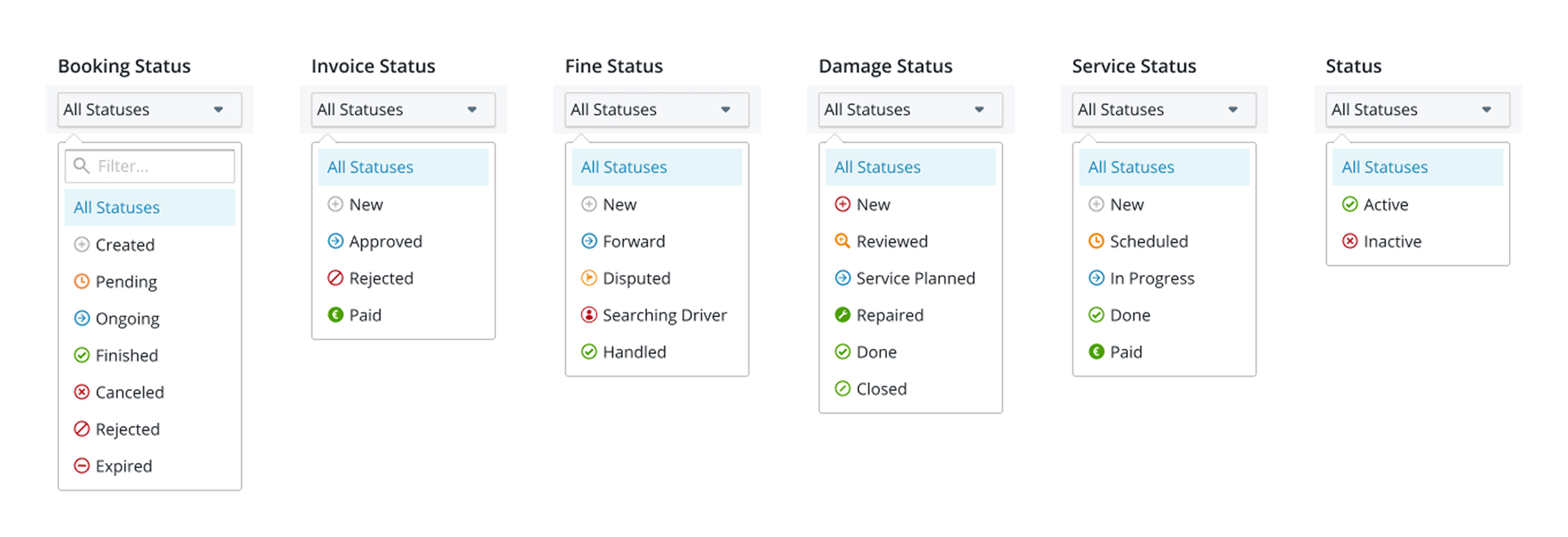
Status indicators across Fleet Management and Reporting now follow a single, consistent visual language — so you always know what a status means, no matter which section you're working in.
What's changed:
- Unified status icons: All status indicators across the platform now use the same icons and color meanings, replacing the previous mix of dots, text labels, and inconsistent visuals.
- Fleet Management alignment: Statuses in Invoices, Fines, Damages, and Services have all been updated to match the new standard.
- Reporting alignment: Status displays in eVehicle Check and Export now follow the same consistent style as the rest of the platform.
- Consistent color semantics: The same status now looks and means the same thing everywhere — no more reinterpreting colors or icons depending on which module you're in.
Advantages:
- Faster comprehension: Recognizing a status at a glance is now effortless, since the visual language is the same throughout the platform.
- Reduced confusion: Eliminating conflicting visual styles means less cognitive effort when switching between modules or reviewing multiple areas at once.
- More reliable workflows: A consistent interface makes it easier to spot issues quickly and act on them with confidence.
Bookings: Custom fields now visible in booking details
05/28/2026, 3.206
RELEVANT FOR: Fleet managers & drivers
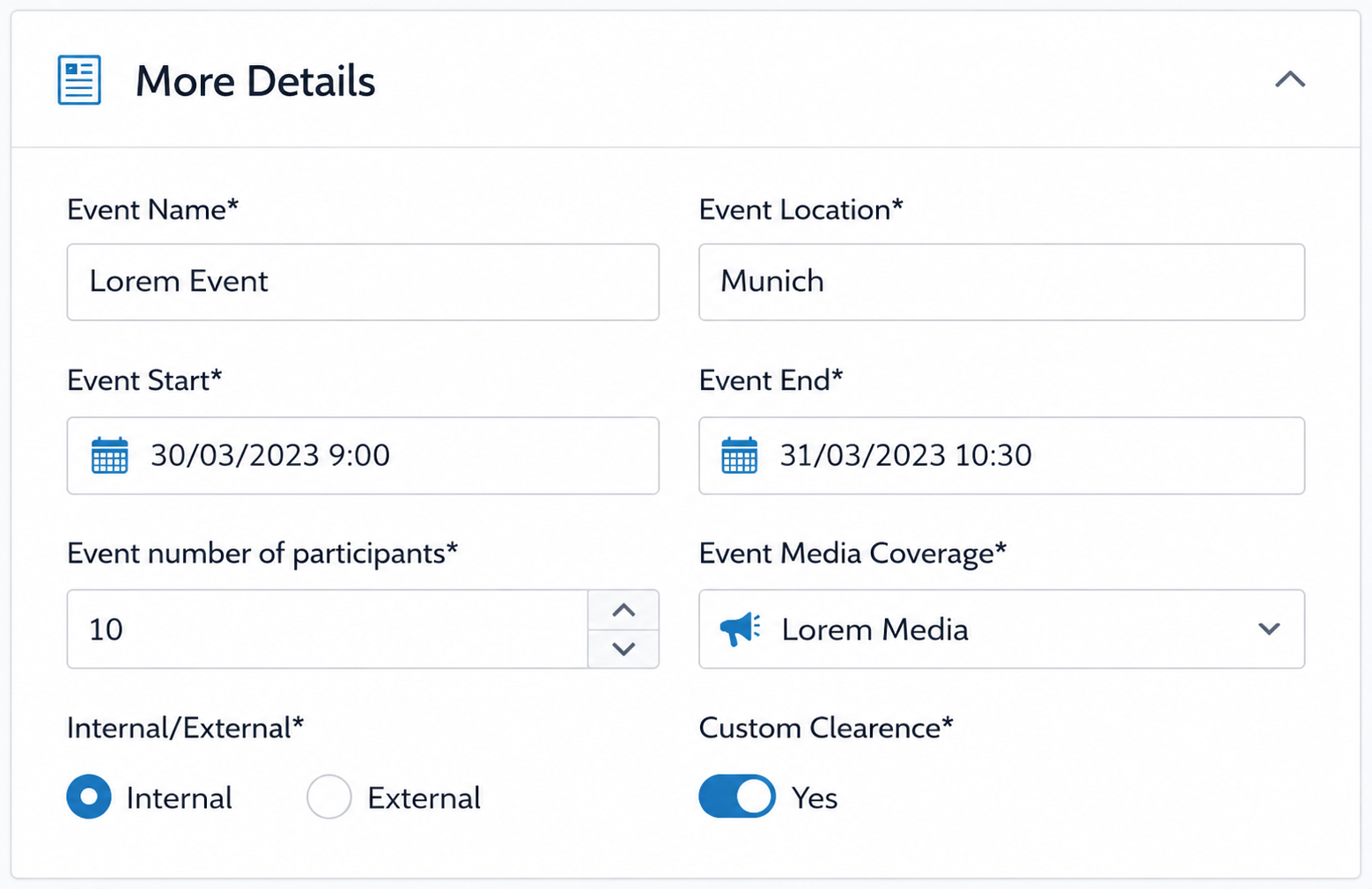
Custom fields configured for your organization are now properly displayed and editable directly within booking details and key management details.
What’s new:
- Custom fields in booking details: Any custom fields set up for your organization now appear as standard input fields within the booking details page.
- Custom fields in key management details: The same applies to key management — custom fields are shown alongside the standard fields.
- Mandatory field indicators: Fields marked as required are clearly indicated with an asterisk (*), and validation feedback is shown if they are left empty.
Advantages:
- Tailored data entry: Capture the information your organization needs directly within the booking workflow, without workarounds.
- Consistent experience: Custom fields look and behave exactly like standard fields, making them intuitive for all users.
Notifications: Control which booking types are sent to line managers
05/28/2026, 3.206
RELEVANT FOR: Fleet managers & platform admins
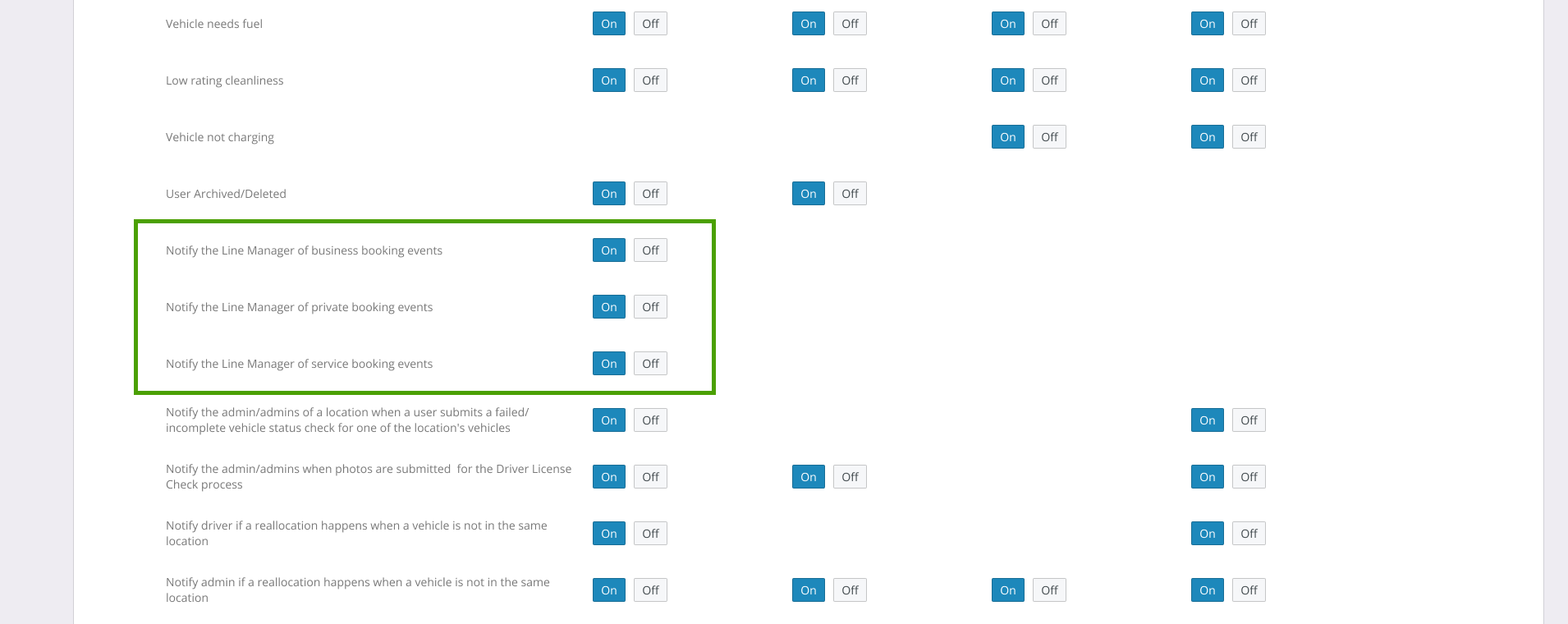
Organizations using the Management Structure feature — where line managers receive notifications about their team’s bookings — can now control exactly which booking types trigger those notifications.
What’s new:
- Per-type notification setting: A new setting under Platform Notifications lets you choose whether line managers are notified for Business, Private, and/or Service bookings independently.
- Private bookings excluded by default: For new setups, private booking notifications to line managers are turned off by default, ensuring personal trips stay private.
Advantages:
- Privacy by design: Line managers only receive notifications for the booking types relevant to their oversight role — private trips are not shared unless explicitly enabled.
- Flexible oversight: Organizations can tailor notification behavior to match their internal policies, whether that means business-only, service-only, or a combination.
Bookings: Category bookings now start with no pre-selected categories on web
05/28/2026, 3.206
RELEVANT FOR: Fleet managers & drivers
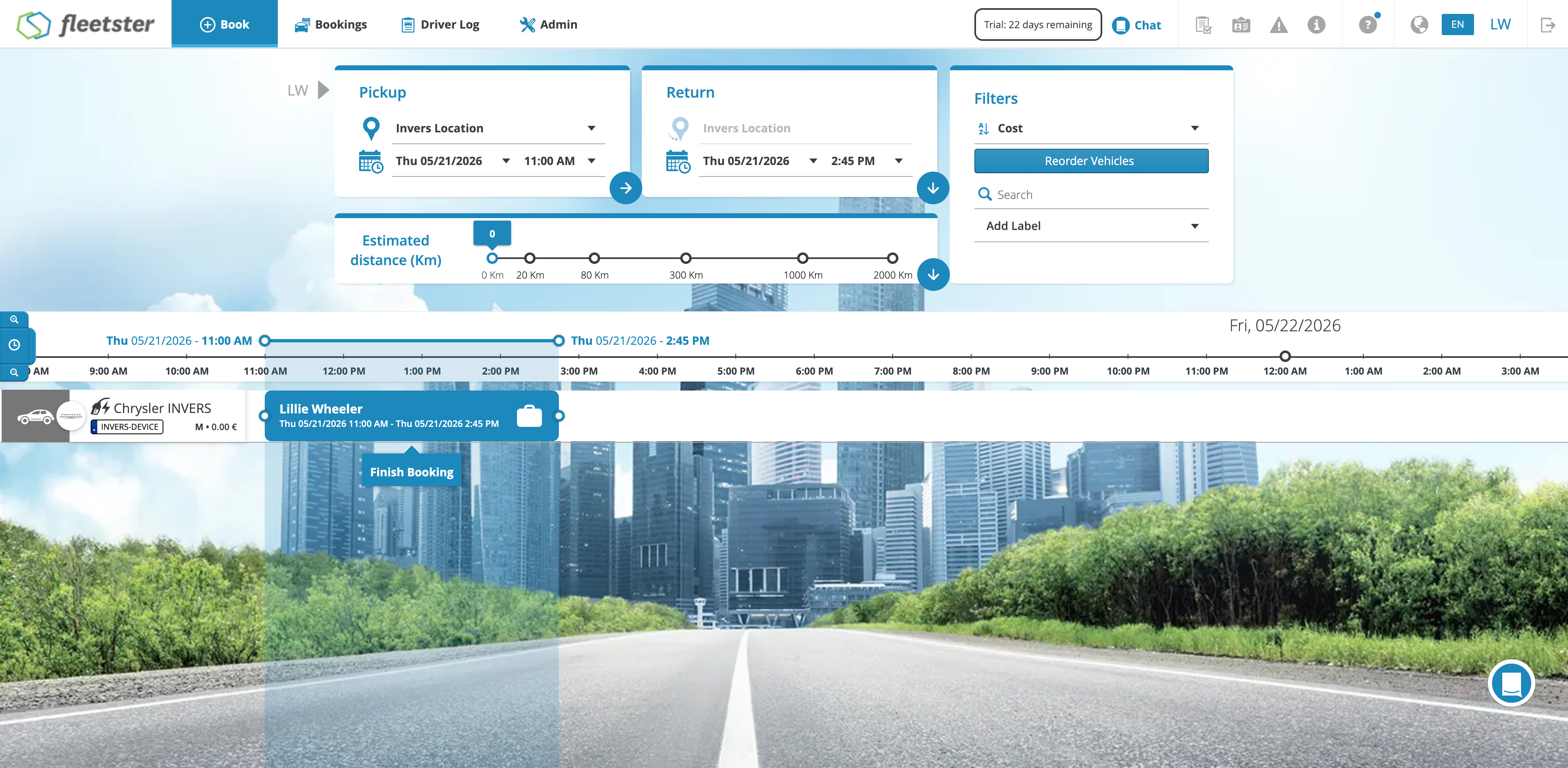
Creating a category booking on the web now works the same way as on mobile: no categories are pre-selected when you start a new booking.
What’s changed:
- No pre-selected categories: When opening a new category booking on the web, all categories start unchecked. You must actively select the categories you want before confirming.
- Consistent with mobile: The web and mobile apps now behave identically for new category bookings.
- Existing bookings unaffected: This change only applies to new bookings — editing an existing booking works exactly as before.
Advantages:
- No accidental bookings: Drivers can no longer unintentionally confirm a booking with categories they did not mean to select.
- Intentional choices: Every category in a booking is now the result of a deliberate selection, reducing the need for corrections after the fact.
Reporting: Visualize upcoming lease contract endings by month
05/28/2026, 3.206
RELEVANT FOR: Fleet managers & fleet planners
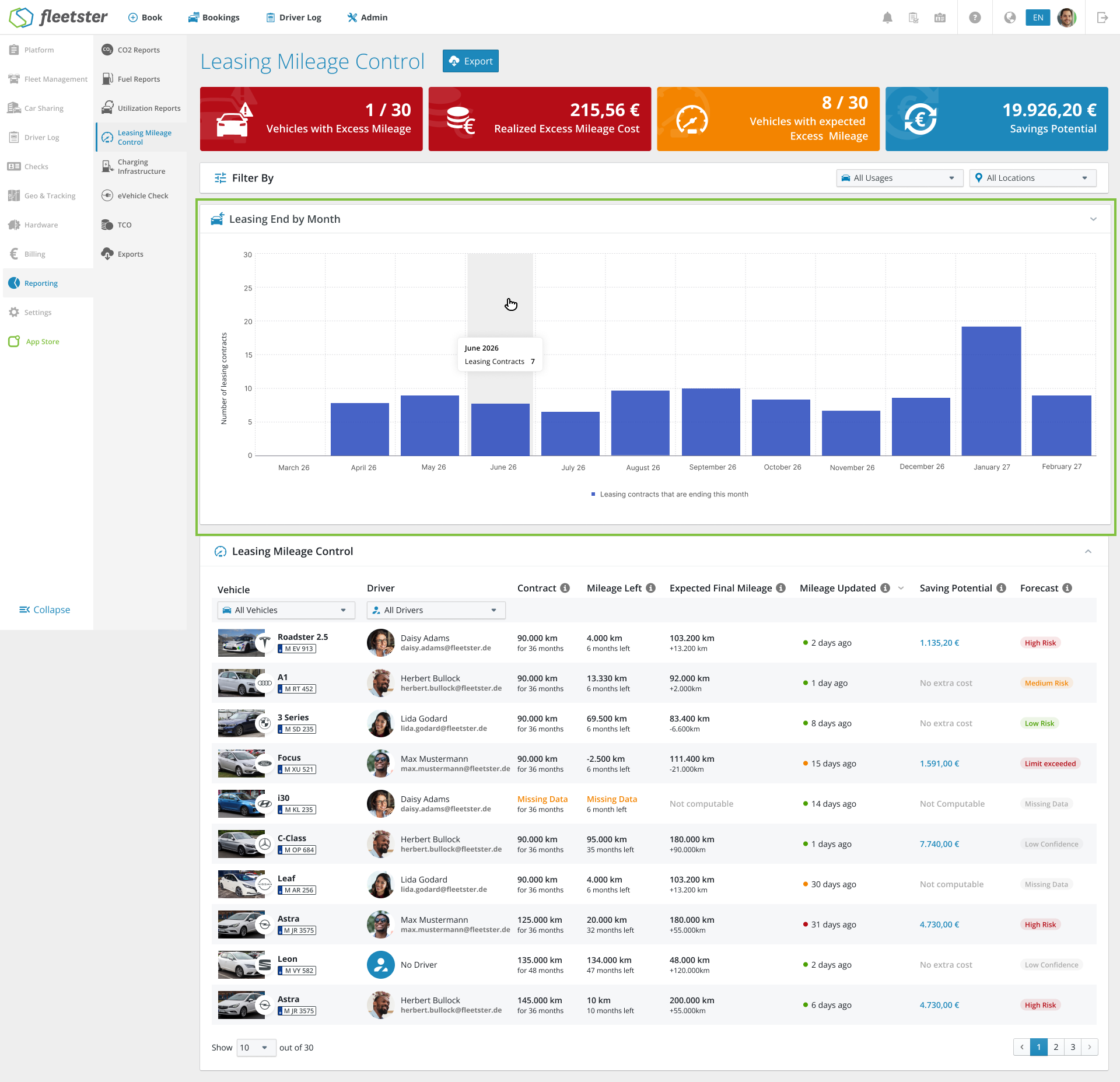
Planning ahead for lease renewals and vehicle returns just got easier. A new chart shows you exactly how many leasing contracts are ending each month over the next 12 months — at a glance.
What’s new:
- Lease End by Month chart: A bar chart displays the number of vehicles with expiring leasing contracts, grouped by month, for the rolling 12-month period ahead.
- Always up to date: The chart updates automatically as your fleet data changes.
- Hover for details: Moving your cursor over any bar shows the exact number of vehicles ending their lease in that month.
Advantages:
- Anticipate peaks: Quickly identify months with a high number of contract endings so you can plan renewals, remarketing, and replacements in advance.
- Better planning: Avoid last-minute surprises by having a clear forward-looking view of your leasing obligations built into your reporting.
Bookings: Allow sending individual Traka PINs for business and private bookings
05/28/2026, 3.206
RELEVANT FOR: Fleet manager & driver
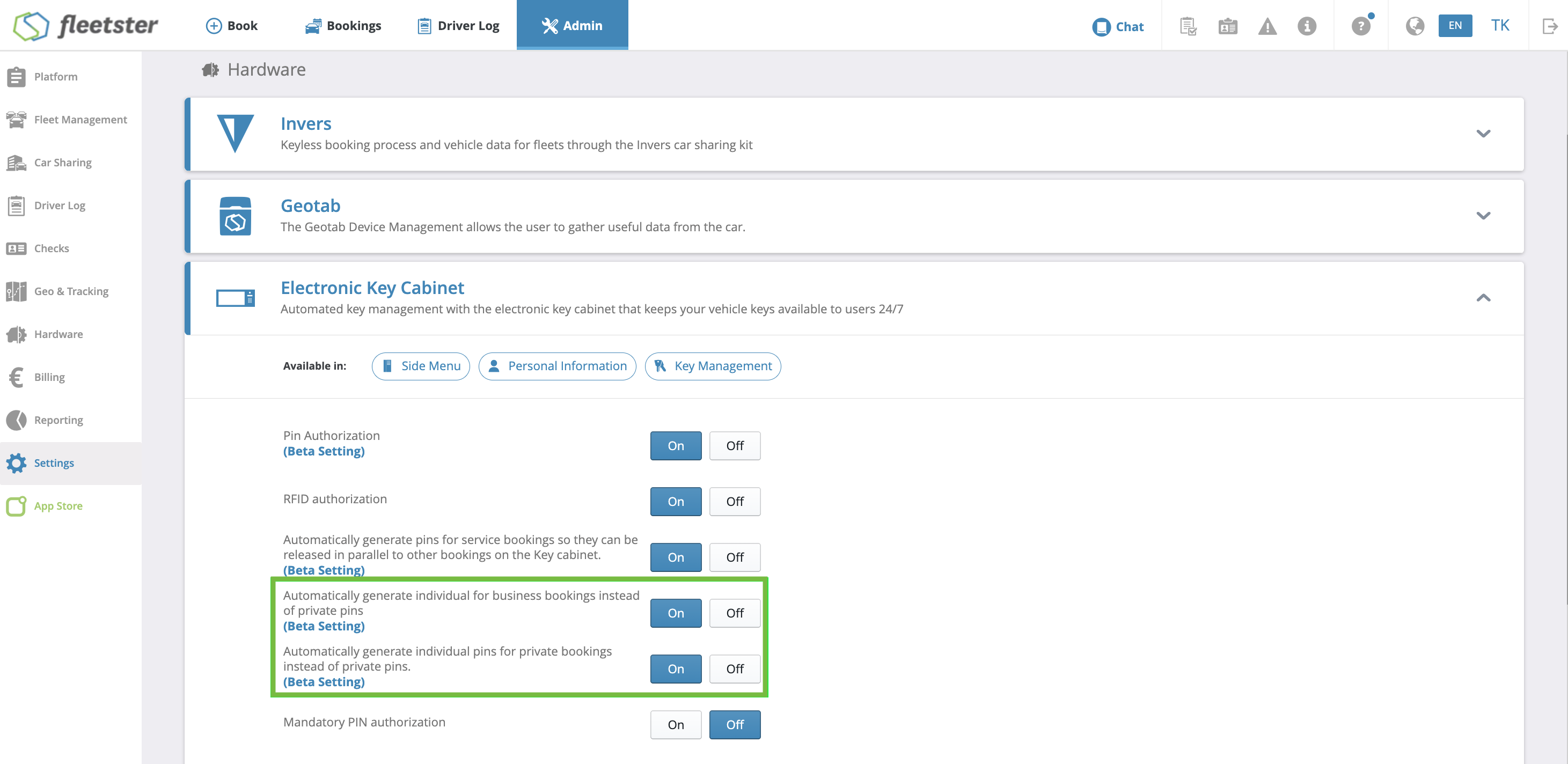
Organizations using category bookings — for example, drivers who transport pupils to school daily — sometimes need to transfer a booking to another driver at short notice. To avoid sharing personal PINs, fleetster now generates an individual Traka PIN per booking for business and private bookings, just like Service Bookings already do.
What's new:
- Individual PIN per booking: A unique Traka PIN is generated for each booking and shown in the booking details — the same mechanism already used for Service Bookings.
- PIN sent in booking confirmation: The generated PIN is included in the booking confirmation email sent to the driver, so the taking-over driver receives access credentials directly.
- Independent settings for business and private bookings: Two separate hidden settings control PIN generation for each booking type. Both are off by default and can be enabled independently of each other.
- No impact on category booking logic: Booking transfers stay on the same vehicle without requiring a cancellation and rebooking — the PIN simply resets when the booking is reassigned.
Advantages:
- No need to share personal PINs: Each driver receives their own PIN for the booking, so transferring a ride does not expose anyone's private Traka credentials.
- Smooth last-minute transfers: Drivers can hand over a booking before or after it has started without cancelling it, keeping the vehicle assignment intact for category bookings.
- Flexible opt-in per booking type: Organizations can enable PIN generation only where needed — for business bookings, private bookings, or both — without changing any other part of the Traka setup.
Driver license check: fixed display in Pending and Ready tabs
05/28/2026, 3.206
RELEVANT FOR: Fleet managers & drivers
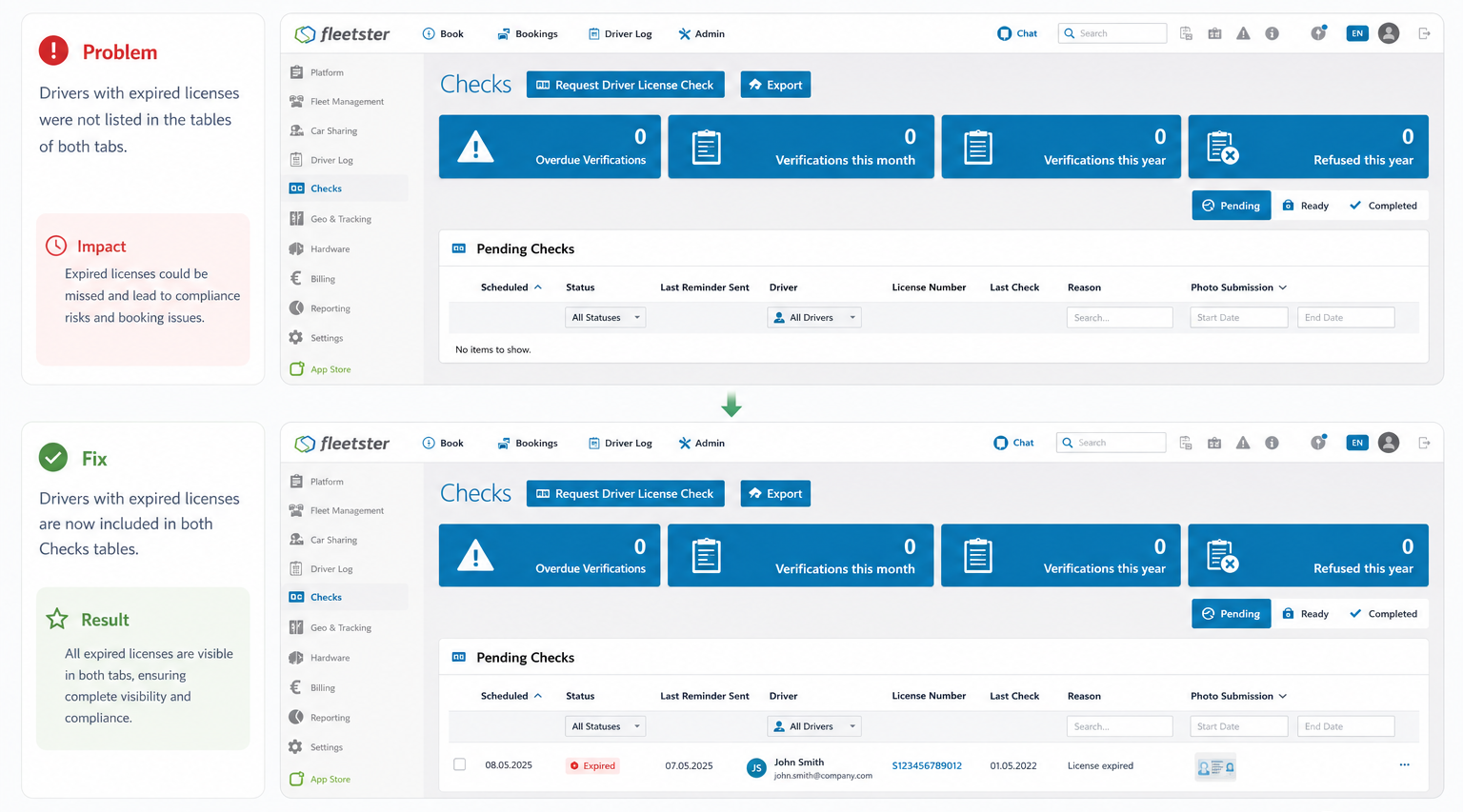
A display issue with driver license checks has been resolved. Checks were previously appearing in both the Pending and Ready tabs simultaneously, which caused confusion about what action was needed.
What’s fixed:
- Awaiting admin review: Checks that have been submitted and are waiting for an admin to review them now appear only in the Ready tab — because no further action is needed from the driver.
- Failed checks awaiting manual start: If a check fails immediately and a manual check has been requested but not yet started, it now appears only in the Pending tab, correctly indicating that the driver still needs to act.
Advantages:
- Clearer status at a glance: Each check appears in exactly one tab, making it immediately clear who needs to take the next step — the driver or the admin.
Driver license check: clearer guidance and better feedback for drivers
05/28/2026, 3.206
RELEVANT FOR: Drivers
The automated driver license check experience has been improved to keep drivers better informed at every step of the process.
What’s new:
- Loading indicator on first start: The first time the check runs, it may take a moment to prepare. Instead of a blank screen, drivers now see a loading indicator with a message explaining the short wait — so nothing feels broken.
- Updated instructions: The guidance shown before scanning has been refreshed with clearer, step-by-step tips: lighting and background, how to hold the license, how to tilt it for the hologram, and a reminder to scan both sides.
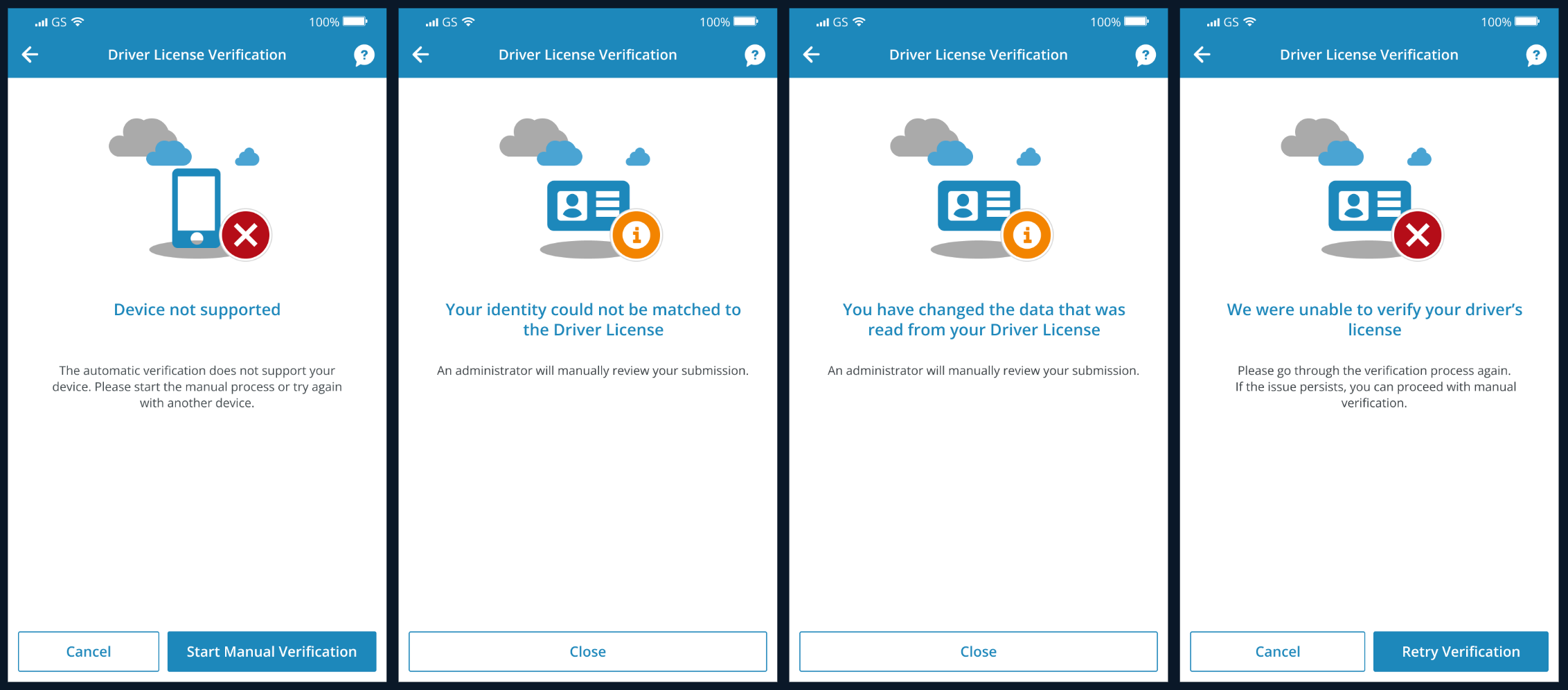
- Reason for manual review: When a check cannot be approved automatically and is sent to an admin for review, drivers now see a specific explanation — for example, if their identity could not be matched to the license, or if data was detected as modified.
Advantages:
- Less confusion: Drivers always know what is happening and why, reducing support requests and frustration.
- Better first-time success: Clearer scanning instructions help drivers complete the check correctly on the first attempt.
- Transparency: When manual review is needed, drivers understand the reason rather than being left wondering.
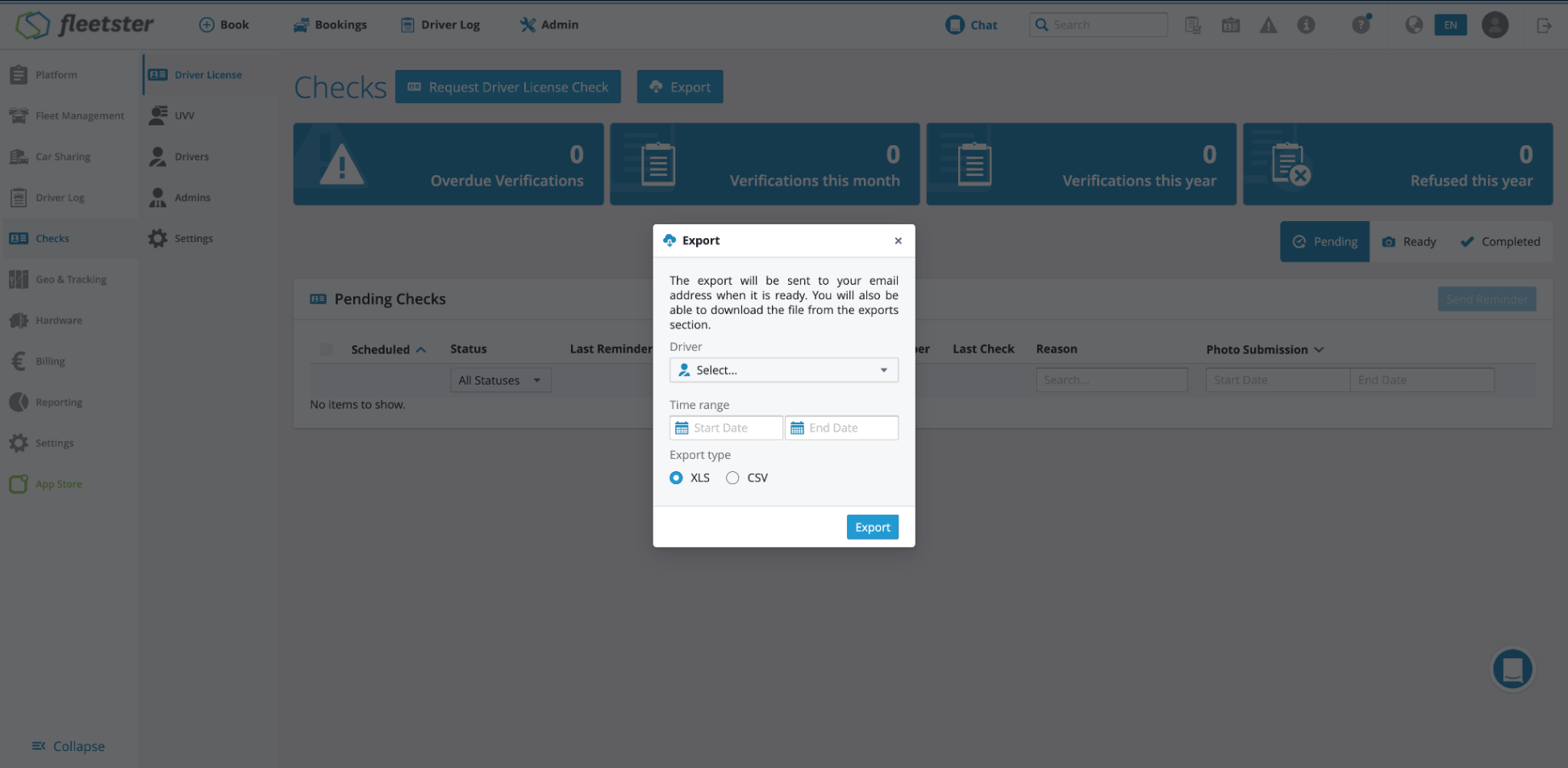
Driver license check export: more complete and accurate results
05/28/2026, 3.206
RELEVANT FOR: Fleet managers
The driver license check export has been improved to give you a complete and accurate picture of all checks within your selected time frame.
What’s new:
- Checks included by activity, not just due date: The export now includes all driver license checks that were created or completed within the selected date range — regardless of when their due date falls. Previously, checks completed within the period could be missing if their due date was outside the range.
- All statuses included: Pending, rejected, waiting for approval, approved, and completed checks are all included.
- Automated check indicator: A new column shows whether each check was handled automatically or manually.
Advantages:
- No missing records: Your exports now accurately reflect all activity within the chosen period, making compliance reporting and audits more reliable.
- Better visibility: The new column makes it easy to see how many checks were processed automatically versus manually.
Refuelling & Charging: Detect and review implausible fuel and energy quantities
05/28/2026, 3.206
RELEVANT FOR: Fleet managers
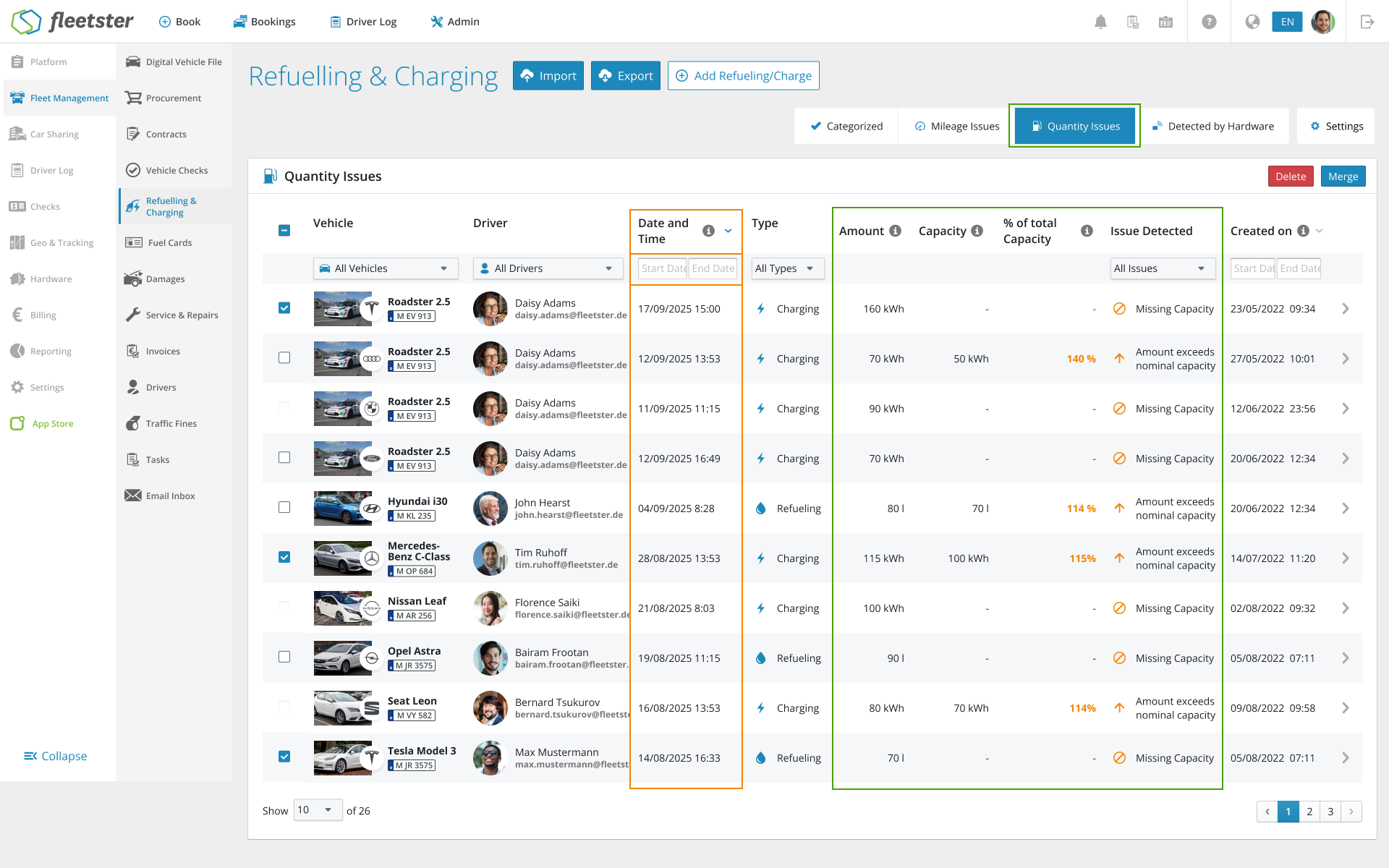
Refuelling and charging entries with physically impossible quantities — such as more fuel than the tank can hold — are now automatically flagged and surfaced in a dedicated view for easy review and correction.
What’s new:
- Quantity Issues tab: A new tab in the Refuelling & Charging section shows all entries where the recorded amount exceeds the vehicle’s tank size or battery capacity. This works for both fuel (liters) and energy (kWh).
- Clear issue labels: Flagged entries are labeled as “Larger than tank size”, “Larger than battery capacity”, or “Missing capacity” (when no tank or battery size is set for the vehicle).
- Detailed table: The view shows the vehicle, driver, date, type (refuelling or charging), recorded amount, known capacity, the percentage of total capacity, and the specific issue detected.
- Highlighted in entry details: When a quantity issue is detected, it is also marked directly on the refuelling or charging entry detail page.
Advantages:
- Catch data errors early: Implausible entries are surfaced automatically, so you no longer need to manually hunt for anomalies.
- Protect your reports: Correcting quantity errors prevents overstated consumption figures and keeps your cost and efficiency reports accurate.
- Faster review: All flagged entries are collected in one place, making it easy to work through them systematically.
Billing: Voucher management now available in the main interface
05/28/2026, 3.206
RELEVANT FOR: Billing admins & fleet managers
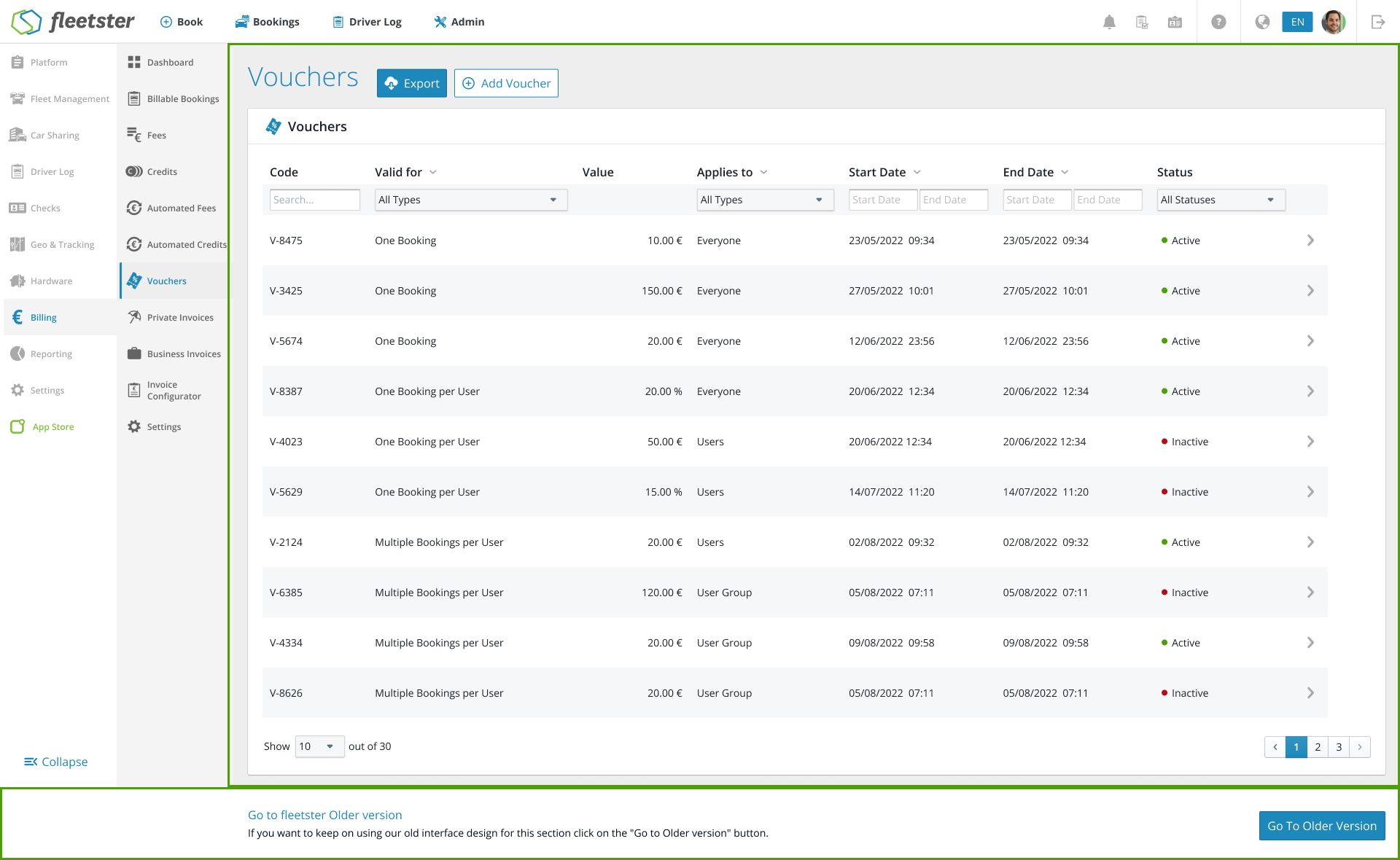
Vouchers can now be fully managed directly from the main billing interface — no workarounds needed. You can create, view, edit, and export vouchers all in one place.
What’s new:
- Voucher list with smart status: All your vouchers are displayed in a clear table showing the code, validity period, credit value, who it applies to, and a computed status (Active or Inactive) based on whether the voucher is enabled and within its validity dates.
- Add & edit vouchers: Create new vouchers or update existing ones with full control over booking type (Business, Private, Service), who can use them (all users, specific users, or user groups), how many times they can be used, and whether the credit is a fixed amount or a percentage of the booking cost.
- Export: Export your voucher data for a selected date range in XLS or CSV format — the file is sent to your email and also available in the Exports section.
- Booking redemption: Drivers can enter a voucher code during booking. The system automatically validates the code and applies the discount. Any unused fixed credit is preserved for future bookings.
Advantages:
- Everything in one place: Voucher management is now part of the standard billing workflow — no need to request manual database changes.
- Full visibility: See at a glance which vouchers are active, who they apply to, and which bookings have used them.
- Flexible rules: Configure vouchers precisely for your organization’s needs, from single-use codes to group-wide discounts.
UX/UI: Status Icons and Naming Standardization
05/07/2026, 3.205
RELEVANT FOR: Fleet Managers & Administrators
What is New:
- Unified Visual Language: We have standardized status indicators across the entire Fleet Management module. Whether you are looking at contracts or emails, the icons, colors, and text styles are now perfectly aligned.
- Consistent Color Semantics: Colors now carry the same meaning everywhere. You no longer have to guess if a specific color represents a "Draft," "Active," or "Completed" state in different sections.
- Module-Wide Updates: This standardization has been applied to the following key areas:
- Contracts: Clearer visibility of agreement lifecycles.
- Procurements: Simplified tracking of vehicle orders.
- Task Rules: Intuitive oversight of automation settings.
- Email Inbox: Consistent status markers for communication threads.
Benefits:
- Reduced Cognitive Load: You can now understand the status of any item at a glance without having to reinterpret icons or dots for each different module.
- Increased Clarity: By removing conflicting visual styles, the system is more intuitive, making it easier for new and experienced users to navigate.
- Professional Oversight: A cleaner, more consistent interface ensures you maintain better control over your fleet’s administrative tasks.
Reporting: Leasing Mileage Control — Forecast & Risk Indicators
05/07/2026, 3.205
RELEVANT FOR: Fleet Managers
What is New:
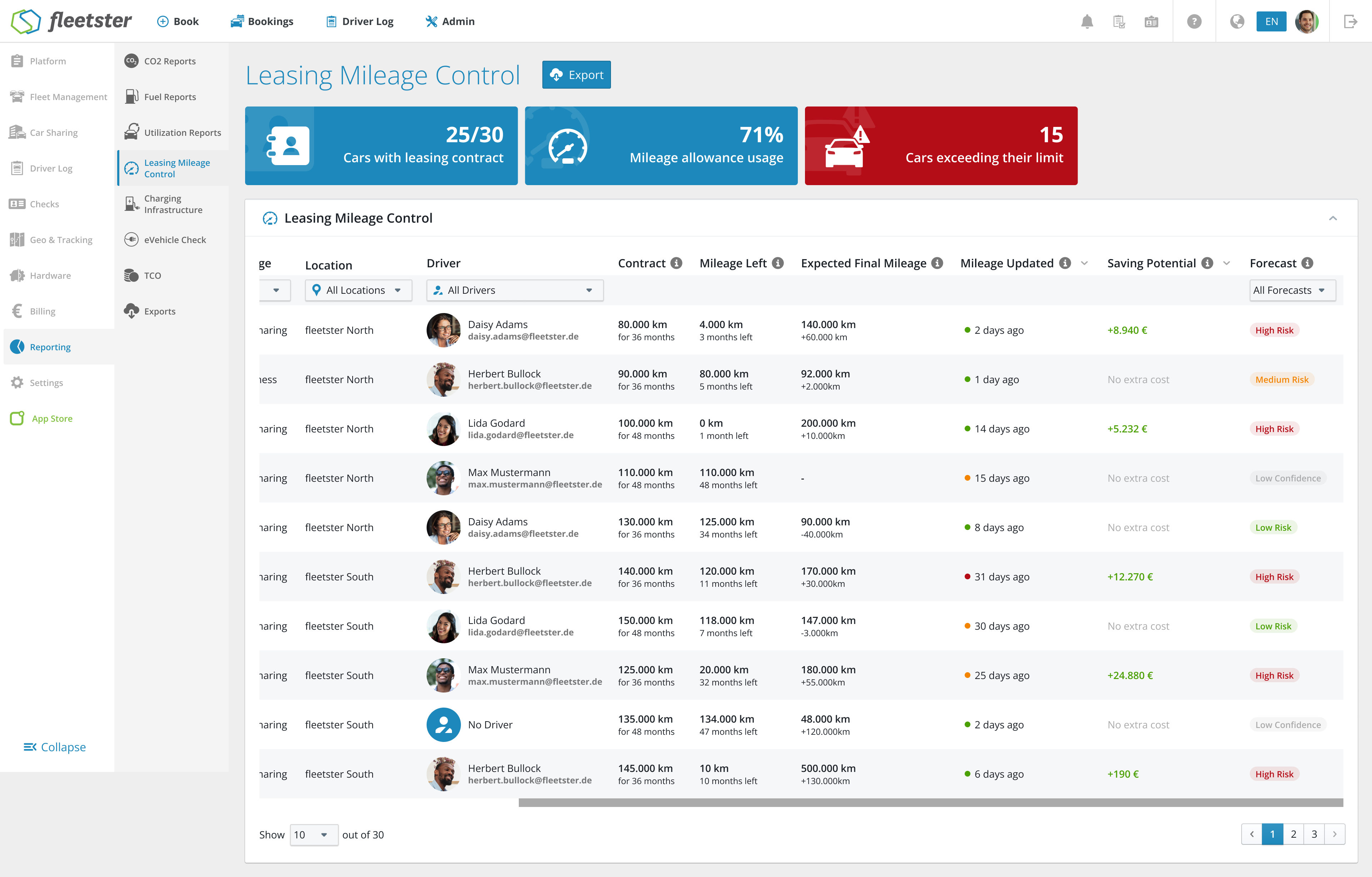
- Proactive Risk Indicators: The report now features a "Forecast Risk" column that categorizes vehicles as Low, Medium, or High Risk based on current driving trends. It even flags "Low Confidence" for new contracts (under 90 days) to ensure you don't make decisions based on insufficient data.
- Financial Impact Forecasting: We’ve added a "Saving Potential" field. This calculates the estimated excess mileage costs you might face at the end of a contract, allowing you to see the real-world cost of current usage patterns.
- Smarter Mileage Projections: The system now extrapolates your current mileage to estimate the "Expected Final Mileage" at the end of the leasing term, comparing it directly against your contract allowance.
- Enhanced Data Transparency: To ensure accuracy, the report now shows exactly how long ago mileage was updated and explicitly flags "Data missing" or "Not computable" if key contract details are absent.
Benefits:
- Cost Avoidance: Identify vehicles heading for expensive over-mileage penalties early enough to reassign them or renegotiate contracts.
- Data You Can Trust: With new confidence signaling and data quality checks, you’ll know exactly which forecasts are reliable and which vehicles need a mileage update.
- Simplified Decision Making: No more manual math. See at a glance which vehicles are "safe" and which ones require your attention to optimize fleet costs.
UX/UI: Clickable Header Cards to Entity Details
05/07/2026, 3.205
RELEVANT FOR: Fleet Managers & Drivers
What is New:
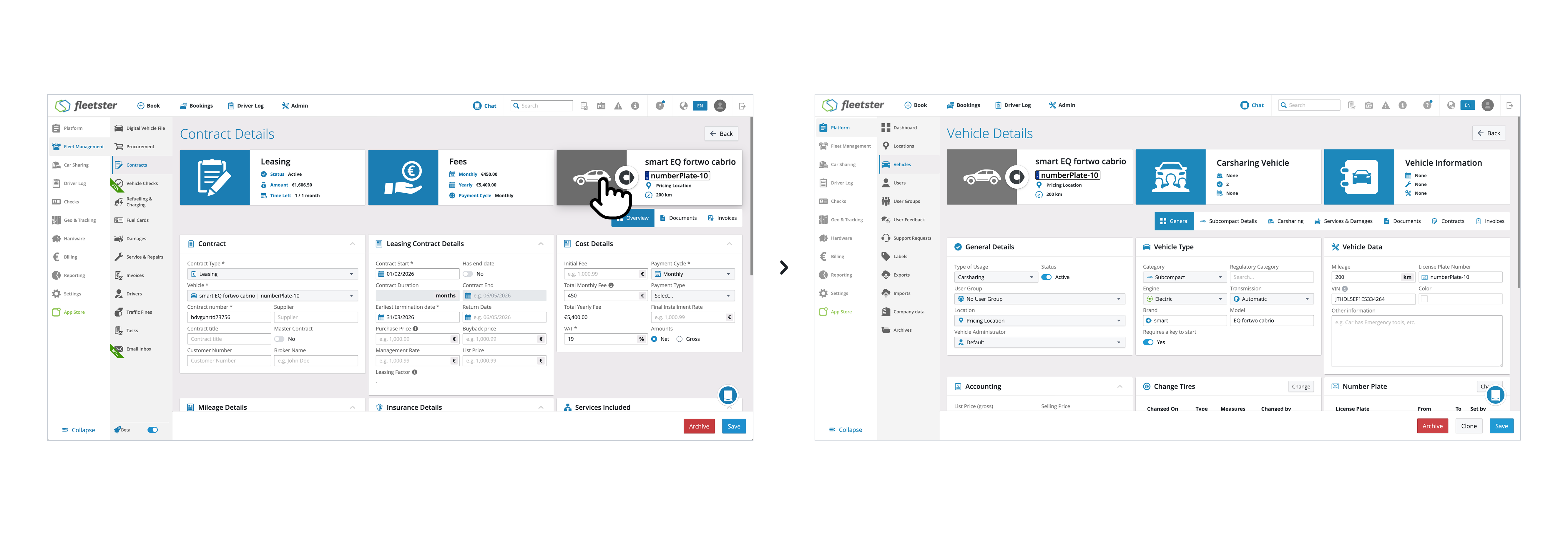
- Interactive Header Cards: Vehicle and User cards found at the top of various pages are now interactive. Clicking on these cards will take you directly to the full details of that vehicle or user.
- Intuitive Visual Feedback: We have introduced a hover effect and subtle animations to these cards. If a card is clickable, it will respond visually when you move your mouse over it, making navigation feel more natural.
- Smart Navigation: The system is intelligent enough to know where you are. If you are already viewing a vehicle's details, the card will remain static to avoid unnecessary page reloads.
- Interface Cleanup: To provide a cleaner workspace, we have removed redundant "View Details" and "Go to Profile" buttons from the save bars and account sections, as the cards now handle these actions.
Benefits:
- Faster Workflows: Save time by jumping directly to vehicle or driver profiles with a single click from almost anywhere in the system—including Damages, Refuelling, Procurement, and Driver Logs.
- Modern User Experience: The updated animations and streamlined interface make the platform feel more responsive and easier to use.
- Less Clutter: By integrating navigation directly into the header cards, we’ve reduced the number of buttons on the screen, allowing you to focus on the data that matters.
Digital vehicle file: better tire management
05/07/2026, 3.205
RELEVANT FOR: Fleet manager & driver
What's new:
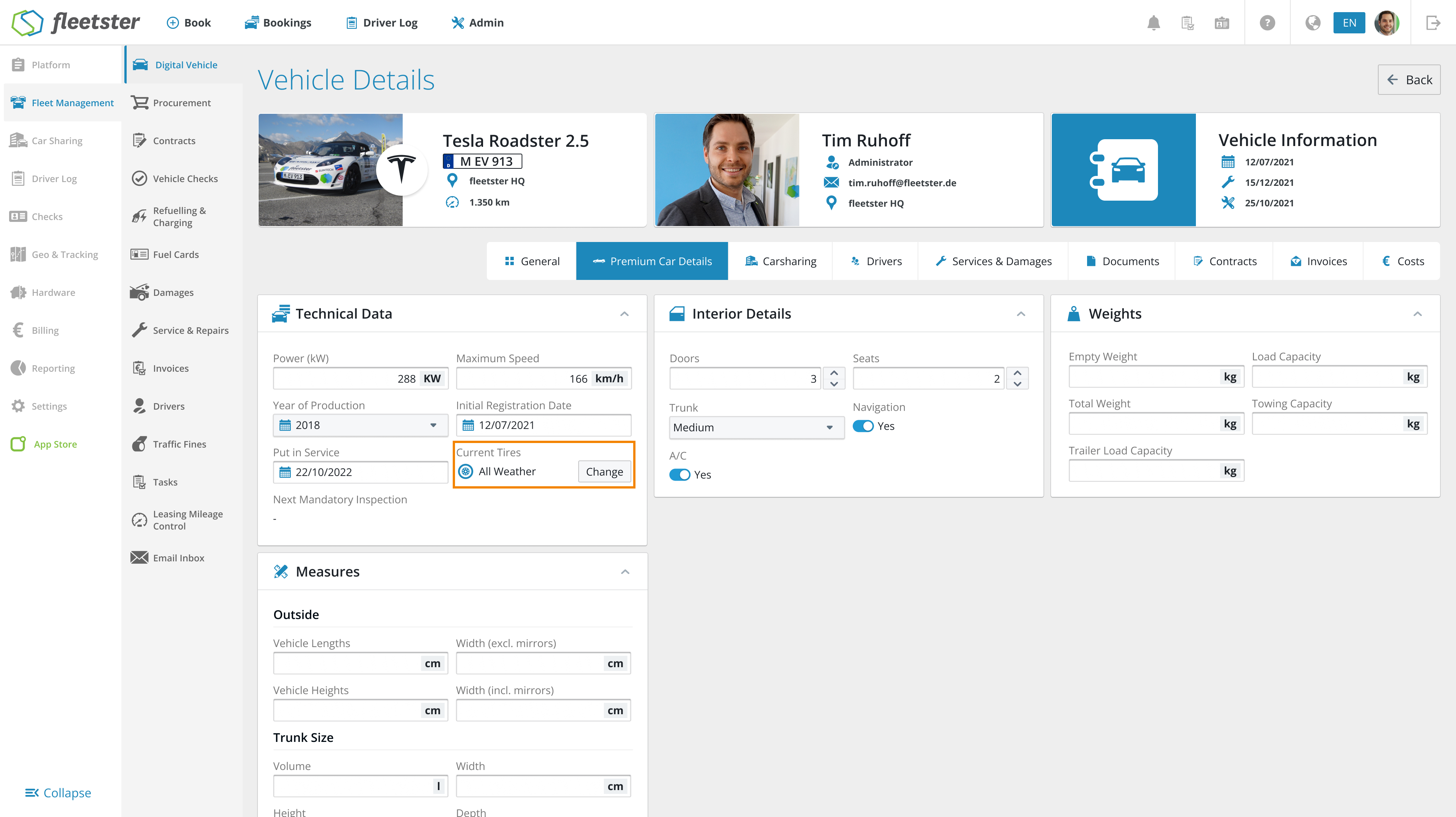
- Renamed Tire Info: in the "Technical data" section, the old "Winter tires" button has been changed to "Current tires" renamed to better represent the actual state of the vehicle.
- Simplified view: this field is now read-onlythis means that it can no longer be switched accidentally, which prevents misunderstandings between the technical data and the actual tire management.
- Quick access: we have one right next to the tire display "Change"-Clicking on it immediately opens the familiar window for changing tires.
- Optimized export: the information as to whether a vehicle is currently equipped with winter tires is now also taken into account in the data exports.
Advantages:
- Less confusion: by removing the superfluous switch, there is no longer any contradictory information at different points in the system.
- Faster operation: you no longer have to search for the special card for the tire change, but can start the process directly from the technical data.
- Higher data accuracy: your reports are now more complete and show you the current equipment in your fleet at a glance.
Security: Enhanced SSO Identifier Support
04/23/2026, 3.204
RELEVANT FOR: System Administrators & IT Managers
What is New:
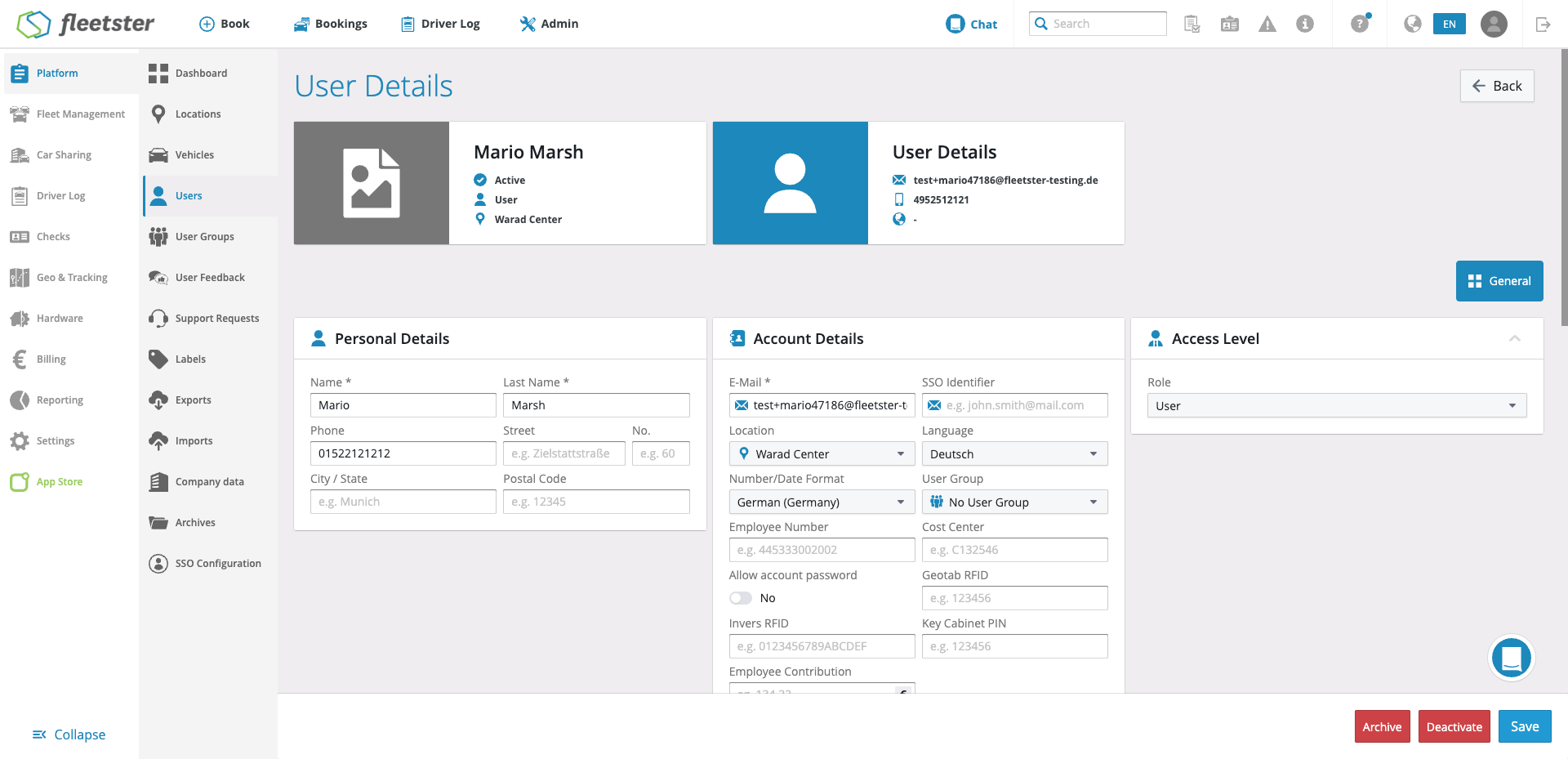
- Additional SSO Identifier: We have expanded our Single Sign-On (SSO) capabilities. Users can now be assigned an optional custom identifier (
extended.Oidc.identifier) to be used during the authentication process, rather than relying exclusively on an email address. - Flexible User Lookup: The SSO login flow has been upgraded to intelligently recognize users by either their standard email address OR their new custom SSO identifier.
- SCIM Integration Updates: Our SCIM integration has been extended to automatically populate the new custom identifier field, ensuring seamless synchronization between your identity provider and our system.
- Global Uniqueness Checks: To maintain strict security, the system enforces global uniqueness. An identifier cannot be duplicated across any other user's email or custom identifier fields during user creation, modification, or restoration. Only User Managers have the permission to change this field.
Benefits:
- Greater Flexibility for IT: This update perfectly accommodates organizations that use non-email identifiers (such as employee ID numbers, alphanumeric codes, or custom usernames) for their SSO authentications.
- Seamless Login Experience: Users experience a smooth, uninterrupted login process regardless of whether the identity provider token passes an email or an alternative identifier.
- Automated Provisioning: With the extended SCIM support, administrators do not have to manually input or manage these new identifiers; everything syncs automatically from your central directory.
- Secure by Design: Strict uniqueness rules and robust tenant validation ensure that your authentication flow remains secure, preventing ambiguity during the login process or unauthorized cross-company access.
Refuelling & Charging: Advanced Mileage Anomaly Settings
04/23/2026, 3.204
RELEVANT FOR: Fleet Managers
What is New:
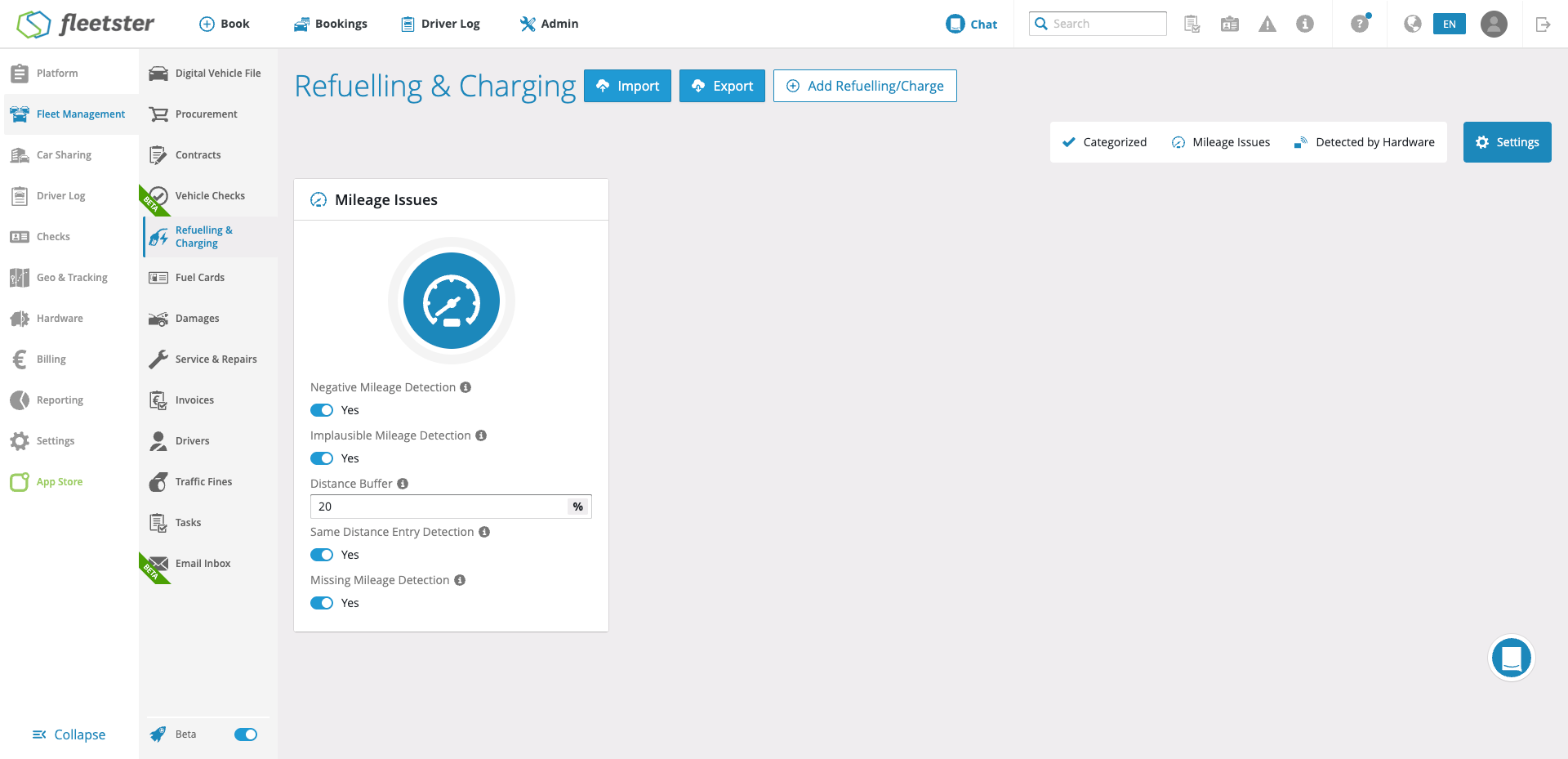
- Dedicated Refuelling & Charging Settings Tab: We have introduced a brand new "Settings" tab within the Refuelling & Charging section, exclusively accessible to Fleet Managers. This provides a centralized space to configure how your fleet handles fuelling data.
- Granular "Mileage Differences" Configuration: You are no longer locked into a one-size-fits-all surveillance system. Under the new "Mileage Differences" card, you can toggle three specific detection rules on or off based on your fleet's unique behavior:
- Negative Mileage Detection: Flags instances where the logged mileage is lower than the previous refuelling event.
- Implausible Distance Detection: Flags entries where the distance driven exceeds the vehicle's maximum range (often indicating a missed refuelling log). You can also set a custom dynamic buffer percentage (defaulting to 20%) to fine-tune this detection.
- Same Mileage Entry Detection: Flags events where the current mileage perfectly matches the previous entry, which usually points to sloppy driver reporting.
- Smart Issue Filtering & Retroactive Calculation: The "Mileage Issues" tab will now intuitively update to only display the categories you have enabled. If you turn all toggles off, the tab hides itself to keep your workspace clean. Furthermore, the system continually calculates issues in the background—meaning if you toggle a setting back on, your historical issues will instantly reappear. Adjusting your implausible distance buffer will also trigger a smart recalculation of past entries.
Benefits:
- Reduced Alert Fatigue: By choosing exactly which mileage anomalies matter to your operations, you can eliminate irrelevant warnings and stop your team from getting overwhelmed by alerts.
- Tailored to Your Fleet: Every fleet operates differently. The ability to toggle specific detections and adjust the "Implausible Distance" buffer allows you to mold the software's surveillance to fit your actual real-world driving patterns.
- Consistent Anomaly Handling: With a structured, clear configuration, responsibility for handling mileage issues becomes much more straightforward. You will no longer miss relevant problems amidst the noise, ensuring better data integrity and accountability across your drivers.
- Seamless Transitions: Because the system calculates issues in the background, you can experiment with turning settings on and off without the fear of losing valuable historical data or having to manually recalculate past refuelling errors.
Reporting: Enhanced Advanced Vehicle List Exports
04/23/2026, 3.204
RELEVANT FOR: Fleet Managers & Data Analysts
What is New:
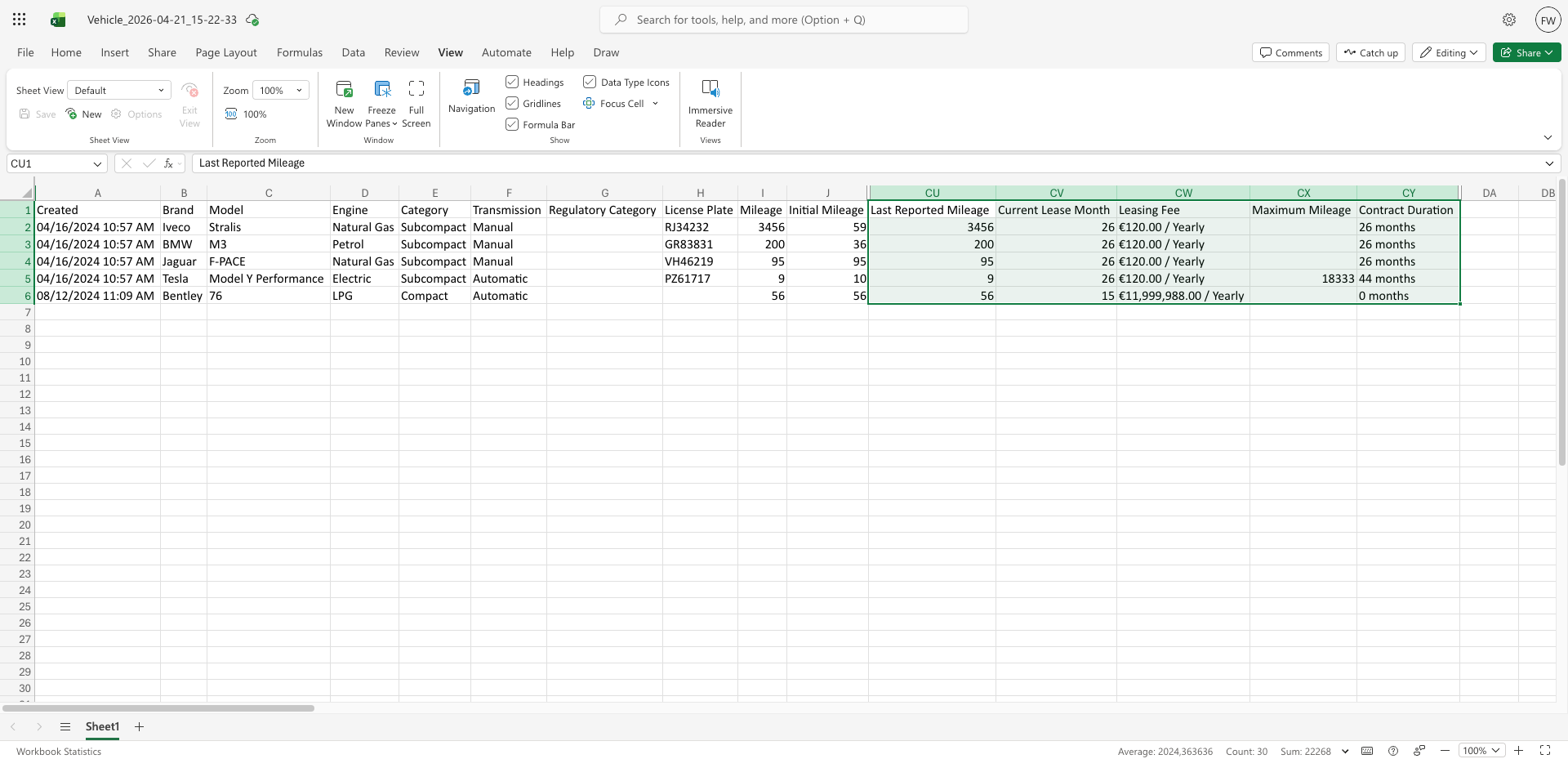
- Comprehensive Data Fields: Exported digital vehicle files now include all the newly created fields from the Advanced Vehicle List. This includes specific data points added to the Purchased, Leasing, CarSharing, and Age views.
- Consistent Inactive Vehicle Inclusion: We have standardized the export logic to ensure that both active and inactive vehicles are reliably included in your exports, matching the visibility behavior of your main vehicle lists.
- Standardized Export Endpoints: The data extraction behavior is now perfectly consistent across all Digital Vehicles export endpoints, ensuring your outputs are uniform and predictable.
Benefits:
- Complete & Accurate Reporting: No more missing columns. Your exported CSV files now perfectly mirror the rich data available within the Advanced Vehicle List interface, eliminating incomplete outputs.
- Seamless Historical Analysis: By intentionally ensuring inactive vehicles remain in the export, you retain the ability to perform comprehensive lifecycle analyses and audits on your entire fleet, past and present.
- Reliable Operations: Consistent filtering rules and complete field inclusion mean you can trust the exported data for your operational reporting without needing to double-check for missing attributes.
Hardware: Enhanced Electronic Key Cabinet Management
04/09/2026, 3.203
RELEVANT FOR: Fleet Managers, System Administrators & Hardware Managers
What is New:
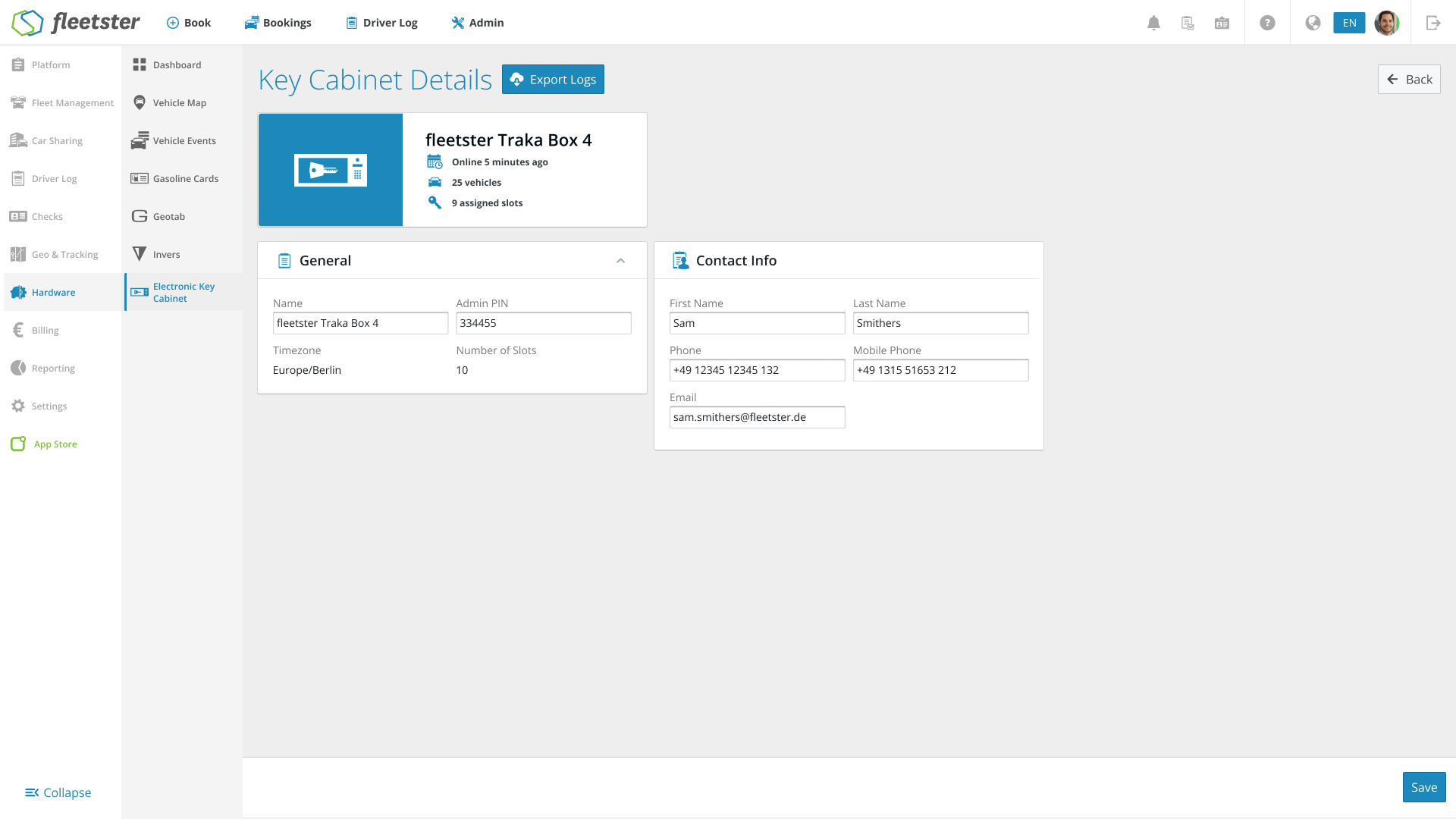
- Dedicated Key Cabinet Hub: We have completely redesigned the Traka key cabinet management experience. You will now find a dedicated "Key Cabinets" section under the Hardware menu, neatly organized into three intuitive tabs: Key Cabinets, Vehicles, and Users.
- Cabinet-Specific Contact Information: You can now assign dedicated contact details (First Name, Last Name, Phone, Cell, and Email) to individual key cabinets. This replaces the old system where only one general company contact could be applied across all cabinets.
- Enhanced Cabinet Insights: Clicking on any key cabinet now opens a detailed view featuring a quick "Mini Analytics" dashboard. At a glance, you can see exactly when the cabinet was last online, how many vehicles are assigned to it, and how many slots are currently available.
- Clearer Vehicle & Key Tracking: The new Vehicles tab provides a highly searchable overview of all your cars and their key statuses. You can instantly see if a key is sitting in a specific slot number or if it is currently "On the road." Assigning a vehicle to a cabinet and a specific fob is now handled in a quick, intuitive popup.
- Streamlined User Management: The new Users tab lets you easily manage Traka PINs and RFIDs. You can view user locations, manually update access credentials, automatically generate secure new PINs, or toggle the "Skip RFID Verification" option on a per-user basis.
Benefits:
- Targeted Local Support: By setting specific contact persons for each key cabinet, drivers immediately know exactly who to call if they run into an issue at a specific location, rather than routing every problem through a single corporate number.
- Total Visibility & Control: With improved search capabilities and clear status indicators ("On the road" vs. specific slot numbers), admins have real-time oversight of where every key and vehicle is at any given moment.
- Faster Administration: The new tabbed layout and quick-edit popups for assigning fobs and generating PINs drastically reduce the number of clicks required to manage your fleet's hardware, saving you valuable time.
- Better Organization: Grouping the cabinets, assigned vehicles, and user access into one centralized, modernized interface makes navigating your hardware ecosystem smoother and much more intuitive.
New Feature: Automatic Driver License check verification
04/09/2026, 3.203
RELEVANT FOR: Fleet Managers, Admins & Drivers
What is New:
- Automated Licence Scanning: We've introduced a fully automated verification flow for card-based driver's licenses. Drivers are now guided through a quick process to scan the front and back of their license, alongside a quick "liveness" face check.
- Instant Approvals: Successfully scanned and verified licenses are now instantly approved by the system. Drivers get immediate feedback, and the check is marked as complete.
- Smart Fallbacks: If a driver has an older paper license, or if the automated scan fails to read a card properly, the app seamlessly redirects them to the traditional manual photo upload process so they are never stuck.
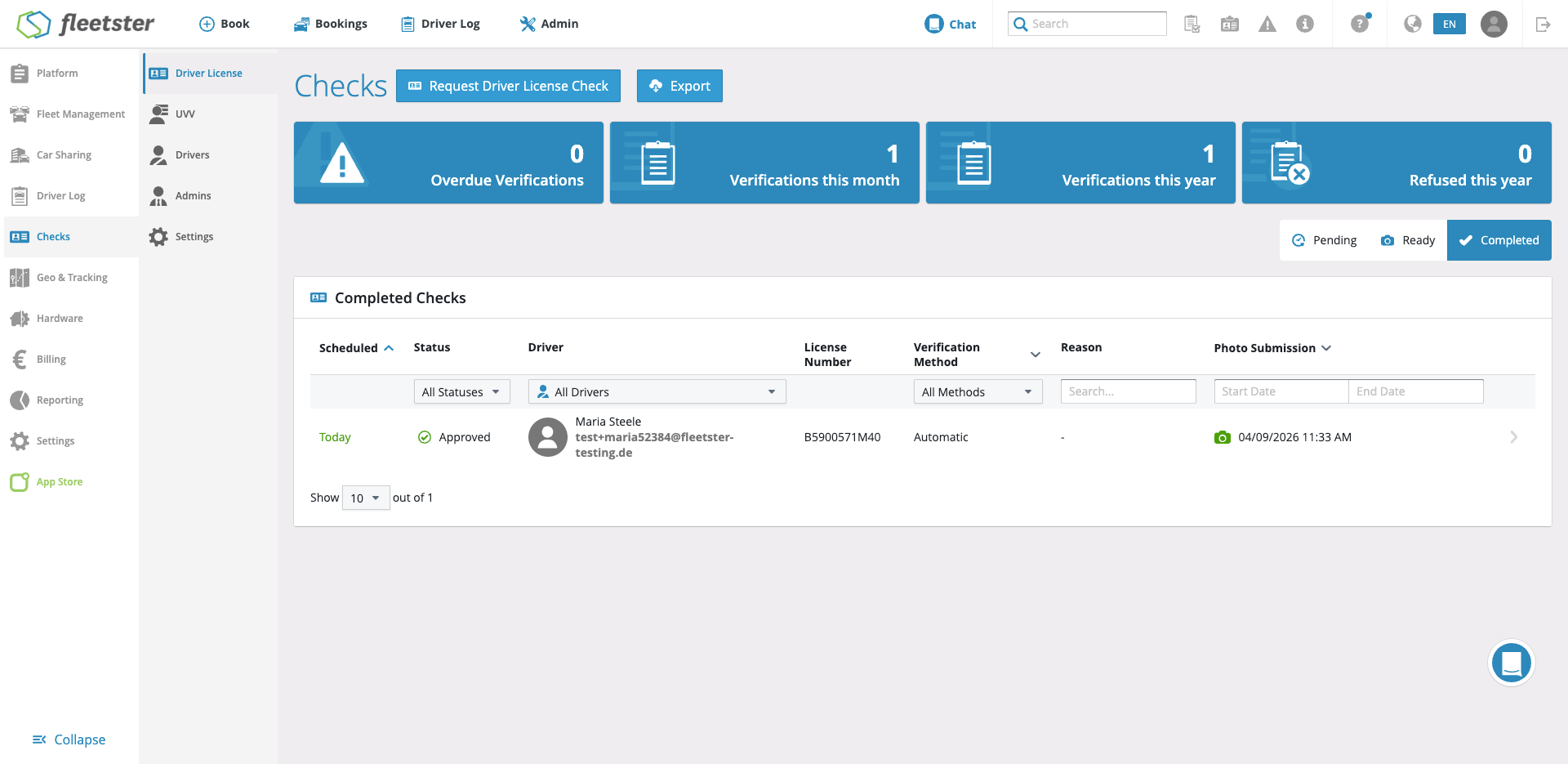
- Admin Oversight Dashboard: A new "Verification Method" column has been added to the dashboard so admins can easily see if a check was done manually or automatically. Admins can open any check, review the captured data, and easily override automated decisions if necessary.
Benefits:
- Massive Time Savings for Admins: By automating the bulk of standard license checks, fleet managers and admins no longer have to manually open, review, and approve every single photo submission.
- Smoother Driver Experience: The new flow includes on-screen tips (like finding good lighting) and provides a much faster, less error-prone experience that eliminates waiting times for manual approval.
- Enhanced Security & Fraud Prevention: The automated system uses advanced technology to check for holograms and verify "liveness," ensuring both the document and the person holding it are genuine.
- Maintained Control: Even with automation doing the heavy lifting, your team stays in control. All automated decisions are fully auditable, and admin decisions will always override the system.
Documents: Organized Document Upload Categories
04/09/2026, 3.203
RELEVANT FOR: Fleet Managers, System Administrators & Drivers
What is New:
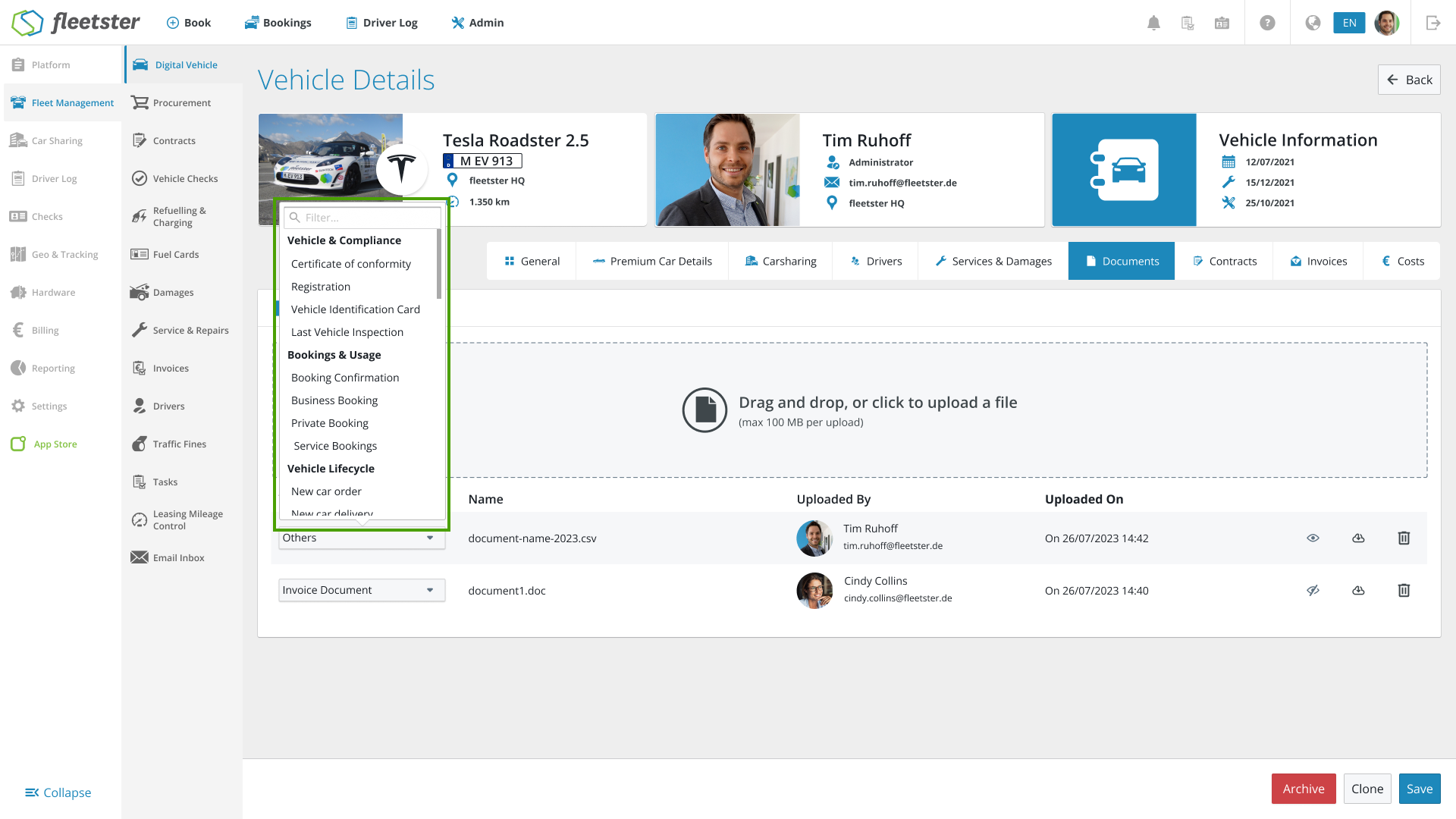
- Logical Grouping: We have completely reorganized the document upload category list. Instead of a random list of labels, document types are now neatly grouped into logical parent categories.
- Streamlined Options: When uploading a document, you will now see clear, organized sections such as Vehicle & Compliance (Registration, Inspections), Bookings & Usage (Business or Private Bookings), Vehicle Lifecycle (Delivery, Handover protocols), Contracts & Finance (Taxes, Contracts), and Incidents (Accident reports).
Benefits:
- Faster Uploads: Finding the correct document type is now much quicker and more intuitive, eliminating the need to scroll through an unorganized list.
- Better Organization: This structured approach ensures that all your fleet documents are consistently tagged, making them much easier to filter and locate in your document repository later on.